

Shipping Estimate
USA
- USA
- CAN
- USA
- CAN
Ships within 48 hours · Estimated delivery Jul 11 - Jul 16
 Promo Codes Available:
For Your Every Summer RSVP, with Code: SUMMER15
Description
duoderm dressing Duoderm Dressings 4x4Duoderm Dressing 4 x 4 DuoDERM CGF (Control Gel Formula) Hydrocolloid Dressings are an advanced wound care product designed to create an optimal healing environment for various types of wounds. These dressings consist of hydrocolloid materials (such as gelatin, pectin, and carboxymethylcellulose) laminated onto a flexible, moisture impermeable backing. The unique CGF layer allows for controlled absorption and gel formation. Uses DuoDERM CGF Dressings
Duoderm Dressing 4 x 4
DuoDERM® CGF (Control Gel Formula) Hydrocolloid Dressings are an advanced wound care product designed to create an optimal healing environment for various types of wounds. These dressings consist of hydrocolloid materials (such as gelatin, pectin, and carboxymethylcellulose) laminated onto a flexible, moisture-impermeable backing. The unique CGF layer allows for controlled absorption and gel formation.
Uses
DuoDERM® CGF Dressings are indicated for:
- Pressure ulcers (stages I–IV)
- Superficial and partial-thickness burns
- Leg ulcers (venous, arterial, diabetic)
- Donor and graft sites
- Minor abrasions and surgical wounds
Not suitable for:
- Infected wounds (unless under healthcare supervision)
- Deep cavity wounds without proper secondary dressings
How Do DuoDERM® CGF Dressings Work?
1. Moist Wound Healing: When applied, the hydrocolloid interacts with wound exudate (fluid), forming a soft gel that keeps the wound moist. This environment promotes:
- Cellular migration
- Autolytic debridement (body’s own removal of dead tissue)
- Reduced pain and scabbing
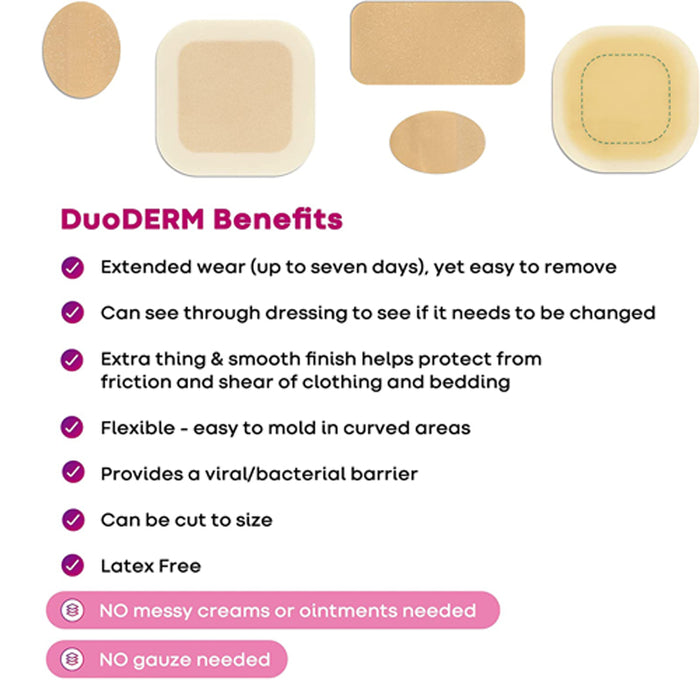
2. Protective Barrier: The outer layer is waterproof and bacteria-resistant, helping protect the wound from external contaminants.
3. Absorption: The CGF layer precisely controls the absorption of excess exudate, reducing the risk of maceration (over-hydration of surrounding skin).
Types of DuoDERM® CGF Dressings
- Standard CGF Dressings: Thicker, for moderately to heavily exuding wounds.
- Thin CGF Dressings: Flexible, suitable for dry-to-lightly exuding wounds or as a secondary dressing.
- Pre-cut Shapes (e.g., CGF Square, CGF Border): For ease of application on areas like heels, elbows, or sacrum.
Application Techniques
1. Wound Preparation:
- Gently clean the wound using saline or as directed by your healthcare provider.
- Dry the surrounding skin for better adherence.
2. Dressing Application:
- Select a dressing that overlaps 1–2 inches beyond the wound edge.
- Remove the backing paper.
- Gently place the dressing over the wound (do not stretch).
- Smooth the edges to ensure a secure seal.
3. Dressing Removal:
- Loosen an edge gently, stretch the dressing horizontally to break the adhesive seal, and peel back carefully.
- Clean wound as needed before reapplying a new dressing
Helpful Tips & Important Wound Care Information
Helpful Tips
- Monitor fluid accumulation: A bulging dressing is a sign of exudate build-up. Change when swelling is observed.
- Dressing wear time: DuoDERM® CGF can stay in place for several days (up to 7 days), unless leakage or odor occurs.
- Avoid using with skin adhesives: This may interfere with the hydrocolloid’s performance.
- Warm between hands: Before application, warming the dressing can improve flexibility and adhesion, especially in cold environments.
- Secure edges: If needed, use hypoallergenic tape to help the dressing stay in place.
Important Wound Care Information
- Infection signs: If you notice increased redness, swelling, pus, or odor, consult a healthcare provider.
- Not for heavy bleeding wounds: These dressings are not designed to control bleeding.
- Safe removal: Pulling too hard can damage new tissue. Remove slowly and gently.
- Contraindications: Not suitable for full-thickness burns or dry wounds.
- Skin integrity: Frequently assess surrounding skin for maceration or allergic reactions.
Summary Table
| Property | DuoDERM® CGF Hydrocolloid Dressing |
|---|---|
| Primary Use | Moist wound healing for chronic/acute wounds |
| Absorption | Moderate-heavy (standard), Light (thin) |
| Wear Time | Up to 7 days |
| Backings | Waterproof, bacteria-resistant |
| Application | Overlaps wound edge, no stretching |
| Special Precautions | Not for infected, heavily bleeding, or dry wounds |
Product Details
- Brand: ConvaTec
- SKU: CGF-4104 (Check for packaging integrator)
- Size: 4 inch x 4 inch (10cm x 10cm)
- Quantity: 5 dressings per box
- Type: Hydrocolloid, Moisture-retentive wound dressing
- Indications: Pressure ulcers (Stage I-IV), diabetic foot ulcers, bed sores, burns, surgical wounds, abrasions, chronic wounds, and cuts.
- Topical Barrier: Shields against bacteria and external contaminants for risk-free healing.
- Sterile: Individually wrapped, ready for immediate use.
- Clinical Use: Hospital, clinic, long-term care, and home wound care settings
- Latex-Free: Safe for use with patients with latex allergies.
Ideal For
- Pressure Ulcers & Bed Sores: Speeds healing of Stage I-IV pressure injuries.
- Diabetic Foot Ulcers: Supports wound closure and prevents complications for at-risk feet.
- Surgical and Traumatic Wounds: Shields fresh incisions or injuries for optimal recovery.
- Chronic, Slow-Healing Wounds: Promotes healing in hard-to-treat wounds and prevents infection.
- Sensitive Skin Areas: Gentle adhesion and easy removal prevent further skin damage.
Key Benefits at a Glance
- Accelerates natural wound healing
- Improves patient comfort and safety
- Reduces frequency of dressing changes
- Prevents bacterial infection
- Protects delicate and vulnerable skin
- Designed for easy application and removal
Shipping Notes
- Free Standard Shipping on $100+ Orders to the USA.
- Except Preorder products are shipped in 48 hours.
- Delivery to the USA:
- Standard Shipping : 3-10 business days
- If time is of the essence, please consider selecting expedited delivery for faster service.
Exchange/Return Notes
- We offer a 30-day return/exchange service after receiving.
- Final sale items are not eligible for returns or exchanges.
- To process your return/exchange, please contact us at [email protected]
- Please click here for more details>>> Return & Exchange Policy