Pay in installments of $6.78 with
 ,
,
 and
and

Shipping Estimate
USA
- USA
- CAN
- USA
- CAN
Ships within 48 hours · Estimated delivery Jul 19 - Jul 24
 Promo Codes Available:
For Your Every Summer RSVP, with Code: SUMMER15
Description
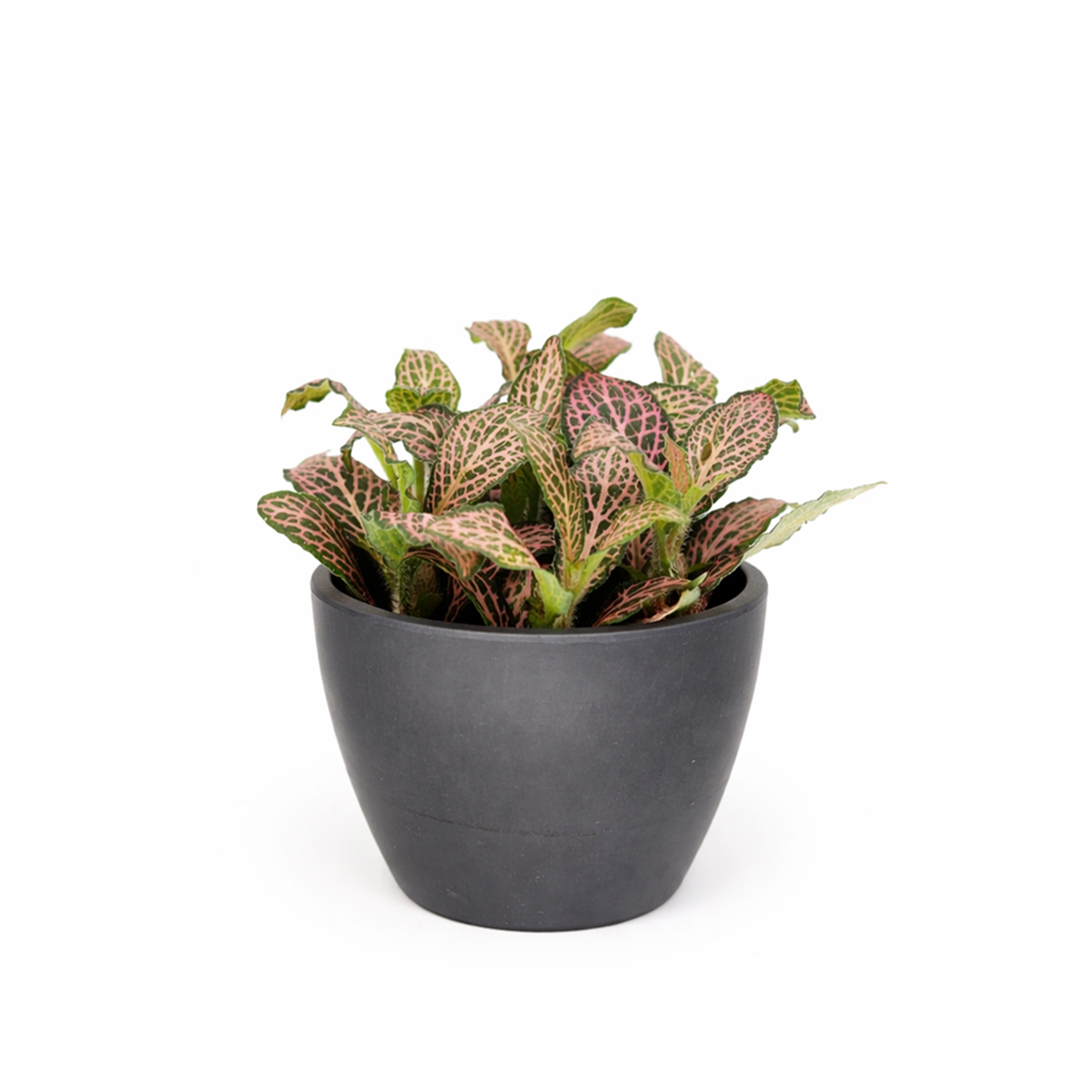
nerve plant air purifier Pink Nerve Plant (Fittonia Pink) - Live Tropical Feng Shui HouseplantDescription Light Soil Water Hardiness Nerve Plant Fittonia is a compact, evergreen perennial with dark green, ovate leaves highlighted by delicate, intricate veins. These veins come in various colors such as silvery white, pink, red, and green, and resemble the appearance of nerves, hence the name! These striking, network like veins contrast against the dark green background of the foliage, giving the plant its distinct, eye catching look. Native to
-
Nerve Plant Fittonia is a compact, evergreen perennial with dark green, ovate leaves highlighted by delicate, intricate veins. These veins come in various colors such as silvery-white, pink, red, and green, and resemble the appearance of nerves, hence the name! These striking, network-like veins contrast against the dark green background of the foliage, giving the plant its distinct, eye-catching look.
Native to the tropical rainforests of South America, including Peru, Bolivia, and Brazil, this plant thrives in warm, humid environments. Nerve plant typically grows 3 to 6 inches tall with a trailing spread of up to 18 inches, making it perfect for indoor spaces and terrariums.
Nerve Plant can be cultivated outdoors as a creeping ground cover in frost-free climates, thriving in locations with filtered sunlight. Its trailing growth habit allows it to spread easily over garden beds. Ideal for planting under taller trees or in spots protected from direct, harsh sunlight, it brings a lush, green carpet with intricate veining that adds depth to outdoor spaces.
Indoors, Fittonia is not the easiest plant for beginners, as it requires consistent humidity and careful attention to watering. It is sensitive to dry conditions and may wilt quickly if neglected, though it can bounce back with proper care.
Although it rarely flowers indoors, it may produce small, inconspicuous reddish or yellowish-white blooms. Its non-toxic nature makes it safe for homes with pets. Overall, the Nerve Plant’s vivid vein patterns and compact growth make it a stunning addition to any indoor plant collection.
-
Nerve Plant thrives in bright, indirect light but can also tolerate low-light conditions. Direct sunlight should be avoided as it can scorch the delicate leaves and cause the vibrant vein colors to fade.
This plant prefers warm temperatures between 65°F and 80°F and high humidity. It is sensitive to dry air and cooler temperatures, which can cause the leaves to wilt or drop.
Keep the soil consistently moist but not waterlogged. Water the plant when the top layer of soil feels dry, and avoid letting it dry out completely, as this can lead to wilting.
Use a well-draining potting mix with good moisture retention. Fertilize with a diluted, balanced liquid fertilizer once a month during the growing season to promote healthy growth.
Nerve Plant is non-toxic to both humans and pets, making it a safe choice for households with animals or children.
-
USDA Zone 11-12
Shipping Notes
- Free Standard Shipping on $100+ Orders to the USA.
- Except Preorder products are shipped in 48 hours.
- Delivery to the USA:
- Standard Shipping : 3-10 business days
- If time is of the essence, please consider selecting expedited delivery for faster service.
Exchange/Return Notes
- We offer a 30-day return/exchange service after receiving.
- Final sale items are not eligible for returns or exchanges.
- To process your return/exchange, please contact us at [email protected]
- Please click here for more details>>> Return & Exchange Policy
4.2 ★★★★★
Based on 18 reviews
Sort
Product Reviews
★★★★★ 5
The Perfect Printer
Style: ET-5150, Set: ET PRO FAX/ADF/PRINT/COPY/SCAN
This is the perfect printer! I love the paper loading tray that holds a ton of paper, and the sophisticated scanning hinge AND THE TOUCHSCREEN! Other printer's I have owned have had the weirdest buttons, but this is so clear and easy to use. We were replacing a broken black and white printer and upgraded to a color printer. We had an eco tank before (LOVE THEM!) so we knew we wanted an eco tank printer again. Honestly I cannot find a single downside of this printer. For Mac users, know that the CD that comes with it is unnecessary :) Just go online per the instructions to grab the Epson software and you'll be set! Full context: My husband and I are small business owners and we love having an in-home printer!
WAS THIS REVIEW HELPFUL?YesReportShare
Reviewed in the United States on September 19, 2025
★★★★★ 5
Great Investment Printer
Style: ET-5850, Set: FAX/Print/Copy/Scan
This is a great overall printer, especially for a home office or small business setup. It prints quickly, handles everyday documents with ease, and the EcoTank system is very convenient and cost-effective over time.
Honestly, it could even hold its own in a regular office environment because of how efficient and fast it is. It is also easy to connect to from a phone, laptop or computer. It was compatible with all the devices and computers in my household, even those with Windows 10.
That said, if your main goal is printing high-quality photos, this wouldn’t be the best option Epson offers. Photo quality is decent, but not exceptional. If photo printing is important to you, I would recommend looking into the Epson 8550 instead.
Overall, a solid, reliable printer for everyday use—just not the top choice for photo-focused needs.
WAS THIS REVIEW HELPFUL?YesReportShare
Reviewed in the United States on March 23, 2026
★★★★★ 5
Excellent Epson, worth the investment!
Style: ET-5800, Set: FAX/Print/Copy/Scan
First, this is a big printer so double check the measurement specs before purchasing if space is an issue.
First impressions: very well built, especially comparing to ET versions such as the ET-4800 ( see my review on that one for details).
This is a sturdy printer, you can feel it when you lift the scanning bed, pull out the paper trays, etc.
Printing quality: excellent right out of the box. I didn’t need to do an extensive alignment or cleaning during setup, everything printed perfectly and was photo quality.
Setup was easy. Although it has a fax feature, I don’t use that so I didn’t need to set it up.
Printing: using the rear paper trays, it prints on 100lb card stock very easily. I recommend only loading a few pages at a time to avoid any issues. I loaded 5 pages and made prints without any issues.
65 lb card stock was also easy to print on using the back paper feed tray and I loaded 8 sheets without an issue but know it could probably handle a few more. Just remember that the thicker the paper the more chance of having it jam with multiple sheets in the rear paper try. AND, only use the rear tray feed for cardstock or other thick paper.
The actual paper tray drawers, there are two and you can set them up for different sizes and types of paper, very convenient.
Now the cool detail: most printers have a flimsy plastic slide tray to catch the prints as they come out of the printer. Not this one. This has a really amazing tray catch that comes out of the printer automatically (it is motorized), and when you are done there is a little illuminated icon on the screen that looks like the printer, you press it and the tray retracts. Pretty cool detail.
The screen: very easy to use and you can actually see it, unlike the postage stamp size screen they used in the ET-4800. All features are very easy to find and select and the icons are illuminated. Using this screen, setup was very easy.
Ink: again a very good feature and very well thought out. The bottles are keyed so they fit in the receptacle. Simply unscrew the cap, tip them over (they won’t spill or leak) and place them in the correct color, the bottles automatically fill the tank. When done filling, remove the bottle and put the cap back on, again they won’t spill or leak because they have a mechanism that prevents it from doing so.
Overall: excellent printer, expensive but over time the ink savings alone help ease the sticker price. It is heavy and sturdy, has wireless capability so you can put it anywhere and print with ease connected to your wireless network, has the ability to print from android and IPhone with an app, and it has amazing prints.
This is one printer I highly recommend.
WAS THIS REVIEW HELPFUL?YesReportShare
Reviewed in the United States on June 2, 2026
★★★★★ 5
No more expensive ink cartridges
Style: ET-5800, Set: FAX/Print/Copy/Scan
Great printer. I am sick and tired of HP giving me problems with their ink cartridges. I discarded my HP office Jet and replaced it with this Epson printer. Easy to set up. Came with two sets of ink bottles. Easy and clean to fill tanks with ink. The screen on my old HP Office Jet printer was so small and difficult to use. This Epson printer has a very large LCD screen which can tilt if you want and very easy to use. Separate paper trays for letter and legal or other sizes. Print, scan and fax. Connect via cable or WiFi. I wish I had purchased this sooner.
WAS THIS REVIEW HELPFUL?YesReportShare
Reviewed in the United States on April 19, 2026
★★★★★ 1
Error handling is extremely poor
Style: ET-5800, Set: FAX/Print/Copy/Scan
This printer will throw errors even though things are working. Some examples are:
1) Printing from an Apple device you will get a “printer busy“ error, even though the print goes through.
2) When connecting to Wi-Fi, the printer will send a “password incorrect” error message, even though it connects to the Wi-Fi.
3) The windows desktop application cannot find the printer, even though you can print to it from that same machine.
When calling Epson for Support, you will find people who insist you do things like go through the WPS procedure even though you tell them your router does not support WPS. You will be forced to go through steps until they say something like “now press the WPS button on the router“ when they will agree with you that your router does not support WPS. They will also take you a very long way to get to a ping command because that is what their documentation tells them to do, even if you’re well aware of how to start a ping in a much quicker way.
Print quality and speed seem to be very good but, at this price point, the error handling issues and lack of adequate support are unacceptable. The result in a lot of frustration, wasted time and wasted paper/ink.
WAS THIS REVIEW HELPFUL?YesReportShare
Reviewed in the United States on May 15, 2024