SKU: 82982634101
indoor plants that start with t

indoor plants that start with t Peperomia Hope 'Peperomia tetraphylla' 4" Pot / Black / With Pot

Sale price$21.47 Regular price$23.86
Save 10%

Pay in installments of $5.96 with ShopPay, AfterPay and Klarna

Shipping Estimate
USA
  • USA
  • CAN

Ships within 48 hours · Estimated delivery Jul 22 - Jul 27

Promo Codes Available:

For Your Every Summer RSVP, with Code: SUMMER15

Description

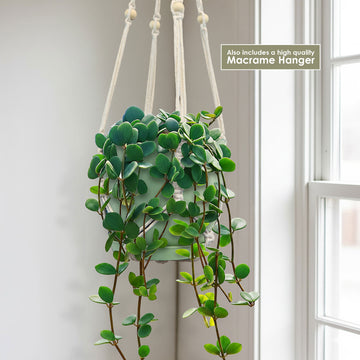
indoor plants that start with t Peperomia Hope 'Peperomia tetraphylla' 4" Pot / Black / With PotT he Peperomia Hope, known as Peperomia tetraphylla, is a delightful houseplant known for its small, round succulent leaves that are soft to the touch. Native to Central America and South America, it is also known as the acorn peperomia or four leaved peperomia. It is a delightful cultivar resulting from a cross between Peperomia deppeana and Peperomia quadrifolia, an interesting species of the Peperomia genus. This image features the Peperomia Hope,

T he Peperomia Hope, known as Peperomia tetraphylla, is a delightful houseplant known for its small, round succulent leaves that are soft to the touch. Native to Central America and South America, it is also known as the acorn peperomia or four-leaved peperomia. 

It is a delightful cultivar resulting from a cross between Peperomia deppeana and Peperomia quadrifolia, an interesting species of the Peperomia genus.

This image features the Peperomia Hope, which makes a colorful choice for containers and hanging baskets.

These trailing stems of the slow-growing cultivar can reach a length of about 12 inches, making them perfect for hanging baskets or as a trailing plant on shelves.

They grow on trailing stems, creating a cascading effect that adds a touch of elegance to any space.

The Peperomia hope flowers are usually greenish-white or yellowish in color and are not the main attraction of this plant.

While Peperomia hope is primarily grown for its foliage, it does produce small, insignificant flowers during the spring and summer.

Like other succulents, Peperomia plants are low-maintenance plants and are neglect-tolerant, making them ideal for travelers or busy owners.

Whether you're an experienced plant parent or just starting out, this versatile Peperomia tetraphylla beauty is sure to impress. Not only are these tropical plants safe for humans and pets, but they also thrive in partial shade and require moderate watering.  

When and How to Water Your Peperomia Hope 

These hope plants need deep irrigation to keep the soil moist, but not too wet. Make sure you check the soil before watering, as these plants do not like to be waterlogged or soggy. Go to https://planetdesert.com/collections/soil-top-dressing-and-amendments/products/soil-cactus-mix-blend-1-gal-4-qt-cacti-succulent-dirt-compost-growing-media Your Peperomia hope plant prefers watering once every 2-3 weeks in the growing season, and once a month in the dormant.

In the spring and summer, during the growing season, watering once every two or three weeks is ample for your Peperomia tetraphylla.

In the winter, during the dormant season, if it doesn't rain, you still should only water the Peperomia hope plant less than once a month.

If the plant doesn't receive enough moisture for an extended period of time, discoloration, pale stems, and browning can occur, leading to stunted growth. In contrast, overwatering can cause root rot and fungal infections.

Light Requirements - Where to Place Your Peperomia Hope 

When grown indoors, it should be placed in the sunniest spot in your home in order to receive the 4-6 hours of bright light that it needs each day. 

This usually means placing the plant in a south- or west-facing window or using artificial light to provide supplemental light.

It can tolerate low light, but it may experience stunted growth, curled leaves, and faded colors.

When grown outdoors, Peperomia tetraphylla prefers full sun to partial shade for at least 6-8 hours a day. They can tolerate some morning sun, but direct afternoon sunlight should be avoided to prevent leaf burn. If the plant is not receiving enough light, its growth may become leggy and sparse.

Optimal Soil & Fertilizer Needs 

The Pepromia hope prefers a well-drained soil and should be fertilized once a year in the spring. You can make or buy a well-draining potting mix, or ideally, use our that contains 5 natural substrates and mycorrhizae, which promote the development of a strong root system that helps your Peperomia tetraphylla thrive. 

When it comes to fertilizing your Peperomia tetraphylla, a small amount of natural fertilizer once a year in the spring will do wonders for your plant's health and growth. Additionally, by using NPK fertilizers in a balanced ratio (5-10-5), you can add beneficial compounds and microbes to the soil without using harsh chemicals. Show your hope, plant some love with awesome organic fertilizer, and watch it thrive. 

Hardiness Zones & More  

In the United States, this trailing Peperomia is mostly an indoor plant, but if you live in southern Florida or Hawaii, then you can cultivate it outdoors in USDA zones 10-12. 

This tropical plant thrives at typical household humidity levels and can withstand a wide range of humidity. It will grow more quickly if you place a humidifier or pebble tray nearby.

A well-draining potting mix with drainage holes in the potting container will help you maintain temperatures and prevent too much moisture. 

How to Grow Best Peperomia Hope Indoors

When growing indoors, the ideal temperature range for your trailing hope plant is 65–75°F.  The Peperomia tetraphylla hope plants are sensitive to both extreme heat and cold, moderate temperatures. Most gardeners in the U.S. will want to keep their plant as an indoor houseplant or grow it in a greenhouse.

Wildlife - Peperomia Hope Attracts the Following Friendly Pollinators

The Peperomia Hope is known to attract friendly pollinators such as bees, butterflies, and hummingbirds with its vibrant flowers and sweet nectar. These pollinators play a crucial role in the ecosystem by aiding in the reproduction of plants and ensuring biodiversity in the environment.

Butterflies
Bees
Hummingbirds
Lady Bugs
Multi Pollinators
Other Birds

According to ASPCA, the Peperomia tetraphylla is non-toxic to pets and humans. It is safe to touch and handle, making it a great option for households with curious pets or small children.

How to Propagate Your Peperomia Hope

Propagating Peperomia hope is relatively easy and can be done through stem cuttings or leaf cuttings. Simply take a healthy stem cutting, remove a few leaves from the lower part of the stem, and place it in a well-draining potting mix. Keep the soil lightly moist until roots start to develop, which usually takes a few weeks.

Key Takeaways

  1. Peperomia 'Hope' features a trailing growth habit, with soft, round, succulent-like leaves that cascade beautifully over pot edges.
  2. This plant is an excellent choice for hanging baskets, wall planters, or shelf displays, adding lush greenery to vertical spaces.
  3. It is mildly drought-tolerant, thanks to its thick, water-storing leaves, and prefers to dry out between waterings.
  4. Peperomia tetraphylla is non-toxic to pets and humans.
  5. Peperomia 'Hope' thrives in bright, indirect light but can also tolerate medium light, making it versatile for various indoor spots.

Final Thoughts

Overall, the Peperomia hope (Peperomia tetraphylla) is a fantastic plant choice for both plant enthusiasts and beginners alike. Its trailing stems and compact size make it perfect for hanging baskets or adding a touch of greenery to shelves. With its vibrant green, succulent-like leaves, it adds a refreshing and elegant look to any space. In terms of care, Peperomia hope is relatively low-maintenance, preferring bright, indirect light and well-draining soil. It's important to let the soil dry out between waterings to avoid overwatering. With its attractive trailing feature and easy care requirements, Peperomia hope is a delightful plant that will surely bring joy to any plant lover or buyer.

Shipping Notes
  • Free Standard Shipping on $100+ Orders to the USA.
  • Except Preorder products are shipped in 48 hours.
  • Delivery to the USA:
  1. Standard Shipping : 3-10 business days
  • If time is of the essence, please consider selecting expedited delivery for faster service.
Exchange/Return Notes
  • We offer a 30-day return/exchange service after receiving.
  • Final sale items are not eligible for returns or exchanges.
  • To process your return/exchange, please contact us at [email protected]
  • Please click here for more details>>> Return & Exchange Policy
SKU: 82982634101

Discover Niche Categories That Outsell indoor plants that start with t

Top-Converting Item to Boost Your Average Order

4.4 ★★★★★
Based on 12 reviews
Sort
Highest Rating
Newest First
Oldest First
Product Reviews
A
Verified Purchase
Alex
Lowell, US
★★★★★ 5
Great for work
Style: 7 in 1 【1 HDMI】
I bought this to use with my MacBook for work, and it’s been a really useful all-in-one hub. One of the biggest advantages is not having to carry separate adapters for HDMI, USB devices, and SD cards. It makes it much easier to connect everything I need at my desk or when working away from home. The HDMI connection worked well with an external monitor, and the USB ports have been useful for keyboard/mouse and flash drives. The pass-through charging is also a big plus since it lets me keep my MacBook powered while still expanding the number of ports available. That makes a big difference if your MacBook already has limited ports to begin with. I also like that it’s compact and easy to keep in a laptop bag, so it works well for both a desk setup and travel. It can get a little warm during longer use, but that seems pretty normal for a small hub doing multiple things at once. Overall, this has been a helpful and convenient accessory for turning a MacBook into a more practical work setup.
WAS THIS REVIEW HELPFUL?YesReportShare
Reviewed in the United States on April 8, 2026
R
Verified Purchase
RVGregoryZ
Grantham, US
★★★★★ 5
My experience with the Anker Products is Great.
Style: 7 in 1 【1 HDMI】
Anker USB C Hub (7-in-1) I now have several Anker Products in my home. These folks just know how to build products. Affordable and durable, stable and easy to use. This 7 in 1 is all Plug and Play. I am using an external power supply, and this product delivers it to all of my connected devices. The stability of every thing plugged into the USB Ports keeps everything connected just as it should. I recommend the Anker Product Line and this product in particular. SO, if you're in need of additional USB Ports, go with Anker.
WAS THIS REVIEW HELPFUL?YesReportShare
Reviewed in the United States on March 2, 2026
B
Verified Purchase
Bimmer369
San Leandro, US
★★★★★ 5
Solid; long lasting
I use this adaptor to hard wire an ethernet internet connection straight into a Samsung Galaxy S10+ with PD (charges phone while connected). I also use an S8+ which works, too. This is a great option for those of us who understand the dangers of being exposed to low-powered microwaves all day and night (AKA Wi-Fi). While hard wired to ethernet, you can enjoy the internet with airplane mode on, which is a big plus! I've used several different branded adaptors (the ones without PD kill your device's battery QUICKLY) for this purpose, and this Anker outshines them all. Most other brands (I've tried Belkin, Ugreen, and some other somewhat obscure brands) work fine for a short time and then begin to get spotty, losing and regaining connection intermittently until crashing and not working at all over a short period of time, usually not longer than 3 to 4 months if you're real lucky. However, I've had this Anker for nearly a year (10 months and change), and it's still going strong. Now, it's not perfect. It does lose connection from time to time and then regain connection just like the others, but nowhere near as frequent, and if you are mindful of the orientation of the cords and take care not to twist or put torque on them once they're connected to a device, it usually keeps connection very nicely. Be sure to put the device in the proper orientation through which you'll be looking at it, and THEN connect the adaptor (don't connect the adaptor and then have to roll the phone over to look at the screen, as this is the fastest way to kill the adaptor and loosen your phone's charging port). When first attaching, I plug the ethernet cable into the adaptor and use a hair-tie rubber band to wrap around the end of the ethernet cable, making sure it's tight with no slack, then I secure it around the BASE of the type-C cable coming out of the opposite end of the adaptor (see attached picture). Then LEAVE IT. If you incessantly disconnect and reconnect this adaptor, I guarantee it will not last as long. As for the features of this adaptor, I can only speak on the ethernet connection, the PD port, and the type-C 5gbps port. The PD port is nice because if you try connecting to the internet and doing pretty much anything without it, your device's battery is going to drain quite rapidly. How fast depends on how good your device's battery is to begin with. S10+ probably won't last half the time without PD as it does with PD. Just realize that your device is not going to gain power while charging through the PD port, but rather the battery will merely die at a slower pace, giving you more time before having to recharge your device. The other factor is how long your charging cable is (the shorter it is, the longer the battery will last). Tip: While using PD port, your device will not warn you of your battery about to die since it is technically charging, so if you're doing something important, you had better keep an eye on your battery percentage, lest it dies unexpectedly. I've not used the hdmi port at all, so nothing to speak on there. The 5gbps type-c port is nice if you want to connect an external hard drive while either A: connected to the internet, B: still being able to charge your phone, or both! I use the Samsung Portable SSD T7, and the Anker is great for saving large videos/files straight from the internet onto the external hard drive. The Anker is also good for freeing up space on your phone by moving existing files to the hard drive while continuing to charge your phone (otherwise, the hard drive connects directly to your phone, so your charging port is being used, and if your battery is low, no charging). Also, if you disconnected the ethernet cable from the Anker while moving files to an external drive, I suspect that the PD port would actually add battery percentage instead of merely slowing down the loss of battery percentage. To summarize: - Don't get Wi-fried: use a hard-wired ethernet connection instead! - Great adaptor that lasts longer than all others I've tried. - PD is a must have feature, but your device will still eventually die. - Great for saving videos/large files straight from internet to external hard drive while being able to charge device simultaneously. This Anker is the one you're looking for! Cheers.
WAS THIS REVIEW HELPFUL?YesReportShare
Reviewed in the United States on December 15, 2022
A
Verified Purchase
Amiga95
Belleville, US
★★★★★ 5
Excellent quality with just the right amount and type of connection points I needed!
Extremely good quality. I've used many Anker product over the years and this one didn't disappoint! Needed it to run a laptop on my network in isolation mode and to have accessible connections for ethernet as well as a wireless mouse and extra cooling fan as my laptop has only 1 standard size USB 3.0 port. This is the mini version so It won't necessarily supply enough juice to charge your laptop at the same time (there's another 8 in 1 made by Anker for that) but it can supply enough power to maybe get you through a very trying session, very short term. Super-easy to connect and just works. Fits comfortably in my carry bag too. Very light weight, good heat dissipation although I didn't really have any or at least not much. Compatible with all the connectors you see in the picture. In my case at least, it wasn't a luxury it was a necessity and it proved it's value immediately.
WAS THIS REVIEW HELPFUL?YesReportShare
Reviewed in the United States on April 26, 2026
L
Verified Purchase
Lars Bogard
Lake Worth, US
★★★★★ 5
USB ports charge.
Relatively cheap, lightweight, and better than most. It gets warm, but not hot. The Video adapter was immediately recognized by my Macbook and works flawlessly at all resolutions made available (much higher than Windows PCs) I used it both as the recipient of my 65W Mac charger, and the Mac received its power from this device; I also had the 65W Mac charger plugged directly into the Mac, and this plugged into the second USB-C plug on the mac. It works (HDMI monitor) both ways. It says that the ports are not for "charging", however be aware that they do charge when devices are connected, for example my iPhone to the extra USB-C port, or the USB-A port. My Logi back-lighted keyboard lights up too. I don't know why they say it is not for charging. Perhaps it is simply saying there are no ports expressly intended to do charging without connecting to your computer.
WAS THIS REVIEW HELPFUL?YesReportShare
Reviewed in the United States on February 18, 2026

recommand products