SKU: 78040022864
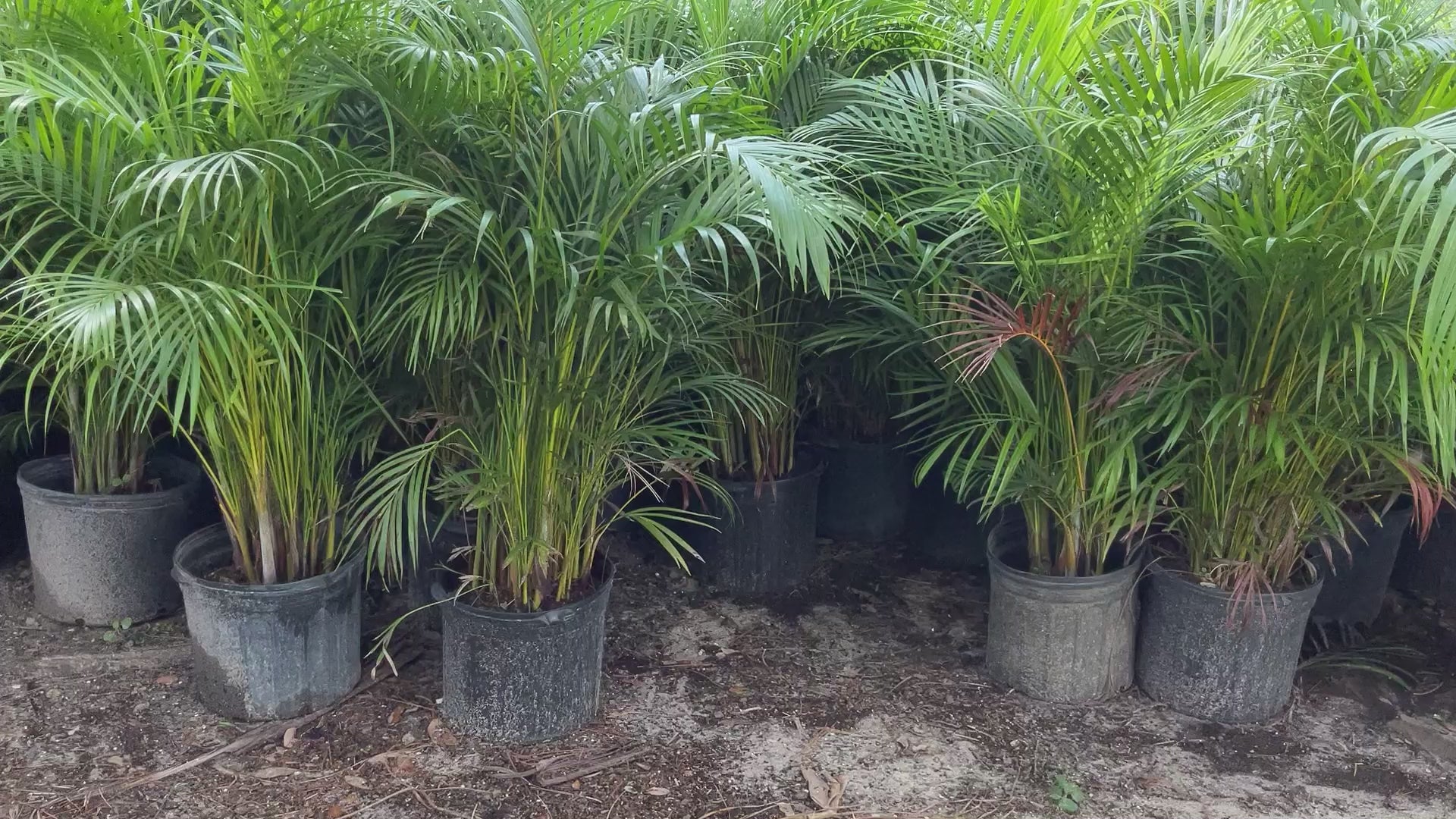
areca palm tree hedge

areca palm tree hedge Areca Palm

Sale price$26.11 Regular price$29.01
Save 10%

Shipping Estimate
USA
  • USA
  • CAN

Ships within 48 hours · Estimated delivery Jul 11 - Jul 16

Promo Codes Available:

For Your Every Summer RSVP, with Code: SUMMER15

Description

areca palm tree hedge Areca PalmAreca Palm The Areca palm trees are a favorite palm for privacy, screening and garden backdrops in many Cape Coral landscaping projects. We recommend using the Butterfly Palm Trees as a living fence to provide privacy from neighbors, or block the view from the street into your home. Once they reach a taller height, with a little trimming they can be thinned out to display their bamboo looking trunks. Either left completely full and lush, or a little

Areca Palm

The Areca palm trees are a favorite palm for privacy, screening and garden backdrops in many Cape Coral landscaping projects. We recommend using the Butterfly Palm Trees as a living fence to provide privacy from neighbors, or block the view from the street into your home. 

Once they reach a taller height, with a little trimming they can be thinned out to display their bamboo-looking trunks. Either left completely full and lush, or a little manicured, the Areca palm tree is a beautiful addition to a tropical landscape.

  • These palms are a great choice for natural privacy screening.
  • Not just another pretty face, the dramatic areca palm can double duty as a spectacular tropical privacy screen.
  • It is sometimes called the "Butterfly Palm"-because they are full and dense.
  • Areca palms are slow to moderate growers for sun and shade and can reach heights of 15 to 20 feet. 
  • Zone 10 is best, though winter in warmers areas or Zone 9B that border 10A, you can use an Areca in a protected spot. You may see leaf tip burn after most winters, even in Zone 10. Areca are clustering palms.
WE ONLY SHIP TO LOCAL FL COUNTIES (Hillsborough, Pinellas, Manatee and Pasco Counties ONLY)

    More Details


    Advantages:

    Easy To Grow

    Low Maintenance

    Good For Containers

      Grows Best:

        Landscape

        House Plant

        House Plant

      Ideal position:

      Full Sun

      6 + Hours best

      Growth Outlook:

      Height : 10-30

      Wide: 8 - 10'

      Growth Rate: Fast

      Plant Spacing: 12' - 18'

      Pet Friendly - yes

      Toxicity: Safe for pets

      Caring For:

      Position Water Temps Food


      Caring for an Areca Palm tree involves several important steps to ensure its health and vitality:

      1. Sunlight: Areca Palms thrive in bright, indirect sunlight. Place your palm near a window with filtered light or provide it with dappled shade outdoors. Avoid exposing it to direct sunlight, as it can scorch the leaves.

      2. Watering: Keep the soil consistently moist but not waterlogged. Water your Areca Palm thoroughly when the top inch of soil feels dry to the touch. Ensure proper drainage to prevent root rot. During winter, reduce watering frequency slightly as the plant's growth slows down.

      3. Humidity: Areca Palms prefer high humidity levels. Mist the leaves regularly with water or place a humidifier nearby to create a humid environment. This helps prevent the tips of the leaves from turning brown.

      4. Fertilization: Feed your Areca Palm with a balanced, water-soluble fertilizer specifically formulated for indoor plants. Apply the fertilizer every two to three months during the growing season (spring and summer). Follow the package instructions for proper dilution and application.

      5. Pruning: Remove any yellow or brown fronds as they age or become damaged. Trim off any dead or brown leaf tips to maintain the plant's appearance. Avoid excessive pruning, as it can stress the palm.

      6. Pests: Monitor your Areca Palm for common pests like spider mites and mealybugs. If you notice any infestations, treat them promptly with an appropriate insecticidal soap or neem oil spray.

      7. Repotting: As the Areca Palm grows, it may require repotting every two to three years. Choose a pot that is one size larger and use well-draining soil. Repotting in spring allows the palm to establish itself before the active growing season.

      By following these care guidelines, you can ensure that your Areca Palm remains healthy, vibrant, and a beautiful addition to your indoor or outdoor space. Regular attention to watering, light, and humidity will help your palm thrive for years to come.

      Shipping Notes
      • Free Standard Shipping on $100+ Orders to the USA.
      • Except Preorder products are shipped in 48 hours.
      • Delivery to the USA:
      1. Standard Shipping : 3-10 business days
      • If time is of the essence, please consider selecting expedited delivery for faster service.
      Exchange/Return Notes
      • We offer a 30-day return/exchange service after receiving.
      • Final sale items are not eligible for returns or exchanges.
      • To process your return/exchange, please contact us at [email protected]
      • Please click here for more details>>> Return & Exchange Policy
      SKU: 78040022864

      Discover Niche Categories That Outsell areca palm tree hedge

      Top-Converting Item to Boost Your Average Order

      4.4 ★★★★★
      Based on 2292 reviews
      Sort
      Highest Rating
      Newest First
      Oldest First
      Product Reviews
      J
      Verified Purchase
      Jordan P.
      Belleville, US
      ★★★★★ 5
      I started my own photo printing shop
      Having a printer that performs this well has been great. Setting it up was easy to do with the included instructions. I already have a color laser printer which I use all the time, and you may be wondering why I would go buy an inkjet printer. Photos. You can't print on glossy paper with a laser printer very well. All the photo paper I've purchased clearly says it's for inkjet printers. While this hasn't stopped me from trying. The results have been very poor. Especially if you want to cut the photos to specific sizes. Little bits of toner get everywhere. I've been putting off getting an inkjet because the cartridge system is too expensive and messy. I got more ink on my hands pulling the stickers off the refills than filling every tank on the HP 7602. This printer has all the features you would expect such as Wi-Fi, flatbed scanner, automatic document feeder, 2-sided printing, and even an ID card copy function. If your business provides financing this is something that would really make things easy for you. My wife and I print photos from our phone using the HP Smart app or the phone's default printing app and both produce excellent results. The photos are where you would expect them to be, and the quality is as good as getting them from the pharmacy. Like I said I have a laser printer, but I was curious how this would work just printing some regular documents. It’s not quite as fast obviously but the results are just as good. I love the user interface that is so seamlessly placed into the front bezel. Unless it’s telling you something you would never know it was there. This Printer checks a lot of boxes for me and was 100% worth the investment.
      WAS THIS REVIEW HELPFUL?YesReportShare
      Reviewed in the United States on January 21, 2024
      D
      Verified Purchase
      deing
      Houston, US
      ★★★★★ 1
      HP Warranty: Know this before buying; Unit malfunction in less than 5 months
      UPDATE: Not even 5 months using this printer and there are problems. 1 - the printer's black ink is not working. A blank paper comes out for documents printed in black ink only. The problem: the black ink is not running through the tube that connects the blank ink tank to the ink cartridge. The tube is totally clear. 2 - The ink cartridge does not move to the center when opening the printer cover, preventing access and removal of the ink cartridge. HP Tech Support: Spent about an hour with tech support for them to tell me what I already knew - the printer is defective. HP Warranty: HP is not abiding by the terms of the warranty. According to the standard warranty, HP is to first ship a replacement. To ship the defected unit back, the customer is to use the prepaid shipping label provided by HP and use the box of the replacement unit to ship the defective unit back. Without any advance notification to the customers, HP has indicated to me that this policy does not apply to Smart Tank printers. Smart Tank purchasers are responsible to bear the cost of shipping the defective unit and providing the box. Once HP receives the defective unit, they will then ship the replacement. This policy obviously extends the period the customer is without a working printer. I tried pushing back, but to no avail. Replaced a HP Officejet Pro 8600 printer. The HP 7602 takes up less space, is well made, looks nice and the printing quality is better. The printing speed is slower, which will be much more noticeable when printing multiple, double sided pages. The paper tray does not have a slider from the top to ensure that the paper stays level and in place. It only has sliders on the side. I would have liked to see an Officejet Pro 8600 equivalent tank printer. The cost of ink cartridges for regular inkjet printers can not be justified for someone that does not print much.
      WAS THIS REVIEW HELPFUL?YesReportShare
      Reviewed in the United States on March 8, 2025
      M
      Verified Purchase
      Michelle Y.
      Omaha, US
      ★★★★★ 5
      Why didn’t I buy this sooner?
      I am so happy I shelled out for the 7602. HP makes less expensive Ink tank printers but this is perfect for me. Pros: 1. The printing quality is great. I’m in the middle of a massive project that requires thousands of pages to be printed. I upgraded to 32lb paper to ensure the project would be quality, but also to handle double sided printing with images. The images with this printer and clear with zero smudging. 2. It’s fast. It said 12 pages per minute, but I’m getting more than that double sided. 3. The paper tray. The ad doesn’t go into this, but the paper tray is rad. I have terrible back pain so to sit and do a project for hours is hard enough. To have to get up to reload a paper tray sucks. This paper capacity has got to take 200-250 sheets. I grab about half the package of paper to fit a load snuggly. I LOVE this feature. 4. The cost I was worried about the reality of the savings on ink. The initial cost is over $300. However the little ink jet cartridges are between $30 to $50 each time. They run out so fast. Plus, HP changed the machines to only read their proprietary cartridges, so you can’t order a cheap fast cartridge off Amazon. I printed close to 1,000 pages last night and I’m only seeing a slight dip in the ink levels. That’s crazy. Now consider the ink. The bottles are designed so they fit over the loading tube. No mess. I was worried about this because I am a stone cold clutz. I did spill a drop of blue, but I was moving fast. The bottles have a plastic top the presses into the tube creating a seal. Imagine when you pull a gas nozzle out of your tank. If you are in a rush you might drip gas on your car. This is the same. You pull the bottle up slowly allowing the plastic barrier to seal. I just whipped off the bottle but only 1 drop spilled, by the tube. I haven’t tried the scanner. I will update in awhile. The only con is the paper catch. This is where the prints come out and stack up. It has a manual slide out. If you forget to pull it out your pages will end up on the floor. I’m a bit spoiled from the automatic arm that extended on my ink jet when you press print. To me that is such a small sacrifice for all the advantages. I highly recommend this printer. In the last 3 months I spent $600 on cartridges. I wish I had done this sooner!
      WAS THIS REVIEW HELPFUL?YesReportShare
      Reviewed in the United States on August 31, 2025
      M
      Verified Purchase
      MS
      Lowell, US
      ★★★★★ 4
      So far a great printer
      So far a great printer. Was a little worried after reading a lot of the reviews. However I was tired of ink cartridges and wanted to give the tank a shot. Heck I have 30 days to try it out with Amazon returns , so why not. Setup only took a couple minutes. Simple to read instructions, online setup guides made it quick and easy. Filling the ink tanks was painless. Installing printer heads was easy. Although was a little worried as it took a little more force the. Expecting to close the cover. Was afraid I was going to brake it. Zero problems connecting to internet. Did a test fax and worked great! Did a test scan with zero issues! Printed several test pages from cell phone and computer with zero issues. Print quality was great even with testing on plain printer paper. Only negative I have is the power cable does not connect securely and can easily come loose causing power to disconnect. Which is my reason for 4 stars as I can see how this might become an issue
      WAS THIS REVIEW HELPFUL?YesReportShare
      Reviewed in the United States on April 5, 2026
      R
      Verified Purchase
      Robert Merriman
      Belleville, US
      ★★★★★ 5
      Very Happy with My New Printer - Features Important to You are Worth the Cost
      My HP Photosmart 7520 purchased in Dec 2014 finally died. It was inexpensive, but was a faithful servant! I could not resolve a new "printhead not detected" error and although I may still be able to fix, I thought it time to replace. I grew tired of the print cartridge change outs. I just spent a day using this new (my third HP) printer and all is well. I like everything about it. Ease of set up, the paper tray, document feeder, the look/design, and especially the ink. The ink will last a long time given my use and replacements will not be $$. I even like the panel light which duration can be user selected. I could have spent less, but the additional features are worth the cost to me. The set up via my MacBook was easy. Yes, I could have done this with my phone, but I enjoy using my Mac. Registration was seamless. I did have a hiccup. Initially color printing was not available from my Mac OS. HP test pages were fine, but no color via any apps using my Mac OS. I Googled the issue and within 2 minutes I found that a reinstall of the Mac driver from the HP site was needed. That took another 2 minutes and color options appeared in the print settings! Strange, I know, and I don't care why ... just glad that a fix was that easy. So, I examined Canon, Brother, and all the HP models, chose this one and glad I did. I have been messing with this tech since the late '80s and I like how HP has evolved its printers. My laser printer experience was limited to the workplace ... I am an inkjet guy at home so I limited my search to that format. I don't think you will be disappointed. Purchased via Amazon. Delivery within 2 days.
      WAS THIS REVIEW HELPFUL?YesReportShare
      Reviewed in the United States on December 24, 2025

      recommand products