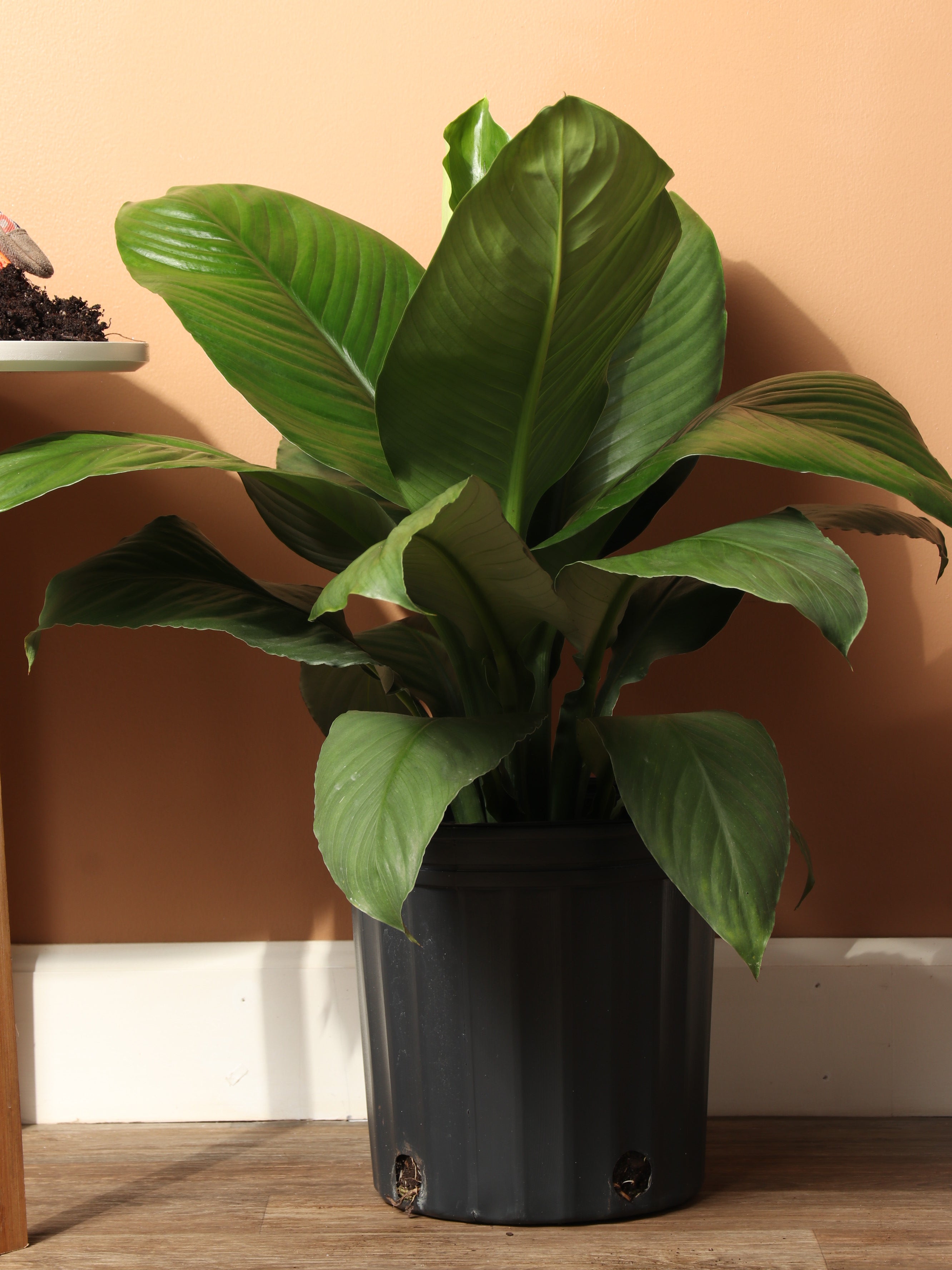
SKU: 7695799796
peace lily sensation plant

peace lily sensation plant 3-5 Ft Sensation Peace Lily

Sale price$20.75 Regular price$23.06
Save 10%

Shipping Estimate
USA
  • USA
  • CAN

Ships within 48 hours · Estimated delivery Jul 13 - Jul 18

Promo Codes Available:

For Your Every Summer RSVP, with Code: SUMMER15

Description

peace lily sensation plant 3-5 Ft Sensation Peace LilyDescription Meet the Sensation Peace Lily the gentle giant of the houseplant world commanding attention without raising her voice. This large peace lily mastered the art of quiet confidence, like a towering cathedral that doesn't need to shout about its magnificence. Native to tropical regions, this giant Peace Lily boasts glossy, ribbed leaves that can stretch up to 20 inches long (50 cm), creating that "did I accidentally wander into a botanical

Description

Meet the Sensation Peace Lily – the gentle giant of the houseplant world commanding attention without raising her voice. This large peace lily mastered the art of quiet confidence, like a towering cathedral that doesn't need to shout about its magnificence.

Native to tropical regions, this giant Peace Lily boasts glossy, ribbed leaves that can stretch up to 20 inches long (50 cm), creating that "did I accidentally wander into a botanical conservatory?" feeling in your living room. At 6 feet tall (1.8 meters) in ideal conditions, she's the perfect height for making dramatic statements while still fitting under most ceilings.


Care 

How to care for a Sensation Peace lily indoors

Caring for your Sensation Peace Lily indoors means giving it consistently bright indirect light, proper soil moisture management, humidity levels above 50 percent, regular fertilizing during the growing season, and excellent drainage to keep it healthy and happy.

Keep her soil consistently moist but never waterlogged, feed her diluted fertilizer every two weeks during growing season, and give those magnificent leaves a gentle wipe-down to maintain their glossy appearance. Sensation Peace Lily care is surprisingly forgiving if you occasionally forget her watering schedule – just don't make it a habit!


Do Sensation peace lilies need direct sunlight?

Sensation Peace lilies do not need direct sunlight exposure. Harsh, intense light will damage their leaves. Bright, filtered light near a north or east-facing window is her sweet spot for maintaining those gorgeous leaves and encouraging blooms.


Is the Sensation Peace Lily a good indoor plant?

The Sensation Peace Lily makes a fantastic indoor plant. It's super easy to care for, cleans your air, handles different light levels like a champ, and looks stunning all year long. Perfect if you want maximum impact with minimal fuss.


Is the Sensation Peace Lily poisonous?

Yes, the Sensation Peace Lily contains harmful calcium oxalate crystals that make it mildly or moderately toxic to humans and pets if ingested. It causes immediate oral irritation, discomfort, potential digestive upset symptoms, and temporary swallowing difficulties that require attention.

While she's not as dangerous as some plants, you'll want to keep curious pets and small children from taking taste tests. Think of those beautiful leaves as "look but don't touch" artwork – admire from a distance for everyone's safety.


What is the best location for a peace lily?

The best location for your Peace Lily is positioned near a bright window with filtered indirect natural light, safely away from cold drafts, heating vents, harsh air conditioning units, and any areas with temperature fluctuations throughout the day.

A bathroom with a window is actually ideal since she loves the humidity from your showers. Otherwise, any bright corner where she can show off those dramatic proportions without getting scorched by direct sun will make her perfectly content.


Do Sensation Peace Lilies bloom?

Sensation Peace Lilies bloom all through the growing season. They’re like nature's victory dance – elegant white flags announcing that you've mastered the art of plant parenthood. The flowers appear more frequently when she's happy with her light and humidity levels.


Do Sensation Peace Lilies like full sun or shade? 

Sensation Peace Lilies prefer shaded areas over full sun. She's more "champagne brunch in a conservatory" than "beach volleyball in blazing sun." Give her soft, filtered light and she'll reward you with lush growth and those coveted white blooms.


How often should I water a Sensation Peace Lily?

Water your Sensation Peace Lily whenever the top inch of her soil feels completely dry to touch, typically once a week. Adjust your watering frequency based on room temperature, humidity levels, seasonal changes, and how fast she’s growing.

She's quite dramatic about her thirst – those leaves will droop like she's auditioning for a soap opera when she needs water. The good news? She perks up within hours of a good drink, making it easy to read her hydration needs.


Do peace lilies need misting?

Your Peace Lily will love daily misting sessions to keep her humidity levels above 50 percent, especially if she’s in dry indoor environments or during heating and air conditioning seasons. A light spritz on the leaves is all she needs.


What is the lifespan of a Sensation Peace Lily?

A Sensation Peace Lily can live 5-10 years or even much longer with good care, and some really well-cared-for plants have been known to thrive happily for decades when they get the right conditions and proper attention.

She's in this relationship for the long haul – like that friend who's been there through every apartment move and career change. With consistent care, she'll be gracing your space and purifying your air for years to come.


Does a Peace lily need to be near a window?

Keep your Peace Lily near a bright window to make sure she gets enough natural light. Think of it as finding prime real estate – close enough to the action but far enough away to avoid the chaos.


Pet-friendly?

The Sensation Peace Lily is not pet-friendly. While not as toxic as true lilies, she's still not safe for curious pets who like to sample your plant collection.


Is the Sensation Peace Lily toxic to dogs?

The Sensation Peace Lily is toxic to dogs, causing oral irritation, drooling, vomiting, and difficulty swallowing if any part of the plant is consumed. Keep her positioned where your four-legged family members can't reach those tempting leaves for unauthorized snacks.


Is the Sensation Peace Lily poisonous to cats?

Cats are naturally curious about plants, but this is a friendship that needs boundaries. The Sensation Peace Lily is definitely poisonous to cats and will cause immediate oral discomfort, drooling, vomiting, and complete loss of appetite if chewed or eaten.


Factoids

How long do Sensation Peace Lily flowers last?

Sensation Peace Lily flowers typically last several weeks to a couple of months under optimal growing conditions, making them remarkably long-lasting compared to most other common houseplant blooms and flowering displays throughout the indoor gardening world and plant collecting community.

Each bloom is like a month-long celebration of your plant care skills. The white spathes gradually fade from pure white to green, giving you plenty of time to enjoy her floral show before she focuses energy back into those magnificent leaves.


Are there different types of peace lily?

Yes, there are over 40 different types of peace lily species and many distinctive cultivars available worldwide, including popular varieties like 'Domino', 'Picasso', 'Wallisii', and the impressively giant 'Sensation' variety for collectors and plant enthusiasts seeking statement pieces.

The peace lily family is like a diverse group of siblings – they share the same basic good looks but each brings their own special flair. Sensation is definitely the tallest, most dramatic sister in this particular plant family reunion.


What is the significance of the peace lily plant?

The peace lily plant symbolizes peace, hope, spiritual renewal, purity, and remarkable resilience, often gifted during times of sympathy, remembrance, or new beginnings throughout various cultures and spiritual traditions worldwide for centuries, making it deeply meaningful for recipients.

She's basically a living meditation on tranquility – which makes perfect sense when you see how her presence transforms a space into something more serene. No wonder people choose her when they want to send meaningful, peaceful vibes.


Is Sensation Peace Lily the same as a peace lily?

The Sensation Peace Lily is a giant version of the Peace Lily. She’s the Peace Lily who hit the gym and got serious about her growth goals. While regular Peace Lilies are lovely, Sensation took the basic formula and supersized it.


Buy a Sensation Peace Lilly

Transport yourself into a tropical sanctuary with the Sensation Peace Lily – the statement plant that proves bigger really is better. With her dramatic 6-foot presence and air-purifying superpowers, she's the living sculpture your home didn't know it needed.

Our live video shopping experience means you can point to the exact giant peace lily that captures your heart before she ships. No plant lottery here – just you, us, and the perfect match waiting to become the crown jewel of your indoor jungle!

Shipping Notes
  • Free Standard Shipping on $100+ Orders to the USA.
  • Except Preorder products are shipped in 48 hours.
  • Delivery to the USA:
  1. Standard Shipping : 3-10 business days
  • If time is of the essence, please consider selecting expedited delivery for faster service.
Exchange/Return Notes
  • We offer a 30-day return/exchange service after receiving.
  • Final sale items are not eligible for returns or exchanges.
  • To process your return/exchange, please contact us at [email protected]
  • Please click here for more details>>> Return & Exchange Policy
SKU: 7695799796

Discover Niche Categories That Outsell peace lily sensation plant

Top-Converting Item to Boost Your Average Order

4.6 ★★★★★
Based on 1128 reviews
Sort
Highest Rating
Newest First
Oldest First
Product Reviews
N
Verified Purchase
Nick Mumbles
Los Angeles, US
★★★★★ 5
Great!
Style: 7-in-2 4K@30Hz
I love that this thing adds extra ports to a very limited MacBook without the dangling terrible looking cord. The slim profile is a plus too. Additionally same color for aesthetics. Looks and performs great.
WAS THIS REVIEW HELPFUL?YesReportShare
Reviewed in the United States on June 9, 2026
A
Verified Purchase
Aaron
Louisville, US
★★★★★ 5
Great 10gbps USB-C Hub, worked with Anker support through compat issues with PD4 iteration 1
Original Review (updates below): ----- The moment I noticed this thing on Amazon, I bought it and it literally just arrived. Finally, 4K60 over just USB-C with other ports (including making up to 10Gbps available to them) for a reasonable price. Unfortunately, the first two things I've done with it were both disappointing. I'll cut to the chase, the power delivery pass through isn't working with one of their own chargers. The first device I tried connecting this with is my Anker PD4 with one USB-C cable as the only thing plugged into it so I can test the truly up to 100W (-15 for its own power) claims. I've tried connecting it with Apple's 2m USB-C charge cable (100w capable) and an equivalent CableMatters cable that also supports 100W. When plugged directly into my laptop, both of these cables immediately start charging it and show up as 100W power sources. When this Anker hub is plugged in and either of them is connected to the power delivery port on the side of it, the laptop does not charge (laptop is a 16" Macbook Pro, I've tried multiple ports just for the heck of it). My second complaint is that when absolutely nothing is plugged into it, it becomes fairly warm to the touch. Why, when it's doing nothing, is it hot? I'm clearly not running data or even power through it so I have low hopes for it under load. The fact that it doesn't work in exactly the scenario they want it to most (a MacBook Pro with one of their own chargers) seems like a pretty big fail. I've got lots of USB-C things though so I thought I'd grab a couple and try those. Using an Apple 96W USB-C charger, the device does pass through power delivery properly. It shows up as providing 79W to the laptop (siphoning off 17W in this instance). I also have a 56W Aukey charger that splits power between a USB-A port and a USB-C port that can provide 45W of power delivery. When plugged into that charger it does appear to work as well and appears in macOS as a 30W power source. Maybe the problem is the Anker PD4? But it works fine providing power to the laptop directly. Would love to hear from Anker about these two products working together and what I should actually expect. Having it be unreliable for power delivery isn't great, but power and heat aside (it is getting a little bit warmer now that it's providing power from the Apple power adapter, but still definitely holdable), the hardware looks and feels good and the cable feels durable. Worth also noting that there's a white LED ring on the side of it that appears to be always on when it's plugged in. Don't know why it needs an LED. ----- Update, June 22, 2020: I've done some more testing and Anker has reached out to me to investigate what might be the issue. I can say that the hub works as I would expect from a quick test with my iPad Pro 11" with the above functioning chargers. It was able to pass through power with the 96W Apple Charger on the other end to both the iPad port as well as a Magic Keyboard port. The ethernet adapter showed up in iOS settings and an external drive was functional. When connected via the Magic Keyboard, which is a power only connection, as expected it provided only power. Still no power passthrough of any kind when connected to the PD4. ----- Update July 1, 2020: I've written back and forth with Anker and they've sent me a replacement hub. It also doesn't work with the PD4. I've tried multiple USB-C cables but they have also shipped a cable to test with it. For now I'm increasing the review from 2 to 3 stars because I am more and more suspicious about the PD4 and less about this hub. They claim that they have tested the setup I have separately without issue, and I've sent video showing the problems I've encountered, so the troubleshooting is ongoing. Have had a chance to use Ethernet on it without issue. Still need to try to test out its throughput when trying to use a 10Gbps USB-C enclosure and a 4K60 monitor at the same time (+ ethernet). More updates to come. ----- Update July 10, 2020: I've continued to talk with Anker support and they shipped me a replacement PD4. The one I had was labeled as "Iteration 1" on its barcode, the one I got back was labeled "Iteration 2". I tested it out and it works perfectly with this hub, passing through the correct amount of power to multiple Macbook Pros and fast charging an iPad Pro. Clearly the fault doesn't lie with this hub and is instead an issue with the first iteration PD4, so I'm updating my review accordingly. Working with Anker support was great. I've also been able to test USB-C throughput (without driving a display as well so far) and it properly utilizes 10Gbps. I've attached some extra images showing various devices connected to it (keyboard dongle, SD card, USB-C 10Gbps external SSD enclosure, USB sound card, ethernet).
WAS THIS REVIEW HELPFUL?YesReportShare
Reviewed in the United States on June 19, 2020
J
Verified Purchase
Juan Muratalla
Bozeman, US
★★★★★ 5
Excellent Quality and Reliable Performance from Anker’s 8-in-1 USB-C Hub
I’m really impressed with this Anker USB-C Hub with Ethernet (8-in-1). The build quality feels premium, setup was completely plug-and-play, and all ports work flawlessly with my laptop. The Ethernet connection is stable and fast, which has been perfect for work calls and large file transfers. I also love how compact and portable it is while still offering plenty of connectivity options. HDMI output looks great, USB ports transfer quickly, and the SD card reader is very convenient for photo and video work. Anker continues to deliver reliable products, and this hub is no exception. Highly recommended if you need a dependable all-in-one USB-C hub for productivity or travel.
WAS THIS REVIEW HELPFUL?YesReportShare
Reviewed in the United States on May 20, 2026
T
Verified Purchase
Tommy
Lexington, US
★★★★★ 5
Works great (quick test)
Just got this and tested and works great I attached to my MacBook with Ethernet and had a solid connection I tested my steam deck by plugging in Ethernet then adding HDMI then adding power and everything worked as it was plugged in I tested my Nintendo switch even though it clearly states it's not supported and it did not work at all. Even the power pass through did nothing. This is not even remotely a problem since it was advertised as such but I figured it was with a try and worth noting
WAS THIS REVIEW HELPFUL?YesReportShare
Reviewed in the United States on May 31, 2026
K
Verified Purchase
kunoh
Lexington, US
★★★★★ 4
Despite some caveats; this is a versatile hub
The Anker 555 8-in-1 USB-C Hub is a good buy if you’re looking for a hub from a reputable brand. I use it with an M1 Macbook Air, and it has been reliable so far. This hub has the following ports: 1 USB-C data port, 1 USB-C Power Delivery Port, 2 USB-A data ports, 1 HDMI port, an Ethernet port, and a microSD/SD card reader. Charging, PD (Power Delivery): To keep my Macbook charging, I connect a PD (Power Delivery) capable cable to the USB-C port meant for PD. (The other USB-C Port on this hub is meant only for data.) Once connected, the hub will eventually become warm to the touch, but this hasn’t caused any problems so far. Video Performance - no problems in 1440p I can connect my 1440p 144hz monitor to this hub’s HDMI port and my Macbook Air has no problem outputting a refresh speed of 144hz, as well the lower refresh rates of 120hz and 60hz. (I do not have a 4k monitor, so I could not test that.) USB-A Ports - works flawlessly I’ve tried keyboards, USB Drives, and even gaming Mice. All of these devices work as expected when connected to the USB-A Ports. Ethernet - Excellent speed I've connect this hub using an Ethernet cable to Gigabit speed Internet. The speed is just as fast as other computers on the network, and there is no slowdown at all, even with most of the ports on the hub being used. Gaming Keyboards with USB-C connectors - some issues. Some peripherals such as keyboards with USB-C connectors may not work on the USB-C ports on this hub. I tried using a Glorious GMMK Mechanical Keyboard and it did not work with this hub’s USB-C ports. (Of course you could try to simply use a USB-C to USB-A adaptor and then connect via the other USB ports on the hub instead.) Extension Cable - Use a Thunderbolt 4 cable Although this is totally optional, I like to use a small, 6-inch USB-C Extension cable to allow this hub to have more slack away from my laptop when connected. To allow this to work, I had to use a Thunderbolt 4 extension cable. I've tried other cables such as a Thunderbolt 3 extension cable. However, some of the attached devices on the hub were not recognized. Only the the Thunderbolt 4 extension cable allowed all my attached devices to be recognized. Other devices I have successfully connected an external SSD via the USB-C data port on this hub. I also regularly use an external DAC using the USB-A ports connecting to an IFI HIP DAC. Both of these devices work perfectly with this hub. Data transfer speed is rated at 10Gbs, though I haven't actually confirmed that. It works well enough for my purposes of transferring text documents and the occasional batch of vacation photos to my external SSD. Conclusion This hub from Anker is rated at 10Gbs which is plenty for me. But if you regularly transfer large amounts of data (like for video editing), I would instead recommend a powered docking station such as those from CalDigit. But for me, this portable hub does everything I need, and for much less money.
WAS THIS REVIEW HELPFUL?YesReportShare
Reviewed in the United States on January 28, 2023

recommand products