Pay in installments of $6.48 with
 ,
,
 and
and

Shipping Estimate
USA
- USA
- CAN
- USA
- CAN
Ships within 48 hours · Estimated delivery Jul 17 - Jul 22
 Promo Codes Available:
For Your Every Summer RSVP, with Code: SUMMER15
Description
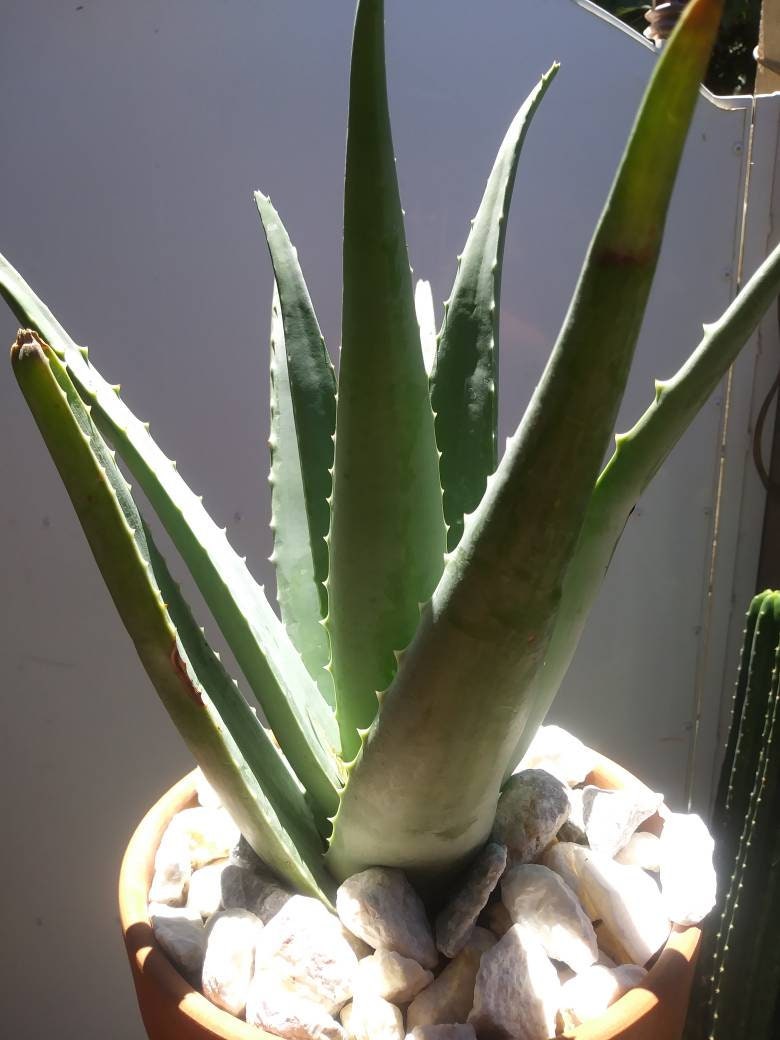
desert plants aloe vera Aloe Vera – Beaultiful Desert Plants* Ship Bare root (without pot and soil) Pot size is only notated for your reference. * If you are going plant your cactus or succulent in a pot, have it prepared beforehand with cactus mix soil (recommended), then water lightly. *If you going to plant it into the ground, ensure proper drainage *We Only ship Priority to ensure your Succulents plant will take between 2 to 3 days to arrive, we are not responsible for any the shipping carriers are delays.
* Ship Bare root (without pot and soil) Pot size is only notated for your reference. * If you are going plant your cactus or succulent in a pot, have it prepared beforehand with cactus mix soil (recommended), then water lightly. *If you going to plant it into the ground, ensure proper drainage *We Only ship Priority to ensure your Succulents plant will take between 2 to 3 days to arrive, we are not responsible for any the shipping carriers are delays. * My Jades have really short roots, We reefed to the gallons that are planted in the add so you can see or estimate the actual size of the plant, do not expect to receive any Jade with long roots, That's why these trees are easy to Trim and give a shape as a bonsai tree and plant them in a shallow pot. * We try to ship our succulent plants as soon as we get the order is customer responsibility to be aware of the plant arrival also customers will get a notification by email. If the customer wants to delay or change the day of the shipment please contact us as soon as possible. *We take great care in the packaging of your plants, but unfortunately the same cannot always be said in how they are handled once they leave us .*Is the customer responsibility to purchase a (Heat pack) if the Succulent plant is ship to a cold area, we usually recommended it if the whether is 35* or lower, If you are purchasing a large succulent plant please make sure you buy enough heat pack to cover the plant (1 heat pack every 12") We are not responsible for damages to the Succulent plant if is NOT enough coverage of the heat pack, and if is delay by USPS, the heat only will keep the box warm for 72 hours. Aloe Vera Botanical Name Aloe vera Plant Type Houseplant Sun Exposure Full Sun, Part Sun Soil Type Sandy Soil pH Neutral Bloom Time Summer Flower Color Orange, Pink, Red, Yellow Hardiness Zones 10, 11 The aloe vera plant is an easy, attractive succulent that makes for a great indoor companion. Aloe vera plants are useful, too, as the juice from their leaves can be used to relieve pain from scrapes and burns when applied topically. Here’s how to grow and care for aloe vera plants in your home! The aloe vera plant is an easy, attractive succulent that makes for a great indoor companion. Aloe vera plants are useful, too, as the juice from their leaves can be used to relieve pain from scrapes and burns when applied topically. Here’s how to grow and care for aloe vera plants in your home! Aloe vera is a succulent plant species of the genus Aloe. The plant is stemless or very short-stemmed with thick, greenish, fleshy leaves that fan out from the plant’s central stem. The margin of the leaf is serrated with small teeth. Before you buy an aloe, note that you’ll need a location that offers bright, indirect sunlight (or, artificial sunlight). However, the plant doesn’t appreciate sustained direct sunlight, as this tends to dry out the plant too much and turn its leaves yellow. Keep the aloe vera plant in a pot near a kitchen window for periodic use but avoid having the sun’s rays hit it directly. Please note: The gel from aloe vera leaves can be used topically, but should not be ingested by people or pets. It can cause unpleasant symptoms such as nausea or indigestion and may even be toxic in larger quantities. PLANTING BEFORE PLANTING It’s important to chose the right type of planter. A pot made from terra-cotta or a similarly porous material is recommended, as it will allow the soil to dry thoroughly between waterings and will also be heavy enough to keep the plant from tipping over. A plastic or glazed pot may also be used, though these will hold more moisture. When choosing a container, be sure to pick one that has at least one drainage hole in the bottom. This is key, as the hole will allow excess water to drain out. Select a container that’s about as wide as it is deep. If your aloe plant has a stem, choose a container that is deep enough for you to plant the entire stem under the soil. Aloe vera plants are succulents, so use a well-draining potting mix, such as those made for cacti and succulents. Do not use soil. A good mix should contain perlite, lava rock, coarse sand, or all three. Aloe vera plants are hardy, but a lack of proper drainage can cause rot and wilting, which is easily the most common cause of death for this plant. A layer of gravel, clay balls, or any other “drainage” material in the bottom of the pot is not necessary. This only takes up space that the roots could otherwise be using. A drainage hole is drainage enough! (Optional) To encourage your aloe to put out new roots after planting, dust the stem of the plant with a rooting hormone powder. Rooting hormone can be found at a local garden center or hardware store, or online.Shipping Notes
- Free Standard Shipping on $100+ Orders to the USA.
- Except Preorder products are shipped in 48 hours.
- Delivery to the USA:
- Standard Shipping : 3-10 business days
- If time is of the essence, please consider selecting expedited delivery for faster service.
Exchange/Return Notes
- We offer a 30-day return/exchange service after receiving.
- Final sale items are not eligible for returns or exchanges.
- To process your return/exchange, please contact us at [email protected]
- Please click here for more details>>> Return & Exchange Policy
4.5 ★★★★★
Based on 17 reviews
Sort
Product Reviews
★★★★★ 4
Good protector but bubbles at install
Model: iPad 11th A16 2025/10th
This is probably the 10th or so glass screen protector I have bought and installed for reference. Compared to others I’ve used in the past, it was just as easy to install but I struggled with bubbles under the screen and I took weeks for them to come out. Works as it should, good visibility and protection, just went it was easier and quicker to install.
WAS THIS REVIEW HELPFUL?YesReportShare
Reviewed in the United States on June 2, 2026
★★★★★ 5
Excellent Screen Protector!
Model: iPad 11th A16 2025/10th, Model: iPad 11th A16 2025/10th
This screen protector was easy to install and fits my iPad perfectly. The screen remains clear and responsive, and it provides great protection against scratches and fingerprints. Very happy with this purchase
WAS THIS REVIEW HELPFUL?YesReportShare
Reviewed in the United States on June 4, 2026
★★★★★ 5
Great quality and protection.
Model: iPad 11th A16 2025/10th
I'm really happy with this screen protector. It fits the iPad perfectly and doesn't interfere with cases. It feels very sturdy and scratch-resistant, giving me peace of mind. Definitely worth it.
WAS THIS REVIEW HELPFUL?YesReportShare
Reviewed in the United States on May 31, 2026
★★★★★ 5
Easy set up
Model: iPad Pro 12.9 2022/2021/2020/2018
Nice product. I cracked my screen in my iPad and wanted something to keep it from getting worse
WAS THIS REVIEW HELPFUL?YesReportShare
Reviewed in the United States on June 12, 2026
★★★★★ 5
4 years on - Still - A very good printer, if you can ignore its demands to update firmware
Style: WF-7840, Set: DUAL TRAY (500 sheets)/FAX/ADF/PRINT/COPY/SCAN
Summary:
It is an excellent printer (4.6 out of 5) if you don't mind its constant requirements to update the firmware, which I have not since the day I bought it. I have had this printer for over a year. It has printed close to 5,000 pages of different sizes, papers, colors and document types. As someone said in the other posts (a big thank you), firmware update is only to drive users to get Epson's proprietary ink cartridges. When the printer harasses me to update the firmware, I just keep on ignoring it. Epson does a good job to harass you both on the printer and computer - just ignore it.
Pros:
1. Only printer for <$500, which could print Ledger paper (11x17), which was a must for me. This thing prints beautiful and very crisp AutoCAD drawings. The lineweights and scales are phenomenal.
2. Excellent printing quality using stock and generic print cartridges. The printer can be really customized to get the right tones and textures for your print. Works very well with heavy stock papers and photo papers. I am yet to try any stickers, but I do not foresee any issues with it.
3. Good printing speed. It is not blazing like the commercial printers you find in the offices, but it is very fast for what it does.
4. Excellent connectivity. I had no issues with using either Ethernet or wireless. The printer can print on my Windows devices and Mac machine. I do not print from my phone, so cannot comment on that.
5. Heavy duty. The printer has printed approx. 5,000 pages so far without any troubles. I have not seen it overheat nor do any weird activities when it is printing.
Indifferent:
1. Scanning. While scanning quality is very good, the direct scan option is cumbersome. You cannot use the scan button on the printer to scan into the computer disk. You have to go to the computer and activate the scan software to perform scanning. This can be an issue, if you have a setup where your office is on one floor and the printer is on another, like I have in my home.
Cons:
1. Heavy. This thing is decently heavy and bulky. Don't try to keep on moving it or have it in your mobile office. Also, make sure to have a good sturdy and stable table. The printer twerks, jerks, sashays, parries.
2. Constant harassment to update the firmware. It can sometime be very annoying, but that's a small price to pay, if you get to ignore it. Look at the bigger picture.
Price:
When I bought it, the price was just below 3 bills, I understand it has gone up by half a bill (however, I am seeing the price going >$400 on some occasions). The new price of 3 and a half is not bad given the shape of the economy and supply chain issues. Also, the OEM cartridges (812) are cheaper at Staples than trying to Subscribe and Save here.
Bottom-line: A very good printer, if you ignore and disprove its petulance to update itself.
Update 3/23/2023 - I have had it now for over 2 years. The printer continues to print flawlessly and as of now has little under 10,000 pages printed of different sizes and paper weights. It still begs to update its firmware, which I have not done since its purchase. The only wishlist item I have for this printer is if it were to come with the Epson ink-tank.
Update 3/28/2024 - Three years into it I have, still not updated it. The printer continues the work. I have now printed about 12,000 pages. In December, after I replaced all my cartridges, it started missing colors' tones, textures, and locations. Did full printer head alignment and cleaning twice (instructions are clear on the printer screen under Settings-> Maintenance menu). Printed test pages, and now it is working flawlessly.
Update 3/20/2025 - Marks 4 years of running this printer. Definitely the least amount of pages printed annually - about 1,500. No firmware update performed and it still cries to update. Still running strong on both inks - generic and branded. There is a seller on eBay that offers XL cartridges for the colored ones too. Definitely worth giving a shot. If you are in a market for a prosumer printer consider this one in your list, if you can get it below $300.
WAS THIS REVIEW HELPFUL?YesReportShare
Reviewed in the United States on May 4, 2022