Shipping Estimate
USA
- USA
- CAN
- USA
- CAN
Ships within 48 hours · Estimated delivery Jul 11 - Jul 16
 Promo Codes Available:
For Your Every Summer RSVP, with Code: SUMMER15
Description
white panda succulent Panda Plant 'Kalanchoe tomentosa'Are you looking for the perfect indoor succulent for any room? Then the stunning panda plant, known as Kalanchoe tomentosa, is your answer. This lovely furry succulent plant is native to Madagascar and is a member of the well known Kalanchoe genus. It gets its name from the fuzzy, silvery leaves that resemble the fur of a panda. This Panda plant has a unique appearance with its thick, oval shaped leaves that are covered in tiny fine hairs, giving it a
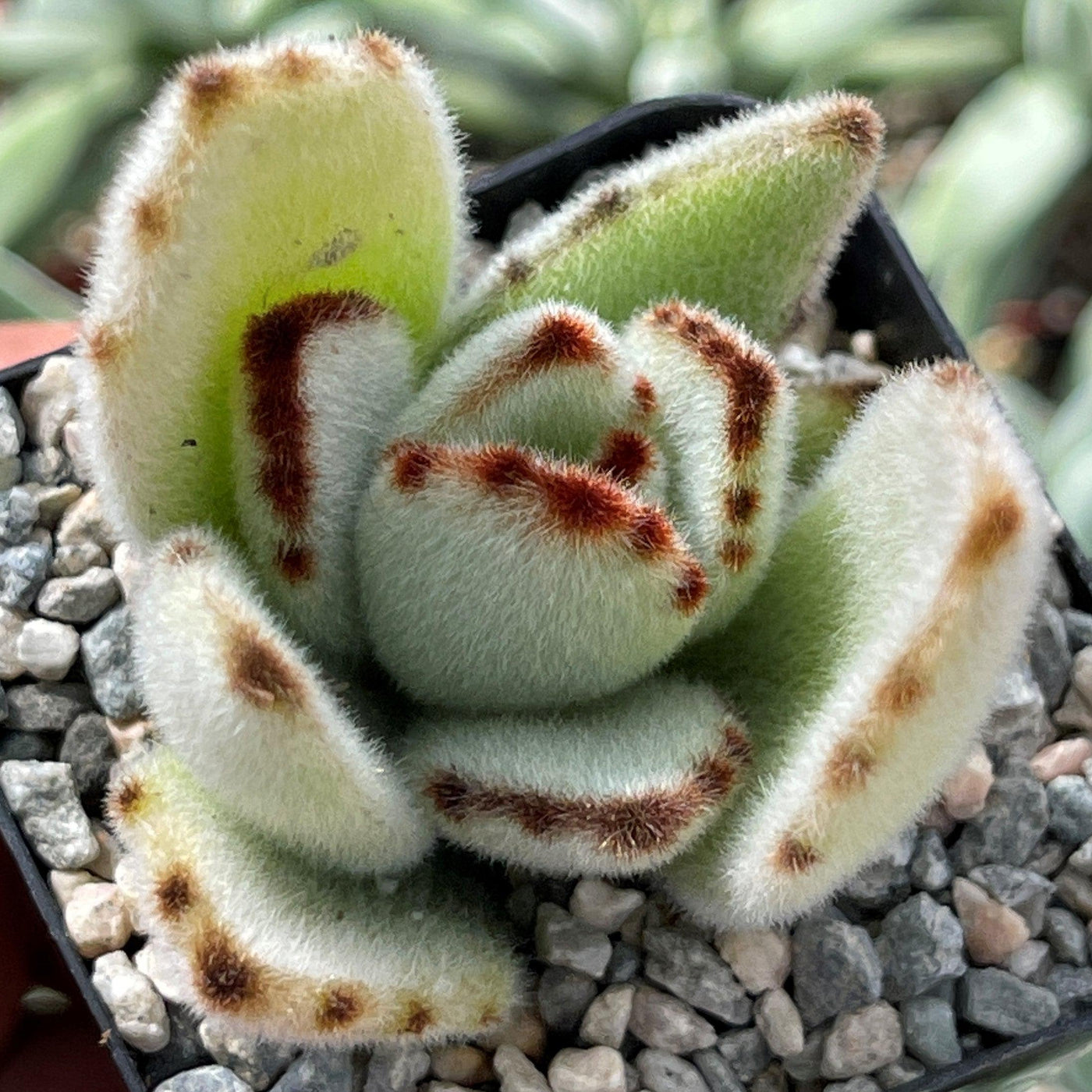
Are you looking for the perfect indoor succulent for any room? Then the stunning panda plant, known as Kalanchoe tomentosa, is your answer. This lovely furry succulent plant is native to Madagascar and is a member of the well-known Kalanchoe genus. It gets its name from the fuzzy, silvery leaves that resemble the fur of a panda. This Panda plant has a unique appearance with its thick, oval-shaped leaves that are covered in tiny fine hairs, giving it a soft and fuzzy texture. It's like petting a panda!
The Kalanchoe tomentosa is sometimes referred to as the "Chocolate Soldier" due to the brownish-red markings on the edges of its leaves. It's like having a soldier made of chocolate! However, it's important to note that "Chocolate Soldier" is also the name of another cultivar of Kalanchoe tomentosa that has a more pronounced chocolatey coloration throughout its leaves. It has several other common names, such as pussy ears, cat ears, donkey ears, and plush plants.
When fully grown, this slow-growing kalanchoe tomentosa can reach heights of up to 2 feet and has a robust, thick stem that develops branches and several grey-green leafy clusters. When properly pruned, they can produce branches that extend below the level of the pot, and so they are great for growing in a hanging basket. It grows in a compact and bushy shrub-like growth habit, making it a perfect addition to your indoor garden or as a charming decoration on your desk.
The flowers of Kalanchoe tomentosa only bloom in their natural habitat with small yellow-green tubular-shaped flowers in spring and summer.
Additionally, you can propagate your panda plants by leaf cuttings and stem cuttings. These summer dormant plants are mildly toxic for pets and humans if consumed, so keep these panda plants away from children.
Overall, the Panda Plants are delightful succulents to have in your collection. Its unique appearance and easy-care requirements make it a popular choice among succulent enthusiasts. So, if you're looking for cute and low-maintenance house plants, these Panda Plants are definitely worth considering! Read on to discover how to grow a panda plant indoors or outdoors.
Watering Needs
The watering needs of the Panda Plants are similar to other succulent plants. These Kalanchoe plants have adapted to survive in arid environments, so they don't require frequent watering. To avoid root rot, allow the soil to dry out completely between waterings.
When watering your indoor Panda Plant, make sure to give it a thorough soak, allowing the water to fully penetrate the soil. Then, wait until the top inch or so of the soil is completely dry before watering again. The kalanchoe tomentosa still survive even if you neglect to water them for a week or two. However, this does not imply that they can be neglected.
Remember, it's always better to underwater than overwater your kalanchoe succulents. They are more drought tolerant than they are of excessive moisture. So, be patient and let your Panda Plant enjoy a little dry spell between drinks!
Light Requirement
The Kalanchoe tomentosa loves basking in bright light. It thrives in bright indirect sunlight, so placing it several feet away from a sunny south-facing window or in a well-lit area is ideal.
However, be cautious about exposing your Panda Plant to direct sunlight for extended periods, especially during the hottest parts of the day. This can cause sunburn on its furry leaves. If you notice the leaves turning brown or developing spots, it may be a sign of too much sun exposure. Providing some shade or diffusing enough light with a sheer curtain can help protect your Kalanchoe tomentosa.
Remember, finding the right balance is key! Aim for bright, indirect light to keep your Panda Plant happy and healthy. It'll appreciate the sunshine without getting too much of a tan!
Optimal Soil & Fertilizer Needs
When it comes to soil and fertilizer needs for your Kalanchoe tomentosa Panda Plant, it's important to provide it with well-draining soil. Planet Desert specializes in succulents and has specialized succulent potting soil that includes an organic substrate with mycorrhizae to help with the growth of a healthy root system to help your Kalanchoe succulents thrive. As an okay alternative, you can create your own succulent potting mix by combining equal portions of perlite, coarse sand, and good natural potting soil.
As for fertilizer, the Panda Plant doesn't require a lot of feeding. During the growing season, which is typically spring, you can use a balanced NPK diluted fertilizer once a year. Apply it once a month or as directed on the fertilizer packaging.
Remember, less is more when it comes to fertilizer for your Panda Plant. It's better to under-fertilize than over-fertilize, as excessive nutrients can cause damage. With the right soil succulent mix and a light touch of fertilizer, your Kalanchoe tomentosa will thrive and show off its adorable leaves!
Hardiness Zone & More
Native to Madagascar, the Kalanchoe tomentosa is typically grown as a houseplant in many regions. In terms of hardiness zones, it is generally recommended to grow Panda plants indoors in USDA zones 10-11, which have mild to warm temperatures year-round.
When it comes to temperature, the Panda Plant prefers a range of 65-75°F (18-24°C) during the day and slightly cooler temperatures at night. It can tolerate slightly higher temperatures, but be cautious of extreme heat, as it can cause stress to the plant. As for humidity, the Panda Plant is adaptable and can handle average indoor humidity levels. It doesn't require any specific humidity requirements.
Remember, it's always a good idea to monitor the temperature and humidity levels in your specific location and adjust accordingly to provide the best growing conditions for your Panda Plant. With the right climate, you can grow Panda Plants indoors for healthy growth.
Don't miss out on this opportunity to add something truly exceptional to your succulent plant collection from these stunning Kalanchoe tomentosa varieties. Order your very own Kalanchoe tomentosa Panda plant today!
Shipping Notes
- Free Standard Shipping on $100+ Orders to the USA.
- Except Preorder products are shipped in 48 hours.
- Delivery to the USA:
- Standard Shipping : 3-10 business days
- If time is of the essence, please consider selecting expedited delivery for faster service.
Exchange/Return Notes
- We offer a 30-day return/exchange service after receiving.
- Final sale items are not eligible for returns or exchanges.
- To process your return/exchange, please contact us at [email protected]
- Please click here for more details>>> Return & Exchange Policy