Shipping Estimate
USA
- USA
- CAN
- USA
- CAN
Ships within 48 hours · Estimated delivery Jul 9 - Jul 14
 Promo Codes Available:
For Your Every Summer RSVP, with Code: SUMMER15
Description
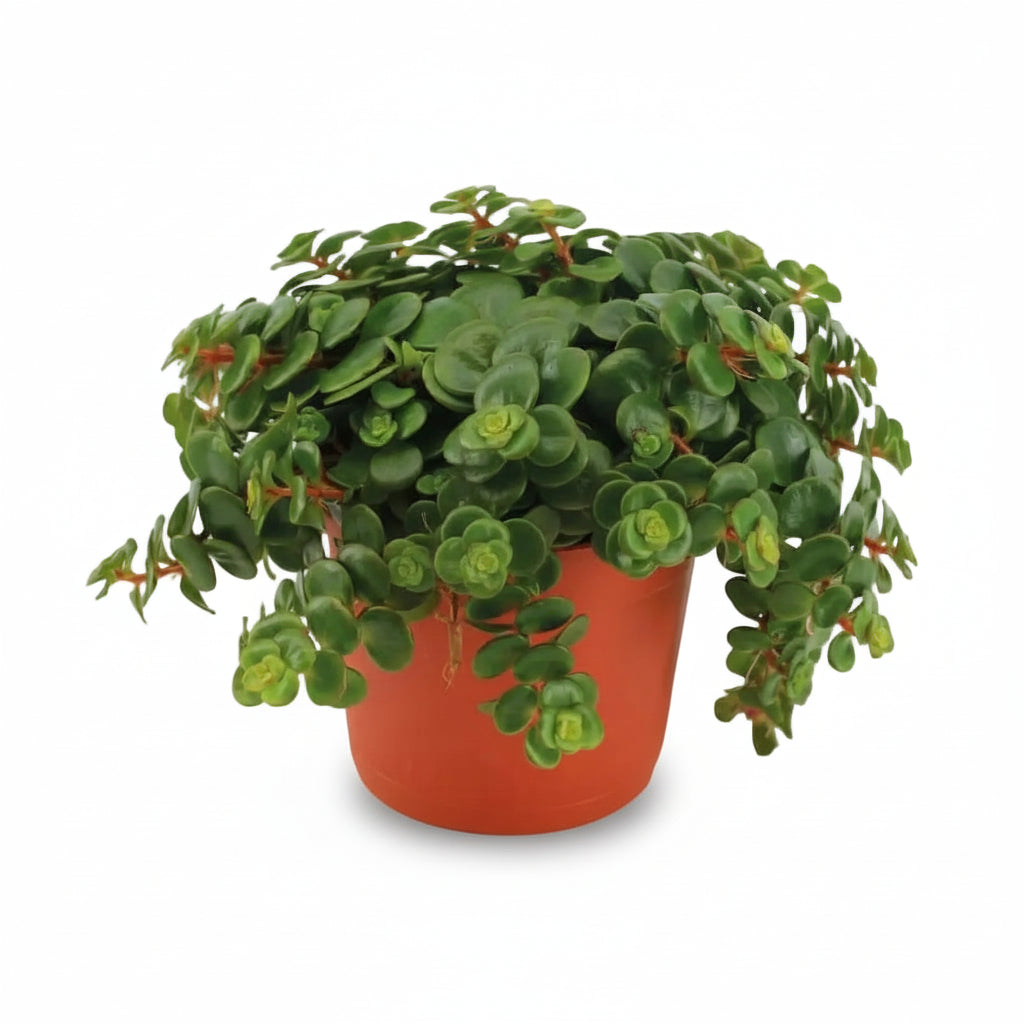
tundra tornado succulent Sedum Tornado (Spiral Sedum) — SucculentUnique spiral foliage Bright light to partial shade Very drought resistant Graphic trailing habit Non toxic H15 cm Pot 11 cm Sedum makinoi 'Tornado', also called Spiral Sedum, is a compact succulent native to the rocky slopes of Japan. Its bright green fleshy leaves, arranged in tight spirals along flexible trailing stems, give it a graphic silhouette that is immediately recognizable a plant that intrigues and effortlessly structures a plant
🌀 Unique spiral foliage • ☀️ Bright light to partial shade • 💧 Very drought resistant • 🌿 Graphic trailing habit • 🐾 Non-toxic • 📏 H15 cm | Pot Ø11 cm
Sedum makinoi 'Tornado', also called Spiral Sedum, is a compact succulent native to the rocky slopes of Japan. Its bright green fleshy leaves, arranged in tight spirals along flexible trailing stems, give it a graphic silhouette that is immediately recognizable — a plant that intrigues and effortlessly structures a plant arrangement.
Very easy to care for, it stores water in its leaves and easily tolerates missed waterings. Its naturally trailing habit sets it apart from most succulents — left free on a shelf, it cascades its spirals, an effect few plants from the cactus and succulent family can offer with such elegance in a trailing composition.
Exposure & Location
Sedum 'Tornado' comes from the rocky, well-lit environments of Japan — it loves light, which maintains the density of its spirals. In partial shade, the rosettes stretch and lose their compactness; understanding how light and humidity interact helps find the ideal spot to avoid this stretching.
- Ideal exposure: bright indirect light — east or west windowsill, a few hours of gentle sun.
- Tolerates: light partial shade, outdoors from May to September sheltered from rain and wind.
- Avoid: intense direct afternoon sun that scorches the leaves.
- Temperature: 15–28 °C, minimum 10 °C.
- Substrate: very well-draining — cactus soil or universal potting mix + 30% sand/perlite.
In partial shade, the spirals stretch toward the light and lose their compactness — if the rosettes elongate, it’s a sign to move the plant closer to a brighter light source.
Watering & Care
Soft or yellowing leaves almost always indicate overwatering — this is the most common mistake with houseplants, even more so with succulents whose fleshy leaves hide early signs of root rot.
- Watering: very infrequent — wait until the substrate is completely dry before watering.
- Frequency: about every 8 to 10 days in summer; every 2 to 3 weeks in winter.
- Technique: generous watering followed by complete drying — avoid frequent light watering that promotes root rot.
- Drainage: essential — pot must have drainage holes, no standing water in the saucer.
- Fertilizer: diluted succulent fertilizer, every 6 to 8 weeks in spring and summer.
A heavy watering followed by a long dry period is always better than frequent light watering — Sedum prefers dryness between waterings to a constantly slightly moist substrate.
Decor Ideas & Plant Combinations
With its trailing stems and graphic spirals, Sedum 'Tornado' is equally comfortable alone in suspension or combined with other indoor succulents with complementary shapes.
- Hanging on a shelf: its trailing stems naturally unfold from a high shelf — place it in a Lago cream decorative pot whose neutral tone highlights the graphic spiral of the stems.
- Succulent arrangement: pair it with a Crassula tenelli and a Senecio Herreianus for a trio of contrasting textures — tight spirals, velvety leaves, and trailing round beads.
- Zen open terrarium: place it on a bed of light gravel in a white relief ceramic decorative pot — the contrast between the bright green spirals and the mineral whiteness creates a very successful Japanese garden effect.
- Minimalist graphic composition: combine it with an Aloe with pointed leaves — the soft spiral roundness of the Sedum strongly contrasts with the angular rigor of the Aloe for a very effective shape duo.
Placed on decorative gravel in a concrete decorative pot, it creates a very successful minimalist zen garden effect — the mineral substrate enhances its natural Japanese character.
Verdeia Tips
- Choose a wide, shallow pot: Sedum makinoi has shallow, spreading roots — a wide pot suits it much better than a tall pot that retains too much moisture deep down and promotes root rot.
- Take it outside in summer: from May to September, it fully benefits from a sunny terrace or balcony to densify its spirals — bring it indoors as soon as nights drop below 10 °C and protect it from heavy rain.
- Propagate easily by cuttings: cut a 5 to 7 cm stem, let the cut dry for 24 hours in open air, then place it on dry substrate — it roots in 2 to 3 weeks, a method valid for all fleshy-stemmed succulents.
Sedum cuttings can also be propagated directly in the mother pot to create a denser, bushier effect — simply push the dried stem into the substrate around the plant.
Technical Specifications
- Botanical name: Sedum makinoi 'Tornado'
- Common name: Spiral Sedum
- Family: Crassulaceae
- Origin: Japan (Honshu, Shikoku, Kyushu)
- Dimensions: H15 cm | Pot Ø11 cm
- Adult size: up to 25 cm in suspension
- Exposure: bright indirect light to partial shade
- Substrate: very well-draining — cactus soil or universal potting mix + 30% sand/perlite
- Watering: very infrequent — substrate should dry completely between waterings
- Care: very easy
- Growth: moderate
- Toxicity: non-toxic
- Habit: naturally trailing
- Decorative style: Minimalist / Graphic / Wabi-sabi
- Special features: unique spiral foliage, trailing habit, very drought tolerant, easily propagated by cuttings
Each plant is unique: photos show a representative example. The density of rosettes and curvature of stems naturally vary depending on light and season.
Shipping Notes
- Free Standard Shipping on $100+ Orders to the USA.
- Except Preorder products are shipped in 48 hours.
- Delivery to the USA:
- Standard Shipping : 3-10 business days
- If time is of the essence, please consider selecting expedited delivery for faster service.
Exchange/Return Notes
- We offer a 30-day return/exchange service after receiving.
- Final sale items are not eligible for returns or exchanges.
- To process your return/exchange, please contact us at [email protected]
- Please click here for more details>>> Return & Exchange Policy