Pay in installments of $6.95 with
 ,
,
 and
and

Shipping Estimate
USA
- USA
- CAN
- USA
- CAN
Ships within 48 hours · Estimated delivery Jul 16 - Jul 21
 Promo Codes Available:
For Your Every Summer RSVP, with Code: SUMMER15
Description
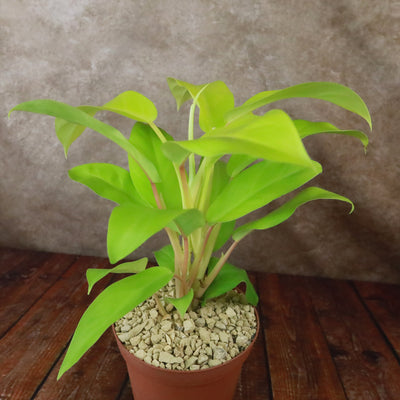
golden philodendron care ‘Golden Goddess’ Philodendron 6" Pot / Teal / Without PotThe Golden Goddess Philodendron is a striking tropical houseplant known for its vibrant golden yellow foliage and easy to care nature. This fast growing climbing philodendron has gained immense popularity among houseplant enthusiasts due to its adaptability, bright color, and ability to thrive indoors with minimal maintenance. Unlike traditional green philodendrons, its chartreuse leaves add a lively pop of color to any indoor space, making it a
The ‘Golden Goddess’ Philodendron is a striking tropical houseplant known for its vibrant golden-yellow foliage and easy-to-care nature. This fast-growing climbing philodendron has gained immense popularity among houseplant enthusiasts due to its adaptability, bright color, and ability to thrive indoors with minimal maintenance. Unlike traditional green philodendrons, its chartreuse leaves add a lively pop of color to any indoor space, making it a favorite for plant collectors and interior decorators alike.
Native to the tropical rainforests of South America, the philodendrons are often found climbing trees, using aerial roots to anchor themselves.
The Philodendron ‘Golden Goddess’ has striking, bright golden-yellow leaves.
One of its most unique features is its changing leaf color; new leaves start as bright yellow and slowly turn lime-green as they mature.
The amount of light also affects this color shift, with brighter light keeping the leaves golden and lower light making them greener.
This golden goddess plant has a climbing or trailing growth habit, making it an excellent choice for trellises, moss poles, or hanging baskets.
This fast-growing philodendron can quickly reach impressive heights when given the right support.
When grown indoors as a houseplant, Philodendron ‘Golden Goddess’ typically grows up to 6 feet tall, depending on care and support. If allowed to climb, it can grow even taller, creating a lush vertical display. The leaves can reach up to 8 inches in length, developing a full and dense appearance over time.
Philodendron ‘Golden Goddess’ is a climbing philodendron, and providing a moss pole, trellis, or other vertical support will help it develop larger leaves and a more upright growth habit.
If placed next to a wall, it may lean toward it, but without a textured surface or additional support, it won't attach and climb effectively on its own. Aerial roots will try to grip onto a rough surface, but a moss pole or trellis will encourage stronger, healthier vertical growth.
The flowers of Philodendron ‘Golden Goddess’ are small, inconspicuous, consisting of a spathe and spadix. The spathe is a leaf-like part that wraps around the flower, while the spadix is a thick, upright spike where tiny flowers grow. These blooms are small and not very noticeable, and the plant rarely flowers indoors. If it does bloom, it usually happens in the warmer months, like late spring or summer.
When and How to Water Your Golden Goddess Philodendron
It is a drought-tolerant tropical plant, making it an excellent choice for those who occasionally forget to water. This variety thrives in slightly dry conditions and does not tolerate overwatering. The best approach is to allow the top two inches of soil to dry out before watering again. Overwatering can lead to root rot, so it's crucial to ensure proper drainage in the pot or planting area.
In the spring and summer, during the active growing season, the Golden Goddess requires more frequent watering. Warmer temperatures and increased light exposure speed up soil evaporation, so checking moisture levels at least once a week is advisable. Deep watering is best, ensuring moisture reaches the roots. However, excess water should always drain out, preventing waterlogged conditions. Misting is not necessary but can be beneficial in dry indoor environments to maintain humidity.
As fall and winter arrive, the plant enters a semi-dormant state, requiring significantly less water. Watering should be reduced to every 2 to 3 weeks, depending on indoor humidity levels. Since the plant is not actively growing during this time, it consumes less water. Always check the soil before watering to prevent overwatering, as the roots remain vulnerable to rot during dormancy.
Light Requirements – Where to Place Your ‘Golden Goddess’ Plant
When grown indoors as a houseplant, your ‘Golden Goddess’ Philodendron thrives in bright, indirect light, making it an ideal houseplant for well-lit spaces.
It should be placed near an east- or west-facing window where it can receive gentle morning or late afternoon sunlight.
Avoid direct midday sun exposure, as its leaves can scorch. If natural light is insufficient, a grow light can supplement the plant’s needs, ensuring its vibrant golden foliage stays bright.
For outdoor cultivation, the plant does best in partial shade to filtered sunlight, as full sun exposure can cause leaf burn.
Ideally, it should receive around 4 to 6 hours of bright, indirect sunlight per day. A shaded patio, under a tree canopy, or on a covered porch are excellent locations for growing this philodendron outdoors. If grown in a particularly hot climate, ensure it is shielded from intense afternoon sun to prevent leaf damage.
Optimal Soil & Fertilizer Needs
The Philodendron plant thrives in well-drained, nutrient-rich soil. Aroid potting mixes work exceptionally well for this variety, as they provide the right balance of drainage and nutrition. Avoid heavy, compact soils that retain too much moisture, as this can lead to root rot. Instead, make or buy a well-draining potting mix, or ideally, use our specialized potting mix, which contains 5 natural substrates and mycorrhizae to promote the development of a strong root system that helps your plant to thrive.
To fertilize your Golden Goddess plant, use a liquid NPK fertilizer (5-10-5) once a year in the spring, during the growing season, to promote healthy foliage. Organic fertilizers like worm castings or compost can also be incorporated into the soil to enhance nutrient levels over time.
During fall and winter, fertilization should be stopped entirely, as the plant's growth slows. Over-fertilizing during dormancy can lead to nutrient buildup and potential root damage. Instead, focus on maintaining proper watering habits and light conditions.
This Philodendron works well with other climbing varieties such as Philodendron Brasil, Philodendron Mcdowell, making it a versatile and colorful addition to your home or office.
Hardiness Zones & More
For indoor growth as a houseplant, ‘Golden Goddess’ prefers temperatures between 65°F and 80°F with moderate to high humidity. It thrives in well-lit environments with indirect light. While it can tolerate lower humidity levels, maintaining at least 50% humidity ensures optimal growth. Placing it near a humidifier or pebble tray can help increase moisture levels in dry indoor climates.
In the United States, this is mostly an indoor plant, but if you live in southern Florida or Hawaii, then you can cultivate it outdoors in USDA zones 9-11.
It should be planted in a shaded to partially shaded location, with humidity levels ideally above 50%.
If temperatures drop below 50°F, bringing the plant indoors is necessary to prevent cold stress.
In frost-prone areas, container planting allows easy relocation during winter months.
Wildlife – Golden Goddess Flowers Attract the Following Friendly Pollinators
The small, inconspicuous flowers of the Golden Goddess plant attract a variety of pollinators, such as bees, butterflies, hummingbirds, beetles, and other pollinators in tropical and subtropical regions.
According to the ASPCA, Philodendron plants are mildly toxic to humans, cats, dogs, and other pets due to the presence of insoluble calcium oxalates. Ingestion can cause mouth irritation, excessive drooling, and gastrointestinal distress. However, it is safe to touch and handle, making it a popular choice for indoor houseplants.
How to Propagate Your Philodendron Golden Goddess
The Golden goddess philodendron propagation is best achieved through stem cuttings. Choose a healthy stem with at least two to three nodes and use clean, sharp shears to cut just below a node. Remove any lower leaves and place the cutting in water or moist soil. In water, roots should begin to form within two to three weeks. If propagating in soil, keep it consistently moist and in a warm, bright environment. Once roots are well-established, transplant the cutting into its permanent container.
Key Takeaways
- The Philodendron Golden Goddess is a fast-growing climber, that has a vining growth habit and can be trained to climb using a moss pole or trellis.
- It can tolerate short periods of dryness but thrives with regular watering when the soil is dry.
- When small, it fits perfectly on desks or shelves, but as it matures, it can be grown in hanging baskets or as a climbing plant.
- It thrives in bright, indirect light and adapts well to typical home conditions.
- The new leaves start as bright yellow and gradually turn lime-green, depending on light exposure.
The Bottom Line
Overall, the Philodendron ‘Golden Goddess’ is a must-have plant for anyone looking to add a vibrant, low-maintenance plant to their collection. Its striking yellow foliage, adaptability, and fast growth make it an excellent choice for homes, offices, and indoor gardens. Whether climbing up a trellis or trailing from a hanging pot, this plant adds a tropical touch and an instant burst of color to any space. With proper care—bright indirect light, occasional watering, and well-draining soil—it will thrive for years to come. This philodendron variety is perfect for plant lovers who want an easy-care, visually striking houseplant.
Shipping Notes
- Free Standard Shipping on $100+ Orders to the USA.
- Except Preorder products are shipped in 48 hours.
- Delivery to the USA:
- Standard Shipping : 3-10 business days
- If time is of the essence, please consider selecting expedited delivery for faster service.
Exchange/Return Notes
- We offer a 30-day return/exchange service after receiving.
- Final sale items are not eligible for returns or exchanges.
- To process your return/exchange, please contact us at [email protected]
- Please click here for more details>>> Return & Exchange Policy