Pay in installments of $5.70 with
 ,
,
 and
and

Shipping Estimate
USA
- USA
- CAN
- USA
- CAN
Ships within 48 hours · Estimated delivery Jul 17 - Jul 22
 Promo Codes Available:
For Your Every Summer RSVP, with Code: SUMMER15
Description
maximum temperature for snake plant Dwarf Snake PlantThe Sansevieria trifasciata Golden Hahnii is a striking cultivar of Sansevieria trifasciata that is highly valued for its compact growth habit and vibrant, variegated foliage. This dwarf snake plant is an excellent choice for indoor and outdoor gardens, adding a splash of color with minimal maintenance. Like other snake plants, it is well known for its air purifying abilities, resilience, and ability to thrive in various conditions. Sansevieria Golden
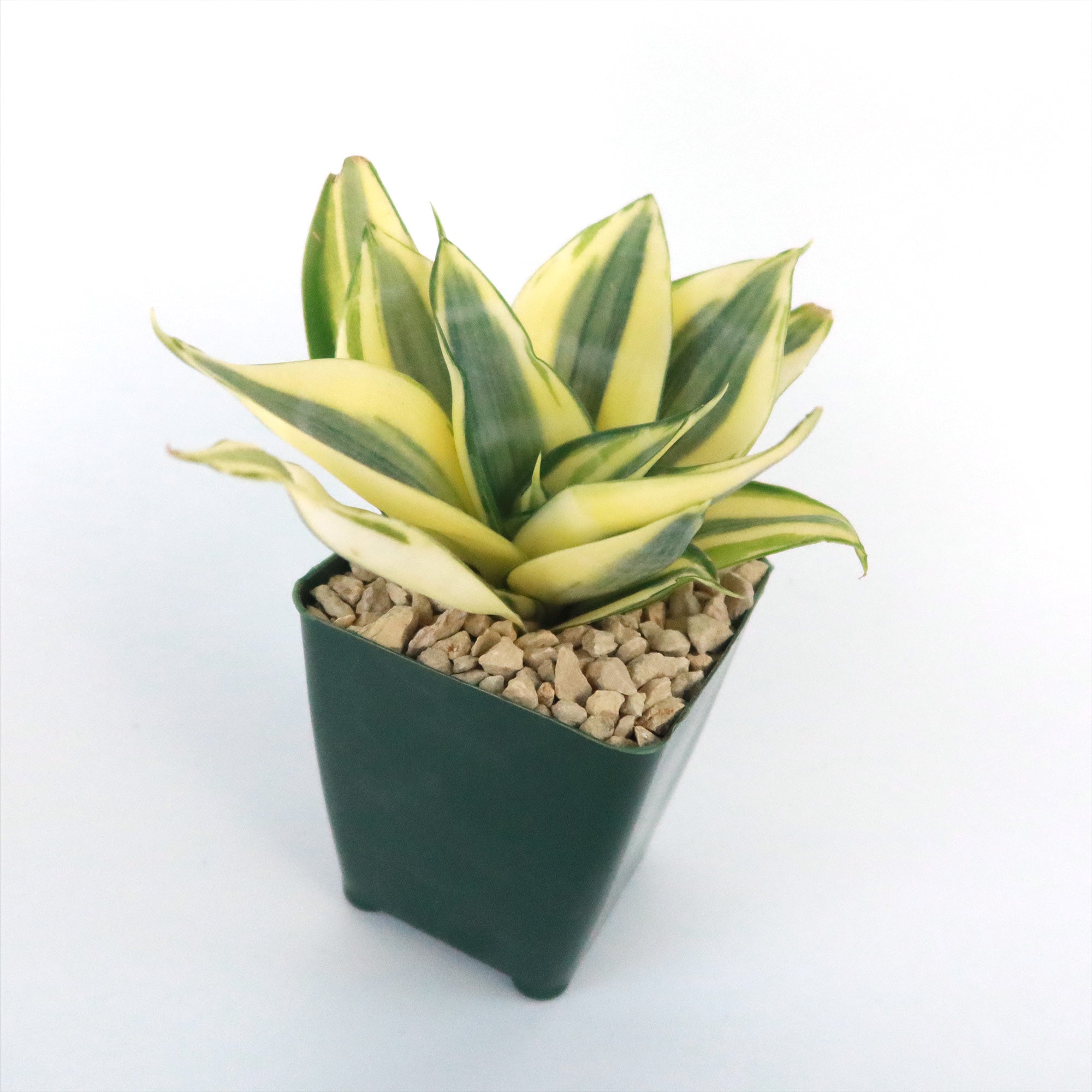
The Sansevieria trifasciata ‘Golden Hahnii’ is a striking cultivar of Sansevieria trifasciata that is highly valued for its compact growth habit and vibrant, variegated foliage. This dwarf snake plant is an excellent choice for indoor and outdoor gardens, adding a splash of color with minimal maintenance. Like other snake plants, it is well-known for its air-purifying abilities, resilience, and ability to thrive in various conditions.
Sansevieria ‘Golden Hahnii’ is commonly referred to as Golden Bird’s Nest Snake Plant due to its rosette-shaped foliage that resembles a small bird’s nest. It is also simply called Golden Hahnii or Dwarf Golden Snake Plant, highlighting both its size and unique golden-yellow margins.
Unlike the other snake plants that can grow quite tall, ‘Golden Hahnii’ is a dwarf variety, typically reaching only 8 inches tall and spreading to a similar width.
This compact size makes it perfect for tabletops, office desks, and small spaces where larger plants might not be suitable.
The most striking feature of Sansevieria ‘Golden Hahnii’ is its beautiful, variegated leaves.
The short, sword-shaped leaves form a dense, spiraling rosette and display bold golden-yellow margins contrasting with deep green centers.
The foliage is thick and succulent-like, helping the plant retain moisture and making it exceptionally drought-tolerant. The leaves have a slightly glossy texture and are often marked with faint horizontal striations, adding to their ornamental appeal.
The flowers of golden bird’s nest snake plant emerge on a slender stalk and are typically greenish-white. While blooming is rare indoors, it may occur if the plant is slightly stressed (such as from infrequent watering or being root-bound). The flowers release a pleasant fragrance, often noticeable in the evening.
Additionally, it is recognized by NASA as an air-purifying plant, helping to remove toxins such as formaldehyde and benzene from indoor environments.
When and How to Water Your Dwarf Snake Plant
Sansevieria ‘Golden Hahnii’ is an exceptionally drought-tolerant plant, making it perfect for forgetful waterers or those living in dry climates. Its thick, succulent-like leaves store water, allowing it to survive extended periods without moisture. This adaptability makes it resistant to overwatering-related issues, such as root rot, which is the most common cause of problems in snake plants. Whether grown indoors or outdoors, it thrives in well-draining conditions with minimal watering.
In the spring and summer, during the growing season, Sansevieria ‘Golden Hahnii’ requires more frequent watering to support active growth. Watering every 10 to 14 days is usually sufficient but always check the soil first. The best method is to let the top 1 to 2 inches of soil dry out completely before watering again. Ensure water drains fully, as stagnant moisture can cause root rot. Avoid wetting the leaves directly to prevent fungal issues.
In the fall and winter, during the dormant season, the plant's growth slows significantly, and its water needs decrease. Water only once every 3 to 4 weeks or when the soil is completely dry. Overwatering during colder months can quickly lead to root rot since the plant absorbs less moisture. If grown in a cooler indoor setting, reduce watering even further to prevent excess moisture retention.
Light Requirements – Where to Place Your Dwarf Snake Plant
When grown indoors, Sansevieria ‘Golden Hahnii’ thrives in bright, indirect light, but it can also tolerate lower light conditions.
Ideally, place it near an east- or north-facing window where it can receive 4 to 6 hours of filtered sunlight daily.
In dimmer rooms, supplement with artificial grow lights for optimal growth.
While it can survive in low light, growth may slow, and leaf variegation may become less pronounced.
For outdoor cultivation, this snake plant prefers partial to full shade, as intense direct sunlight can scorch its leaves, leading to discoloration or burn spots.
If grown in a garden or patio setting, place it in an area where it receives 2 to 4 hours of gentle morning sunlight, with afternoon shade. If exposed to full sun, provide shade during the hottest part of the day to prevent leaf damage.
Optimal Soil & Fertilizer Needs
This dwarf snake plant thrives in well-draining, sandy, or gritty soil that prevents moisture retention. Planting them in ordinary soil will result in compacted roots, stunted growth, and most likely root rot. Instead, make or buy a well-draining potting mix, or ideally use our specialized succulent potting mix, opens in a new tabGo to soil cactus mix blend 1 gal 4 qt cacti succulent dirt compost growing media that contains 5 natural substrates and mycorrhizae to promote the development of a strong root system that helps your succulent to thrive.
Fertilization should be minimal. Apply a balanced liquid fertilizer (5-10-5) diluted to half strength once every once a year in the spring during the growing season. Avoid over-fertilizing, as excess nutrients can lead to root damage or weak growth. During fall and winter, do not fertilize, as the plant's growth slows.
Hardiness Zones & More
When growing indoors, Sansevieria Hahnii Golden snake plant thrives in temperatures between 65°F to 80°F and prefers humidity levels between 30% to 50%. While it is tolerant of occasional temperature fluctuations, prolonged exposure to temperatures below 50°F can cause stress and slow growth.
Avoid placing it near cold drafts, heating vents, or air conditioners, as sudden temperature changes can lead to leaf damage or curling. Good air circulation is essential to prevent fungal issues, especially in rooms with high humidity. If the air is excessively dry, a humidifier or occasional misting can help maintain optimal conditions, though Sansevieria is naturally resistant to dry air.
For outdoor cultivation, it is suitable in USDA zones 10-12. It thrives in warm, dry climates and can be planted in containers, rock gardens, or as ground cover in xeriscapes.
In humid regions, proper drainage is crucial to prevent root rot, which can occur if the soil remains too damp.
Consider using a raised bed or a fast-draining soil mix to improve aeration.
If temperatures drop below 50°F, it’s advisable to bring the plant indoors or protect it with frost cloths or mulch. Prolonged exposure to frost can cause severe leaf damage, and temperatures near freezing may be fatal. In areas with mild winters, placing the plant in a covered patio or against a warm wall can provide extra protection.
Wildlife – Dwarf Snake Plant Attracts the Following Friendly Pollinators
Sansevieria golden hahnii is a popular houseplant that can attract friendly pollinators such as bees, hummingbirds, and butterflies. These pollinators are drawn to the plant's fragrant flowers, which bloom sporadically throughout the year. Additionally, the plant's nectar-rich blooms provide a valuable food source for these beneficial insects.
According to ASPCA, the golden bird’s nest plant is mildly toxic to humans and pets if ingested in a large amount. If ingested, it can cause mild to moderate symptoms, including nausea, vomiting, and diarrhea in cats and dogs.
How to Propagate Your Sansevieria ‘Golden Hahnii’
To propagate your Sansevieria ‘Golden Hahnii’, you can divide the plant at the root level or propagate through leaf cuttings. To divide the plant, carefully remove it from its pot and separate the rhizomes, ensuring each division has healthy roots. For leaf cuttings, select a healthy leaf and cut it into sections, allowing them to callus over before planting in a well-draining soil mix. Keep the new plants in a warm, bright location with indirect sunlight and water sparingly until they establish roots.
Key Takeaways
- Unlike typical snake plants, Sansevieria Golden Hahnii forms a low-growing, symmetrical rosette, making it a perfect tabletop or small-space plant.
- This variety adapts to almost any lighting condition, from bright indirect light to low light, making it ideal for offices and dimly lit rooms.
- With thick, water-storing leaves, it can go weeks without watering—perfect for forgetful plant owners or low-maintenance plant lovers.
- Like other Sansevierias, it removes toxins such as formaldehyde and benzene from the air, contributing to a healthier indoor environment.
- Enjoy the anticipation of its blooming by misting it with water to increase humidity.
The Bottom Line
Overall, the Sansevieria 'Golden Hahnii' is a compact and striking variety of snake plant, characterized by its vibrant golden-yellow leaves with dark green margins. This low-maintenance plant thrives in bright, indirect light and requires infrequent watering, making it an ideal choice for beginners or those with busy schedules. With its unique appearance and easy-care requirements, this golden Sansevieria is sure to add a touch of elegance to any indoor space. Order your very own Sansevieria 'Golden Hahnii' for sale today!
Shipping Notes
- Free Standard Shipping on $100+ Orders to the USA.
- Except Preorder products are shipped in 48 hours.
- Delivery to the USA:
- Standard Shipping : 3-10 business days
- If time is of the essence, please consider selecting expedited delivery for faster service.
Exchange/Return Notes
- We offer a 30-day return/exchange service after receiving.
- Final sale items are not eligible for returns or exchanges.
- To process your return/exchange, please contact us at [email protected]
- Please click here for more details>>> Return & Exchange Policy