Pay in installments of $6.55 with
 ,
,
 and
and

Shipping Estimate
USA
- USA
- CAN
- USA
- CAN
Ships within 48 hours · Estimated delivery Jul 24 - Jul 29
 Promo Codes Available:
For Your Every Summer RSVP, with Code: SUMMER15
Description
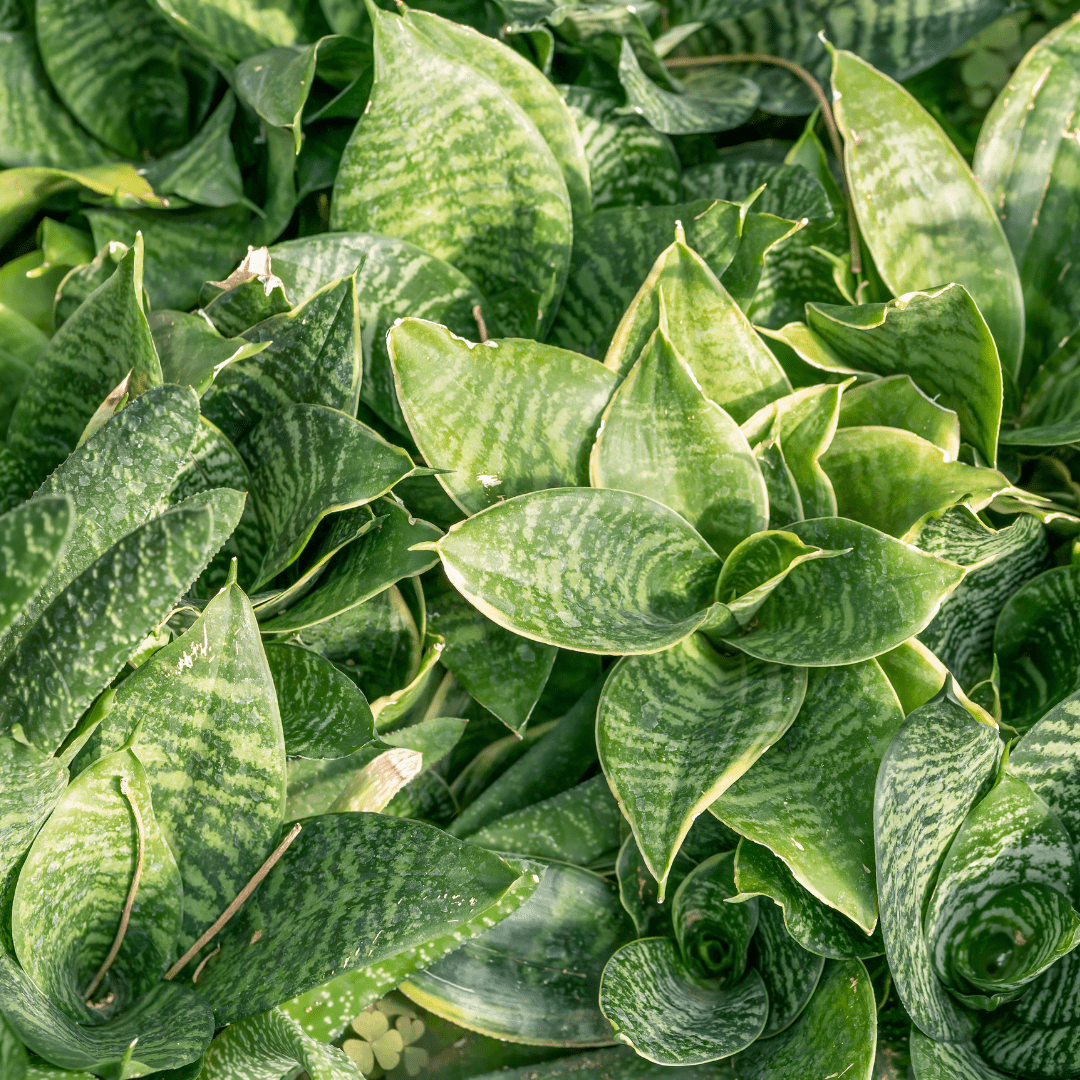
dracaena trifasciata 'hahnii' Bird's Nest Sansevieria Phoenix, AZ | Dracaena HahniiThe Easiest Compact Succulent for Phoenix Patios & Indoor Spaces Bird's Nest Sansevieria (Sansevieria trifasciata 'Hahnii'), also known as Dracaena trifasciata 'Hahnii', is one of the toughest, most forgiving plants you can grow indoors or out. This compact rosette succulent tops out at just 68 inches tall, forming a tight bird's nest shape of dark green leaves with lighter horizontal banding. It thrives on neglect, handles low light, tolerates
The Easiest Compact Succulent for Phoenix Patios & Indoor Spaces
Bird's Nest Sansevieria (Sansevieria trifasciata 'Hahnii'), also known as Dracaena trifasciata 'Hahnii', is one of the toughest, most forgiving plants you can grow — indoors or out. This compact rosette succulent tops out at just 6–8 inches tall, forming a tight bird's-nest shape of dark green leaves with lighter horizontal banding. It thrives on neglect, handles low light, tolerates Arizona heat, and purifies indoor air. Whether you're adding a tabletop accent to a Scottsdale patio, creating a succulent collection in Mesa, or greening up a Gilbert office — Bird's Nest Sansevieria is virtually indestructible.
Bird's Nest Sansevieria Plant Details
| Attribute | Detail |
|---|---|
| Scientific Name | Sansevieria trifasciata 'Hahnii' (syn. Dracaena trifasciata 'Hahnii') |
| Common Names | Bird's Nest Sansevieria, Bird's Nest Snake Plant, Hahnii |
| Mature Height | 6–8 inches |
| Mature Width | 6–12 inches |
| Growth Rate | Slow — compact and tidy |
| Sun | Full sun to low light. Extremely versatile — handles indoor and outdoor conditions. |
| Water | Very low. Highly drought-tolerant. Overwatering is the main threat. |
| USDA Zones | 9–11 (Phoenix is Zone 9b–10a) |
| Soil | Well-draining. Cactus/succulent mix ideal. Adapts to Arizona caliche soils outdoors. |
| Foliage | Evergreen — dark green rosette with lighter horizontal bands |
| Bloom | White to cream — rare, fragrant, typically in mature outdoor plants |
| Air Purifying | Yes — NASA-recognized for removing indoor air toxins |
Bird's Nest Sansevieria Uses in Phoenix Landscapes
Patio & Container Plant
Bird's Nest Sansevieria is a perfect fit for decorative containers on patios, porches, and poolside tables. Its compact rosette form stays tidy without pruning, and it handles the intense heat of covered Phoenix patios without flinching. Group several in matching pots for a clean, modern look at your outdoor entertaining area.
Indoor Houseplant
This is one of the best indoor plants for Phoenix homes. It thrives in low-light rooms, air-conditioned environments, and spaces that would kill most plants. Place it on desks, shelves, coffee tables, or bathroom counters. It purifies indoor air while requiring almost no attention — perfect for busy Scottsdale and Tempe lifestyles.
Succulent Garden Accent
Use Bird's Nest Sansevieria as a low-profile accent in outdoor succulent beds. Its compact rosette form contrasts beautifully with taller columnar cacti, trailing sedums, and spiky agaves. Plant in clusters of 3–5 along borders or at the front of beds for a layered, textural display.
Office & Commercial Spaces
The ultimate low-maintenance plant for Phoenix offices, lobbies, and commercial spaces. It handles fluorescent lighting, inconsistent watering, and air conditioning — conditions that stress most plants. The compact size fits perfectly on reception desks, conference tables, and windowsills.
Best Time to Plant Bird's Nest Sansevieria in Phoenix
Bird's Nest Sansevieria can be planted outdoors in Phoenix any time from March through October. Spring and fall are ideal for outdoor planting. For indoor use, any time of year works perfectly. Avoid planting outdoors in winter, as cold snaps below 40°F can damage foliage.
How to Plant Bird's Nest Sansevieria
- Container planting — use a well-draining cactus/succulent potting mix. Choose a pot with drainage holes.
- Outdoor beds — dig a hole slightly larger than the root ball. Amend heavy clay with perlite or coarse sand for drainage.
- Check for caliche — if planting outdoors in-ground, break through any hardpan for drainage.
- Spacing — 8–12 inches apart for groupings; containers can hold multiple plants for a fuller look.
- Planting depth — set at same level as nursery container. Never bury the rosette crown.
- Mulch — 1–2 inches of gravel or decomposed granite for outdoor plantings. Avoid moisture-retaining organic mulch.
Watering Bird's Nest Sansevieria in Phoenix
Outdoor Watering Schedule
- Weeks 1–2: Every 3–4 days to settle roots
- Month 1–3: Every 7–10 days
- After Month 3: Every 2–3 weeks in summer; once a month or less in winter
Indoor Watering
Water indoor Bird's Nest Sansevieria every 2–4 weeks, allowing the soil to dry completely between waterings. In winter, once a month is typically enough. Overwatering causes root rot — when in doubt, don't water. This plant thrives on neglect.
Can Bird's Nest Sansevieria live outside in Phoenix?
Yes, in protected spots. It handles Phoenix heat well but needs shade from intense afternoon sun outdoors. Covered patios, north-facing beds, and under-tree plantings are ideal outdoor locations. Bring potted plants indoors if temperatures drop below 40°F.
How much light does it need?
Almost none to full sun — it's incredibly versatile. Indoors, it thrives in low-light rooms. Outdoors, it performs well in partial shade to morning sun. Avoid harsh afternoon sun exposure outdoors in Phoenix summers.
Does it purify air?
Yes. Sansevieria is recognized by NASA research for its ability to remove toxins like formaldehyde, benzene, and trichloroethylene from indoor air. It also converts CO2 to oxygen at night, making it an excellent bedroom plant.
How big does it get?
Bird's Nest Sansevieria stays compact — typically 6–8 inches tall and 6–12 inches wide. It won't outgrow its space, making it perfect for small containers, tabletops, and tight planting spots.
You May Also Like
- Aloe vera — Another easy-care succulent that thrives indoors and outdoors in Phoenix.
- Aloe Crosby's Prolific — A compact, prolific aloe perfect for containers alongside Bird's Nest Sansevieria.
- Agave celsii 'nova' — A small rosette agave for outdoor succulent garden pairings.
- Desert Spoon — A larger sculptural accent to complement Bird's Nest Sansevieria in outdoor beds.
How Many Bird's Nest Sansevieria Do I Need?
This compact rosette stays 6 to 12 inches wide, so it works as a tidy low border or a massed front-of-bed carpet. Space plants 10 to 12 inches apart center to center for a continuous look, or 18 inches apart for a more dotted, individual-rosette effect. For container groupings, three to five plants in one wide pot read as a full cluster.
| Area to Cover | Plants Needed (10 to 12 in spacing) |
|---|---|
| 10 sq ft border | 10 to 12 plants |
| 25 sq ft bed | 25 to 30 plants |
| 50 sq ft mass | 50 to 60 plants |
Bird's Nest Sansevieria Season-by-Season in Phoenix
- Spring (Feb to Apr): Slow, steady growth resumes as nights warm. Best window to set out new plants or divide crowded clumps.
- Summer (May to Sep): Cruises through heat in bright shade or morning sun. Outdoors it needs protection from direct Phoenix afternoon sun, which can scorch the leaves. Indoors it sails through summer in air conditioning with almost no water.
- Fall (Oct to Nov): Second prime planting window. Cooler nights are easy on transplants and roots settle quickly.
- Winter (Dec to Jan): Stays evergreen but is frost-tender. Foliage can be damaged below about 40°F, so move potted plants indoors and cover in-ground plantings on frost nights.
At a Glance
✔ Evergreen ✔ Drought-Tolerant ✔ Low-Maintenance ✔ Spineless ✔ Deer & Rabbit-Resistant ✔ Pool-Friendly (Low-Litter)
Plant It With
- Desert Spoon: a larger sculptural rosette that rises behind the low Bird's Nest carpet.
- African Spear: an upright cylindrical sansevieria relative that adds vertical contrast.
- Panda Plant: a fuzzy compact succulent for soft texture in the same container or bed.
- Red Yucca: a low-water companion that sends coral bloom spikes up above the foliage.
Is Bird's Nest Sansevieria Right for Your Yard?
It is ideal for shaded patios, north or east beds, container groupings, and indoor rooms where most plants struggle. It wants well-draining soil and very little water, so it shines in tight spots with bright indirect light. It is not a fit if you need a plant for open, full-afternoon-sun desert exposure or a spot that stays wet, where the rosette will scorch or rot.
Shipping Notes
- Free Standard Shipping on $100+ Orders to the USA.
- Except Preorder products are shipped in 48 hours.
- Delivery to the USA:
- Standard Shipping : 3-10 business days
- If time is of the essence, please consider selecting expedited delivery for faster service.
Exchange/Return Notes
- We offer a 30-day return/exchange service after receiving.
- Final sale items are not eligible for returns or exchanges.
- To process your return/exchange, please contact us at [email protected]
- Please click here for more details>>> Return & Exchange Policy