SKU: 51490169522
plastic plant support netting

plastic plant support netting Trellis Netting

Sale price$26.25 Regular price$29.17
Save 10%

Shipping Estimate
USA
  • USA
  • CAN

Ships within 48 hours · Estimated delivery Jul 14 - Jul 19

Promo Codes Available:

For Your Every Summer RSVP, with Code: SUMMER15

Description

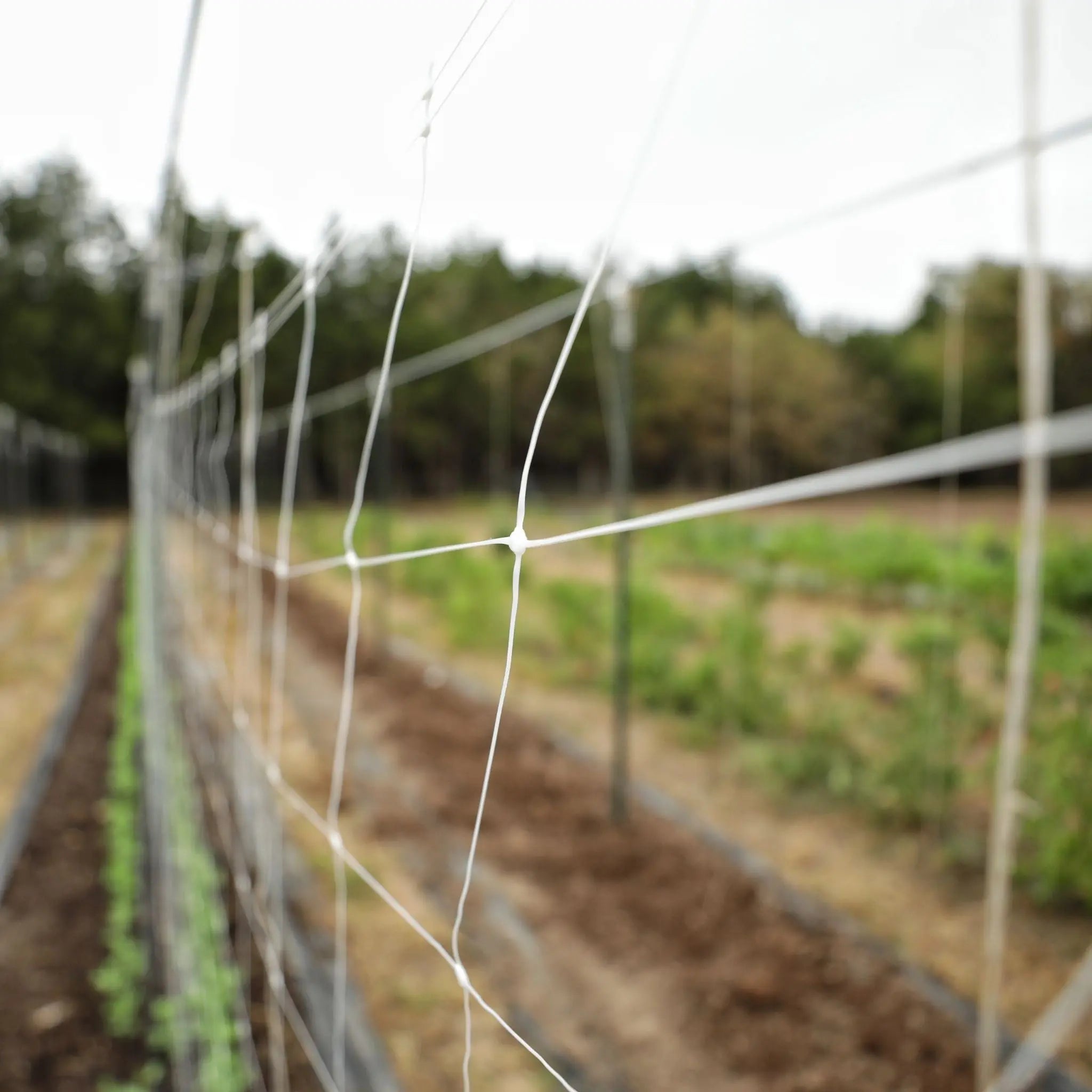
plastic plant support netting Trellis NettingTrellis Netting for Cutting Flowers and Vines This durable, lightweight polypropylene trellis netting is perfect for supporting vegetables, training stems for cut flowers, and tall vines, allowing more airflow and sunlight to reach the plants. This space saving 6" mesh net is available in 3', 4', 6' widths. Get better yields and raise healthier plants using this UV stabilized, chemical resistant trellis netting. You can also use this trellis net

Trellis Netting for Cutting Flowers and Vines

This durable, lightweight polypropylene trellis netting is perfect for supporting vegetables, training stems for cut flowers, and tall vines, allowing more airflow and sunlight to reach the plants. This space-saving 6" mesh net is available in 3', 4', 6' widths. Get better yields and raise healthier plants using this UV-stabilized, chemical-resistant trellis netting. You can also use this trellis net horizontally for long-stem flowers such as dahlias, zinnias, and the like. Keep peas and pole beans supported with horizontal netting. Reduce blemishes on fruit and grow straighter flower stems with supportive trellis netting.

Note:  It is imperative to keep the netting taut as birds can become entangled in the loose mesh. 

Key Features

  • Supports crops for better airflow and sun penetration 
  • Perfect for supporting long-stem cut flowers for straighter stems
  • Flexible, tear-resistant
  • UV-stabilized
  • Helps better utilize garden/greenhouse space
  • Made of durable polypropylene
  • Works perfectly with vine clips
  • Better yields and crop success
  • Creates easier working area for better weed management
  • Reusable season after season
  • Mesh size approx. 6"x 7"
  • Netting thickness- 8g/sqm

HOW DO YOU INSTALL FLOWER NETTING?

Netting can be installed both vertically and horizontally depending on the need. Both are very simple, straightforward processes. 

Vertical Trellis Installation:

To install netting vertically, insert support posts down your rows at approximately every 20'. Next, attach the net to the support posts using string or twine. We suggest that you snake a support cable such as metal wire or other strong cord or string through the netting at the top to support the net. Tie or clip your plants to the trellis netting as they grow and begin climbing. Some plants have tendrils that will tie themselves to the netting.

This style of installation is also used for vining crops in the vegetable garden or market farm. Vegetables and fruits like peas, cucumbers, and tomatoes all benefit from support as they grow.

Horizontal Trellis Installation: 

Install garden trellis net horizontally for cut flowers. Use several layers close together. First, start by putting four wood or metal supports into the ground. Install the first two posts at equal width with your netting (i.e. 3' apart, 4' apart, 6' apart). The second set of posts should be installed 6'-20' wider. The height of the posts would depend on what you are growing.

Next, screw or bolt wooden cross bars between posts 1 and 2, and between posts 3 and 4 at the different heights that you will space your layers of trellis support at. The heights will depend on how tall your plants will grow. Typically this would be at 12", 24" and 36" from the ground.

After that step, attach the trellis netting to the cross bars by wrapping them around the crossbar and then tying string or zip ties around the net and crossbars to hold it in place. 

Finally, unroll the lightweight polypropylene trellis support netting and attach it to the cross bars between posts 3 and 4. You can continue the row by putting support posts, and cross bars every 20' apart and making the layer as long as you want. Then do the next layer the same way.

Want more information about trellis netting? Check out this helpful article.

Shipping Notes
  • Free Standard Shipping on $100+ Orders to the USA.
  • Except Preorder products are shipped in 48 hours.
  • Delivery to the USA:
  1. Standard Shipping : 3-10 business days
  • If time is of the essence, please consider selecting expedited delivery for faster service.
Exchange/Return Notes
  • We offer a 30-day return/exchange service after receiving.
  • Final sale items are not eligible for returns or exchanges.
  • To process your return/exchange, please contact us at [email protected]
  • Please click here for more details>>> Return & Exchange Policy
SKU: 51490169522

Discover Niche Categories That Outsell plastic plant support netting

Top-Converting Item to Boost Your Average Order

4.7 ★★★★★
Based on 1752 reviews
Sort
Highest Rating
Newest First
Oldest First
Product Reviews
T
Verified Purchase
Tony in Hawaii
West Palm Beach, US
★★★★★ 5
A great value for a state of the art monitor.
I use two of these at my home work station. I am not a gamer, I use these mainly for working on multiple spread sheets and financial programs. The high pixel count of these 8k video displays makes it easy to read the screens. I have Windows 11 on my computer, so installation of the 3 monitors was easy. I have my computer monitor set at 150% and these two monitors set at 125% magnification. All three are at eye level. They came with display port cables which my computer and hubs do not have, so I in a 8K HDMI cable for each. I do play a few videos, and those look great. The curved screen helps in keeping all the monitor sort of equidistant from my eyes which helps everything on the 3 screens stay in focus for my 80 year old eyes. I have reflections on my computer screen, but both of these Koorui monitors are reflection free. I first went to Costco to pick up a monitor and this allowed me to zero in that I wanted the 8k and curved screen in a 24 or 27 inch monitor. They did not have that combination. I tried just one of the Koorui monitors along with my older monitor. The Koorui was so far superior that I quickly purchased the second one and tossed out my outdated one. I use these for hours each day, and at this low price I feel I can easily justify this investment. I feel secure these monitors will be with me for a long time.
WAS THIS REVIEW HELPFUL?YesReportShare
Reviewed in the United States on October 27, 2023
Z
Verified Purchase
Zach B.
Boise, US
★★★★★ 1
This sucks.
Well i picked this up on sale for black friday and finally got around to installing my new video card, psu, extra ssd, and finally hooking up this new monitor. The new video card doesn't have a spot for the cable from my old 1080p monitor, so this is the only monitor i can use. It's christmas eve btw. Anyways the monitor fires up fine and looks great for about 6 hours of use. Then as i'm getting ready to boot up elden ring a big vertical magenta line of pixels appears on the right half of the screen, as well as a grey horizontal line of pixels. I didn't do anything before this happened, the monitor was sitting completely still on my desk. One second it worked the next i've got this line. I tested another cable, and while unplugging the displayport cable from the monitor the pink line stayed there as it was registering "no input." So it's definitely the monitor that's broken and not something wrong with my video card or software. I tried contacting technical support early in the morning and still haven't received anything at 5 pm. I realize it's christmas eve but I'm now stuck without a functioning monitor for probably my entire time off for christmas, and will have to pay return shipping, which soaks up all the money i saved getting it on sale. Over all i'm very unhappy with this purchase. edit: Koorui, the manufacturer, never got back to me about the broken monitor they sent me, so i contacted amazon and told them my situation. they told me they couldn't send a replacement because it wasn't available, even though you can order the exact monitor off amazon through prime right now. this order was a critical failure in service with both koorui and amazon. they can't seem to lift a finger for someone who paid them money for a product they sell. they want me to ship the monitor back, receive my money back, then purchase the same monitor for a higher price from them. I'm changing my review to 1 star and i would give 0 stars if i could. unbelievable. edit: ok i shipped the monitor back. they sent me a replacement monitor and this monitor also does not work. it doesn't turn on. i plugged it into both a surge protector and a power strip, then switched the cable and it doesn't turn on. i would be extremely wary of this company and their products. edit 2: by far my worst purchasing experience on amazon. with the second broken monitor they shipped me the support guy actually asked if i would take it to a tv repair shop. i told him we don't have that in the united states and returned the item for a full refund. they got to keep my $150 for about 3 months though. these people should not be allowed to sell on amazon.
WAS THIS REVIEW HELPFUL?YesReportShare
Reviewed in the United States on December 24, 2022
J
Verified Purchase
Jo jo
New York, US
★★★★★ 5
Gaming
Size: 27"/QHD/200Hz
Idk about the specs but my it's used strictly for gaming and got no complaints.
WAS THIS REVIEW HELPFUL?YesReportShare
Reviewed in the United States on June 10, 2026
N
Verified Purchase
Nelson
Belleville, US
★★★★★ 5
Monitor
Size: 27" 240hz/FHD
Great quality, value for money, refresh rate and good appearanve
WAS THIS REVIEW HELPFUL?YesReportShare
Reviewed in the United States on May 7, 2026
Y
Verified Purchase
Young
Whiting, US
★★★★★ 5
Good product for the price.
Size: 27"/QHD/200Hz
This monitor works great. I’ve used it for a while now and I haven’t had issues with this one. Screen size is good and refresh rate isn’t bad either.
WAS THIS REVIEW HELPFUL?YesReportShare
Reviewed in the United States on March 30, 2026

recommand products