SKU: 50038348655
potting soil for succulent plants

potting soil for succulent plants Molly's Gritty Mix for Cactus & Bonsai

Sale price$22.09 Regular price$24.54
Save 10%

Pay in installments of $6.13 with ShopPay, AfterPay and Klarna

Shipping Estimate
USA
  • USA
  • CAN

Ships within 48 hours · Estimated delivery Jul 21 - Jul 26

Promo Codes Available:

For Your Every Summer RSVP, with Code: SUMMER15

Description

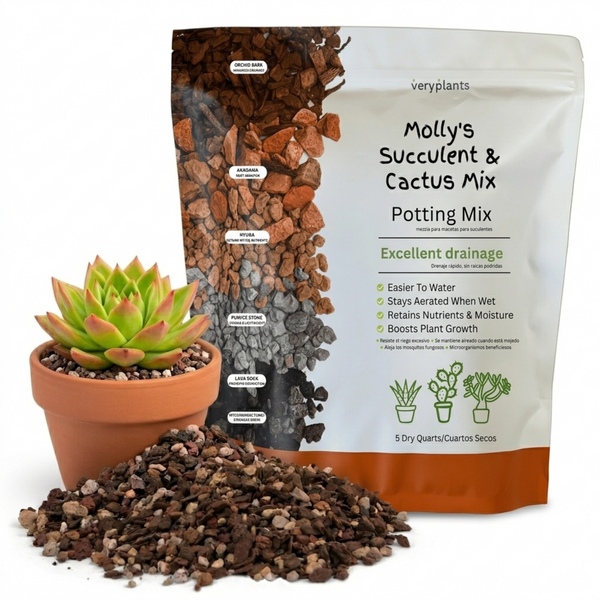
potting soil for succulent plants Molly's Gritty Mix for Cactus & BonsaiQuick answer: what is Molly's Succulent Mix? For: succulents, cacti, bonsai, Haworthia, Echeveria, Sedum, Jade, and any arid environment plant. What's in it: high mineral gritty blend of pumice, lava rock, and crushed bark. Low organic matter by design. Why it works: succulent roots are built to drink fast and dry out fast. The gritty structure drains in seconds and holds zero standing water, so roots don't rot. Pre rinsed and pH balanced straight

Quick answer: what is Molly's Succulent Mix?

  • For: succulents, cacti, bonsai, Haworthia, Echeveria, Sedum, Jade, and any arid-environment plant.
  • What's in it: high-mineral gritty blend of pumice, lava rock, and crushed bark. Low organic matter by design.
  • Why it works: succulent roots are built to drink fast and dry out fast. The gritty structure drains in seconds and holds zero standing water, so roots don't rot.
  • Pre-rinsed and pH-balanced straight from the bag. No salt flush required.
  • Bonsai-safe. The grit profile matches what serious bonsai growers blend by hand from akadama, pumice, and lava.

More plant-specific guidance: Ultimate guide to growing succulents indoors, Potting soil vs potting mix.

Succulents and cacti evolved in arid, mineral-rich environments where water moves through gritty substrate in seconds. Their roots are built to drink fast and dry out fast. Standard potting soil holds moisture for days, suffocates the roots, and rots them from the bottom up. The fix is a high-mineral, low-organic, gritty mix.

Molly's Succulent Mix is engineered to mimic native desert and rocky-slope substrates. A blend of pumice, lava rock, and a small amount of organic matter that drains in seconds and forces the soak-and-dry watering rhythm succulents need.

The gritty-mix philosophy

Most "succulent soil" sold at garden centres is regular potting soil with sand mixed in. That's not what these plants want. The right mix is roughly 70% mineral aggregate (pumice and lava rock) and 30% structural organic (coir, charcoal). Water hits the surface and runs through within seconds. Roots get a brief, intense drink, then dry conditions for the next 1 to 2 weeks. That's how succulents stay alive in pots.

What's in the bag

  • Pumice (volcanic, lightweight): the mineral backbone. Holds a tiny amount of water inside its porous structure, but lets the rest drain freely.
  • Lava rock (red lava): chunky drainage and heat retention. Roots love the warmth differential it creates.
  • Coir fiber (small percentage): just enough organic to retain a little humidity and prevent the mix from drying to a brick. Not enough to compromise drainage.
  • Horticultural charcoal: filters salts from tap water (succulents are surprisingly sensitive to mineral buildup).
  • Calcitic limestone (trace): buffers pH to the slightly alkaline range (6.5 to 7.5) most desert succulents prefer.

Low peat content, no worm castings (succulents don't want a nutrient flush), no commercial fertilizer. The whole mix is intentionally lean.

Plants this is for

Designed for succulents and cacti:

  • Echeveria, Sedum, Crassula (jade), Sempervivum: the classic rosette succulents.
  • Haworthia, Gasteria: they prefer slightly more shade but want the same gritty drainage.
  • Aloe (vera and others): medicinal succulents, this mix prevents the rot they're prone to in heavier soils.
  • Most cacti: Mammillaria, Echinopsis, Opuntia, San Pedro, golden barrel.
  • Lithops (living stones): require fast drainage to stay alive year-round; this mix is well-suited.
  • Bonsai with high drainage needs: juniper, pine, and certain deciduous bonsai work well.
  • Caudex plants: Adenium, Pachypodium, and other swollen-stem species that need fast drainage at the base.

Not for: tropical "succulent-looking" plants like Hoya, Christmas cactus (Schlumbergera), or Easter cactus, which actually prefer humidity-retaining mixes. For those, use Molly's Aroid Mix.

Watering with gritty mix

The right rhythm: soak and dry. Water deeply, then wait until the mix is bone-dry before watering again.

  1. Wait until the top 2 to 3 inches feel completely dry. For most succulents in standard 4 to 6 inch pots, that's every 10 to 21 days indoors.
  2. Water until liquid runs clearly out the drainage holes. Don't dribble. Soak.
  3. Discard any water in the saucer. Do not let the pot sit in standing water.
  4. Wait. The plant will let you know when it's thirsty (slight wrinkling of leaves, lighter pot weight).

In winter, water roughly half as often. Most succulents go dormant or semi-dormant.

FAQ

Why is this so heavy compared to other succulent soil?

Because it's mostly minerals, not peat or coco coir. The weight is what makes it work. Light bag means light drainage, which is the opposite of what succulents need.

Can I use this for bonsai?

For tropical bonsai, no, they want a moisture-retentive aroid-style mix. For drought-tolerant bonsai (juniper, pine, certain deciduous species), yes, this mix or a 50/50 blend with finer organics works well.

Will the mix break down or stay porous over time?

Stays porous. The mineral components (pumice, lava rock, charcoal) don't decompose. The small organic fraction breaks down slowly. Most succulents in this mix can go 2 to 3 years before repotting.

Should I add fertilizer?

Sparingly. Succulents are slow growers and don't need much. A diluted (~1/4 strength) cactus-specific fertilizer once during the growing season (spring) is plenty for most species.

Packaged in a heat-sealed resealable bag. New formula released April 2026, see the formula release announcement for details on what changed.

Related care guide

Watering, light, and repotting fundamentals for succulents and cacti.

→ Read the Succulent & Cactus Care guide

Have questions? Read the Molly's Succulent Mix FAQ for detailed information on watering, repotting, and which succulents this mix works best for.

New: the complete soil guide

Not sure if you need cactus soil or succulent soil? They are the same thing. Read: Best Soil for Succulents and Cactus →

Not sure which mix your plant needs?

Take our free 60-second Soil Finder quiz → Diagnose the problem and get the exact Molly's mix and amount for your plant, plus 10% off.

Shipping Notes
  • Free Standard Shipping on $100+ Orders to the USA.
  • Except Preorder products are shipped in 48 hours.
  • Delivery to the USA:
  1. Standard Shipping : 3-10 business days
  • If time is of the essence, please consider selecting expedited delivery for faster service.
Exchange/Return Notes
  • We offer a 30-day return/exchange service after receiving.
  • Final sale items are not eligible for returns or exchanges.
  • To process your return/exchange, please contact us at [email protected]
  • Please click here for more details>>> Return & Exchange Policy
SKU: 50038348655

Discover Niche Categories That Outsell potting soil for succulent plants

Top-Converting Item to Boost Your Average Order

4.5 ★★★★★
Based on 7 reviews
Sort
Highest Rating
Newest First
Oldest First
Product Reviews
B
Verified Purchase
Bruce Henne
West Palm Beach, US
★★★★★ 5
Great low cost USB C to 4K HDMI splitter adaptor
Color: Black
The Anker USB C Hub 5-in-1 USBC to HDMI splitter with 4K display with one powered USB c and 2 USB A ports works flawlessly and is a perfect travel companion or simple and inexpensive desktop dock to connect a moderan USB C only laptop to a large monitor up to 4K resolution. It supports 4K at 60 Hz so not for high speed gaming but it is flicker free for daily work where running at 60 Hz provides a clean looking 4K display. The USB C and USB A ports work perfectly. I already have four of these in different port configuration but wanted the 4K extension for travel and this was the best one for quality and bang for the buck.
WAS THIS REVIEW HELPFUL?YesReportShare
Reviewed in the United States on May 4, 2026
W
Verified Purchase
Winnie
Whiting, US
★★★★★ 5
Compact, Travel friendly, Works well with ROG ALLY
Color: White
This is a compact and well built adapter, and it is travel friendly. I use it for my ROG ALLY when I don’t want it docked and still need charging and other device inputs. It has just about enough ports for what I need, usb-c power delivery port for charging (ROG ALLY can still run at maximum performance using this with a 100W charging brick and a cable that allows 100W power pass through). I use the remaining USB-C port and two USB-A ports for external hard drives or gaming controller 2.4Ghz receiver. Transferring files between ROG ALLY and an external SSD with this adapter is fast, could reach above 380 mb/s. All the device inputs were as advertised, “plug and play”. The hdmi port also gives me an option to connect my ROG ALLY to TV when I don’t have the dock which takes up more space for traveling. One thing to note, you will have to use the USB-C port on your PC which provides more power (usually at the back and not on the front of the pc), if not plugged in to a power source. When I received my first order, I plugged it into the front USB-C port of my mini PC, just for my wired keyboard and mouse, the computer didn’t recognize it and couldn’t get any input from my keyboard and mouse. I returned the first one and thought it wouldn’t work as I expected. A few days later when I was using another Anker 7 in 1 USB-C adapter, I ran into the same issue but I know that adapter had been working well, then I realized I had to plug it into the port on the back of the PC. So I got this again and tried, it just worked like a charm. Hope they actually mentioned it on their product page so I wouldn’t have to return the first one. The cable length on this adapter is just right, not too long or too short when using with ROG ALLY (not hanging, since the cable is pretty sturdy, when I picked up the ROG ALLY, the adapter just comes along).
WAS THIS REVIEW HELPFUL?YesReportShare
Reviewed in the United States on August 18, 2025
A
Verified Purchase
Alien Nomad
Houston, US
★★★★★ 5
Anker 332 USB-C Hub (5-in-1): The Swiss Army Knife of Connectivity
Color: Black
Ever felt like your laptop was playing a cruel joke on you with its lack of ports? Enter the Anker 332 USB-C Hub (5-in-1)—the tech equivalent of a superhero swooping in to save the day (and your productivity). Port Party This hub is like the ultimate party host: it’s got a little something for everyone. Need to connect an external monitor? Boom, there’s a 4K HDMI port. Want to transfer files faster than a cheetah on a caffeine rush? It’s got two 5 Gbps USB-A ports and a 5 Gbps USB-C data port ready to go. Oh, and don’t worry about keeping your laptop charged while you’re multitasking like a boss—there’s a 100W PD-IN port to keep the power flowing. 4K HDMI: Because Why Settle for Less? Let’s talk about that HDMI port, shall we? We’re talking 4K at 30Hz, which means your Netflix binge or work presentation will look crisp, clean, and oh-so-satisfying. It’s like upgrading from VHS to Blu-ray—you won’t believe you ever survived without it. File Transfers in a Flash Remember the days when transferring files felt like waiting for dial-up internet to connect? Yeah, those days are over. With up to 5 Gbps transfer speeds, you can move files so fast that you’ll barely have time to grab your coffee before it’s done. Just think of all the time you’ll save—and how much more you can procrastinate as a result! Pass-Through Charging: Power Up, Don’t Power Down One of the worst feelings in the tech world is watching your battery icon turn red while you’re in the middle of something important. But fear not—this hub’s got you covered with up to 85W pass-through charging. So, go ahead and keep doing whatever it is you’re doing, whether it’s crushing deadlines or browsing cat memes (no judgment here). Compact and Reliable The Anker 332 USB-C Hub is compact enough to slip into your laptop bag without a second thought. And with an 18-month worry-free warranty, it’s clear that Anker has your back—just in case you get a little too enthusiastic with all those ports. Final Thought In a world where laptops keep losing ports faster than you lose socks in the laundry, the Anker 332 USB-C Hub is the perfect solution. It’s reliable, versatile, and just what you need to bring your laptop back to life. So go ahead—plug in, power up, and let the good times (and files) roll!
WAS THIS REVIEW HELPFUL?YesReportShare
Reviewed in the United States on August 20, 2024
S
Verified Purchase
Seth
Pawtucket, US
★★★★★ 4
Reliable Hub That Gets the Job Done
Color: Blue, Color: Blue
Solid Anker USB C hub that does what it’s supposed to do. Ports work well and it’s easy to use right out of the box. Only downside is the hard plastic casing, it feels fine, but I could see it cracking if something heavy drops on it.
WAS THIS REVIEW HELPFUL?YesReportShare
Reviewed in the United States on February 23, 2026
K
Verified Purchase
KevMeist
Draper, US
★★★★★ 5
Excellent device, see my use case in the review.
Color: Grey
I got the hub in two days ago. I plugged it in to a uni-directional HDMI cable (I have used these for years from Monoprice.com) from the hub to the TV and the PD port into the charging block. Charging started but the iPad Pro screen was NOT showing on the TV. I switched in a regular HDMI cable from the hub to the TV and it worked. The Monoprice cables have some sort of logic in the cable ends allowing a very thin HDMI cable. I have used these on my TVs at home and when teaching at a senior facility for at least 8 years now. So, something with the unidirectional HDMI cables seems to interfere with this hub but “regular” HDMI cables seem OK. Before buying this hub, I had emailed Anker TS with a question. Anker turned around 3 emails with answers in just over an hour. This is one of the reasons why I have bought quite a lot of Anker products over the years. My use for this is to plug in my iPad Pro to my AVR so that I can stream stuff to my TV while simultaneously charging the iPad at the same time. This works well.
WAS THIS REVIEW HELPFUL?YesReportShare
Reviewed in the United States on October 16, 2025

recommand products