 ,
,
 and
and

 Promo Codes Available:
The car seat is compatible with the Maxi-Cosi FamilyFix 360 rotating base. The Maxi-Cosi FamilyFix 360 swivel base provides the safest way to attach a car seat to a car and at the same time makes it as easy as possible for the parent to seat the child thanks to the possibility to turn the car seat one hand towards him. Thanks to FlexiSpin technology, the car seat can be rotated by 360° in any of its positions. The base is attached to the car with the help of ISOFIX mounts. The car seat is attached to the base easily and quickly via Click-and-Go technology. The visual and audible indicator (click) on the base minimize the likelihood of incorrect attachment of the car seat. The ergonomic release button enables simple disconnection of the car seat.
Easy to use:
- the maximum level of comfort and safety for your child
- fast and easy attachment of the car seat to the FamilyFix 360 base via Click-and-Go technology
- the ability to rotate the car seat on the FamilyFix 360 base makes seating and buckling a child easy and convenient
- seat belts don't get in the way while putting the baby in the car seat
- the child's attachment system allows easy and quick one-handed attachment
- easy height adjustment of belts according to the size of the child
- in a car without a base, it is possible to attach the car seat with the help of 3-point belts of the vehicle.
- suitable for traveling on a plane
- ergonomic handle makes it easy to carry the car seat
- the car seat is compatible with all Maxi-Cosi and Quinny strollers as well as other strollers on the market
- along with the Maxi-Cosi FamilyFix 360 base and the Maxi-Cosi Pearl 360 car seat, you get a solution for your baby from birth to 4 years old
Safety:
- transporting the child against the direction of travel for better head and neck protection
- meets the very strict requirements of the i-Size safety standard (R129)
- the side protection system with G-Cell technology absorbs the energy generated in an impact and thus protects your child in the event of a side impact
- the visual and audible indicator (click) on the base of the FamilyFix 360 minimize the possibility of incorrect attachment of the car seat
- A 3-point seat belt allows a child to fast and securely fasten
- without the Maxi-Cosi base, the car seat can be attached using the vehicle's 3-point seat belt
Comfort:
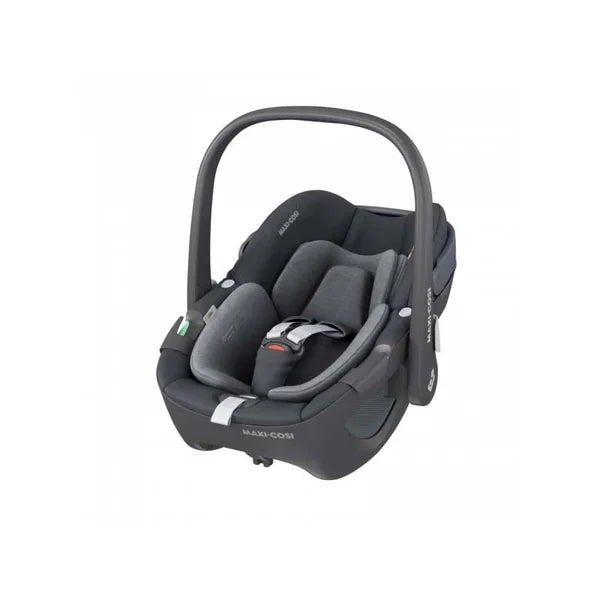
- the car seat includes an ergonomic headrest and a safety newborn insert, designed in cooperation with pediatricians
- both the newborn insert and the headrest can be adapted to the size of the child and completely removed in the older age of the child
- self-supporting canopy protects your baby from the sun
- climaFlow ventilation will ensure the thermal comfort of the child in the seat
- the car seat cover made of pleasant material has a surface treatment against dirt and repels liquid
-the car seat cover is easy to remove and machine wash.
Specifications:
- weight: 4.30 kg
- dimensions (H x H x W): 35 to 56 cm x 67 to 72 cm x 44 cm
- base/base not included in the package/goods, must be purchased separately
The Maxi-Cosi brand provides a car seat replacement service for all its products in the event of an accident.
Easy to use:
- the maximum level of comfort and safety for your child
- fast and easy attachment of the car seat to the FamilyFix 360 base via Click-and-Go technology
- the ability to rotate the car seat on the FamilyFix 360 base makes seating and buckling a child easy and convenient
- seat belts don't get in the way while putting the baby in the car seat
- the child's attachment system allows easy and quick one-handed attachment
- easy height adjustment of belts according to the size of the child
- in a car without a base, it is possible to attach the car seat with the help of 3-point belts of the vehicle.
- suitable for traveling on a plane
- ergonomic handle makes it easy to carry the car seat
- the car seat is compatible with all Maxi-Cosi and Quinny strollers as well as other strollers on the market
- along with the Maxi-Cosi FamilyFix 360 base and the Maxi-Cosi Pearl 360 car seat, you get a solution for your baby from birth to 4 years old
Safety:
- transporting the child against the direction of travel for better head and neck protection
- meets the very strict requirements of the i-Size safety standard (R129)
- the side protection system with G-Cell technology absorbs the energy generated in an impact and thus protects your child in the event of a side impact
- the visual and audible indicator (click) on the base of the FamilyFix 360 minimize the possibility of incorrect attachment of the car seat
- A 3-point seat belt allows a child to fast and securely fasten
- without the Maxi-Cosi base, the car seat can be attached using the vehicle's 3-point seat belt
Comfort:
- the car seat includes an ergonomic headrest and a safety newborn insert, designed in cooperation with pediatricians
- both the newborn insert and the headrest can be adapted to the size of the child and completely removed in the older age of the child
- self-supporting canopy protects your baby from the sun
- climaFlow ventilation will ensure the thermal comfort of the child in the seat
- the car seat cover made of pleasant material has a surface treatment against dirt and repels liquid
-the car seat cover is easy to remove and machine wash.
Specifications:
- weight: 4.30 kg
- dimensions (H x H x W): 35 to 56 cm x 67 to 72 cm x 44 cm
- base/base not included in the package/goods, must be purchased separately
The Maxi-Cosi brand provides a car seat replacement service for all its products in the event of an accident.