Pay in installments of $6.91 with
 ,
,
 and
and

Shipping Estimate
USA
- USA
- CAN
- USA
- CAN
Ships within 48 hours · Estimated delivery Jul 15 - Jul 20
 Promo Codes Available:
For Your Every Summer RSVP, with Code: SUMMER15
Description
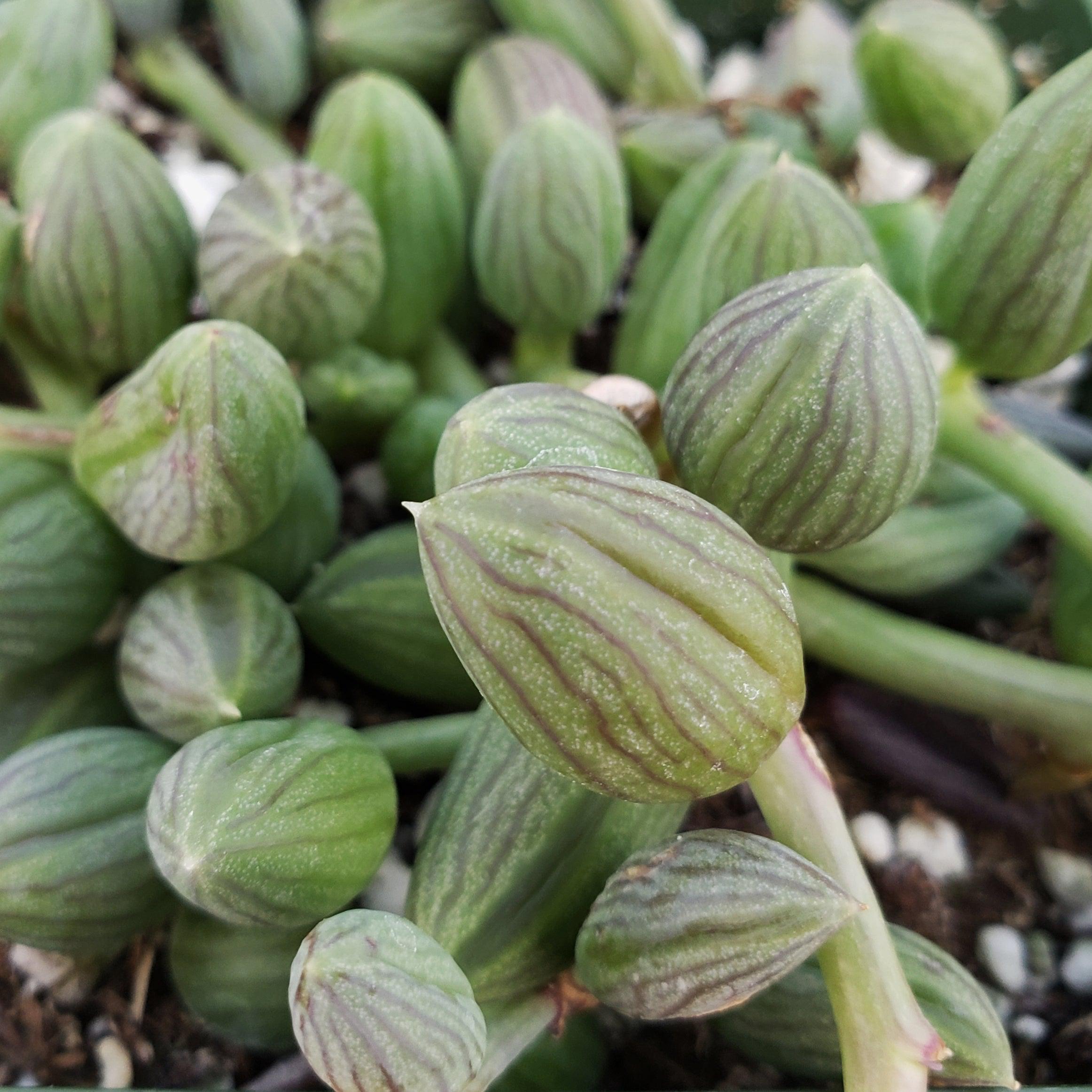
watermelon succulent String of Watermelon – Senecio herreianus 2" PotIntroducing the string of watermelon, known as Senecio herreianus (now Curio herreianus), which is a popular trailing succulent native to South Africa. It belongs to the Asteraceae family and is loved for its unique foliage and trailing growth habit. It has several other common names such as Gooseberry Plant, String of Beads, String of Pearls, String of Raindrops, Curio herreanus, Senecio herreanus, and String of Tears. The string of watermelon is a
Introducing the string of watermelon, known as Senecio herreianus (now Curio herreianus), which is a popular trailing succulent native to South Africa. It belongs to the Asteraceae family and is loved for its unique foliage and trailing growth habit. It has several other common names such as Gooseberry Plant, String of Beads, String of Pearls, String of Raindrops, Curio herreanus, Senecio herreanus, and String of Tears.
The string of watermelon is a stunning succulent with trailing stems and egg-shaped leaves, similar to a String of pearls but larger and elongated. It can grow over 2 feet long and can be found trailing from a pot or creeping along the ground. The leaves are green, lined with dark green or purple tones, resembling the rind of a watermelon, and can be deepened by bright sunlight.
When grown as a houseplant, the string of watermelon can reach a height of about 6-8 inches and spread out in a trailing manner. It's a great choice for hanging baskets or as a trailing accent in pots.
This plant's flowers bloom from spring to fall and are white or off-white, with small, daisy-like blooms. The plant is known for its ability to attract butterflies and bees with its sweet nectar. Its delicate petals bring a touch of elegance to any garden or landscape.
You can propagate the string of watermelon through stem cuttings. Simply take a healthy stem cutting, remove the lower leaves, and allow the cutting to dry for a day or two. Then, place the cutting in well-draining soil and keep it slightly moist. Over time, it will develop roots and start growing into a new plant.
Watering Needs
Like most succulents, the string of watermelon prefers well-draining soil and doesn't like to sit in wet conditions for too long. Overwatering can cause root rot and other issues, while underwatering can cause leaves to shrivel and drop.
Before watering, insert your finger about an inch into the soil to check if it's dry. If it feels moist, wait a few days before watering. When watering, ensure that the soil is well saturated until water drains from the bottom of the pot. This ensures that the roots get enough moisture.
In the spring and summer, during the growing season, water your string of watermelons every 1-2 weeks. In the dormant period (fall and winter), you can reduce watering to once every 3-4 weeks.
Remember, it's always better to underwater than overwater your string of watermelon. If in doubt, it's safer to wait a little longer between waterings.
Light Requirement
When grown indoors, the string of watermelon thrives in bright, indirect light. Place it near a window that receives bright, filtered sunlight for a few hours a day. Avoid exposing the leaves to direct sunlight because it can scorch them.
For outdoors cultivation, it can handle more direct sunlight. However, it's still best to provide it with partial shade during the hottest parts of the day, especially in regions with intense sun. Morning or late afternoon sun is ideal, as it gives the plant the light it needs without the risk of burning the leaves.
When transitioning your string of watermelon from indoor to outdoor or vice versa, it's important to acclimate it gradually to prevent shock. Start by placing it in a slightly shadier spot for a few hours a day, then gradually increase its exposure to brighter light over the course of a week or two.
Remember, the string of watermelon can adapt to different light conditions, but it generally prefers bright, indirect light indoors and partial shade with some direct sunlight outdoors. Observing the plant's response to light and adjusting accordingly will help it thrive.
Optimal Soil & Fertilizer
The string of watermelon plants favors very airy, sandy soil that drains well. Planting them in ordinary soil will result in compacted roots, stunted growth, and most likely root rot. Instead, make or buy a well-draining potting mix, or ideally use our specialized succulent potting mix that contains 5 natural substrates and mycorrhizae to promote the development of a strong root system that helps your succulent to thrive.
The string of watermelon is a relatively low-maintenance plant when it comes to fertilizing. During the growing season in the spring, you can feed it with a balanced (5-10-5), water-soluble NPK fertilizer diluted to half strength. Apply the fertilizer once a year to provide the necessary nutrients for healthy growth.
When applying fertilizer, make sure to water the plant thoroughly first. Then, dilute the fertilizer according to the instructions and apply it to the soil around the base of the plant. Avoid getting the fertilizer on the leaves, as it can cause burns.
Remember, it's always better to under-fertilize than over-fertilize your string of watermelon. Too much fertilizer can lead to excessive growth and weak stems. Always follow the instructions on the fertilizer package and adjust the frequency of application based on the plant's response.
Hardiness Zone & More
When growing indoors, the string of watermelon prefers temperatures between 60°F and 75°F. It can tolerate slightly cooler temperatures during the winter months as long as it's not exposed to frost or freezing conditions. The string of watermelon appreciates moderate to high humidity levels. You can boost humidity by placing a tray filled with water near the plant or using a humidifier. Misting the leaves occasionally can also help provide some humidity.
When grown outdoors, the string of watermelon thrives in hardiness zones 9 to 11, which are regions with milder climates. These zones generally have average minimum temperatures ranging from 20°F to 40°F.
The string of watermelon succulents appreciates moderate humidity levels outdoors as well. In regions with naturally higher humidity, the plant can thrive. However, if you live in a drier climate, you can increase humidity by misting the leaves or placing a humidity tray nearby.
Final Thoughts
Overall, the string of watermelon is a charming and unique plant that brings a touch of whimsy to any space. With its trailing stems and bead-like leaves resembling watermelons or pearls, it's a real eye-catcher. This low-maintenance succulent is perfect for hanging baskets or as a trailing accent in pots. While its small, daisy-like flowers are less significant, the focus is truly on its stunning foliage. Propagating the string of watermelon through stem cuttings is also relatively easy. It requires plenty of sunlight, well-draining soil, and regular watering to thrive. So, if you're looking for a fun and easy-to-care-for plant that adds a pop of green to your surroundings, the string of watermelon is a fantastic choice.
Shipping Notes
- Free Standard Shipping on $100+ Orders to the USA.
- Except Preorder products are shipped in 48 hours.
- Delivery to the USA:
- Standard Shipping : 3-10 business days
- If time is of the essence, please consider selecting expedited delivery for faster service.
Exchange/Return Notes
- We offer a 30-day return/exchange service after receiving.
- Final sale items are not eligible for returns or exchanges.
- To process your return/exchange, please contact us at [email protected]
- Please click here for more details>>> Return & Exchange Policy