Shipping Estimate
USA
- USA
- CAN
- USA
- CAN
Ships within 48 hours · Estimated delivery Jul 15 - Jul 20
 Promo Codes Available:
For Your Every Summer RSVP, with Code: SUMMER15
Description
coffee plant pot Arabica Coffee PlantIntroduction Grow Your Own Coffee Indoors! A Beautiful Houseplant A Natural Air Purifier Easy to grow! Aromatic flowers smell like jasmine! Description Growing Arabica Coffee Plants indoors is surprisingly simple! With some water and light you can easily grow your own coffee! There are few things in life more exciting than growing, harvesting, roasting, and DRINKING your very own coffee. And it is an affordable way to enjoy fresh, delicious coffee.
Introduction
Grow Your Own Coffee Indoors!
- A Beautiful Houseplant
- A Natural Air Purifier
- Easy to grow!
- Aromatic flowers smell like jasmine!
Description
Growing Arabica Coffee Plants indoors is surprisingly simple! With some water and light you can easily grow your own coffee! There are few things in life more exciting than growing, harvesting, roasting, and DRINKING your very own coffee. And it is an affordable way to enjoy fresh, delicious coffee. You'll love sharing and gifting your fresh roasted coffee beans with friends and family!
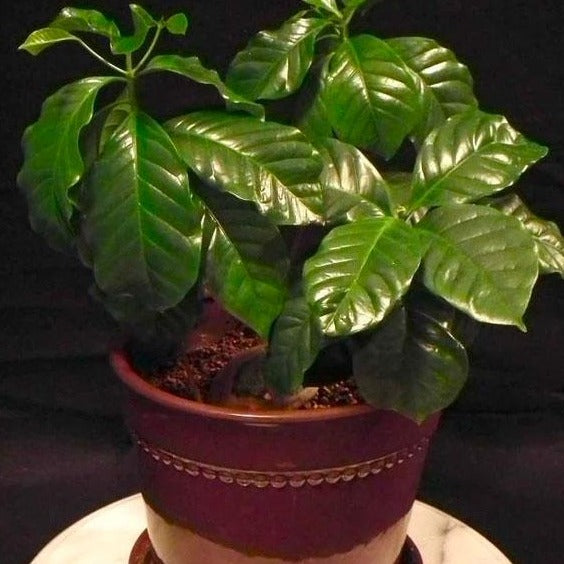
The Arabica Coffee plant is a gorgeous house plant with shiny, deep green leaves. White, jasmine scented flowers blanket your plant before becoming coffee cherries which are the fruit of the coffee plant. Each cherry produces 2 coffee bean and your plant can produce hundreds of cherries. The coffee fruit start out green and transition to red as they ripen over 9 months.
Coffee plants are natural air purifiers. So they offer the added bonus of cleaning the air in your home!
Unless you are in a tropical zone that does not receive freezing temperatures coffee plants must be grown in pots as indoor or patio plants. Arabica Coffee Plants are beautiful and lush. They are an attractive houseplant with their full shape and shiny deep green leaves. They add interest with fragrant flowers and attractive berries.
In tropical climates coffee plants make lovely hedges or specimen plants. They can grow up to 15 feet tall and 8 feet wide when planted in ground.
Arabica Coffee Plants perform best in bright, indirect light. Repot in our special potting mix. The soil and the pot choose need to drain well to keep your Coffee plant happy. Choose a container only a couple inches wider than the pot your Coffee Plant comes in. Coffee plants enjoy humidity so if your home is very dry, mist the leaves daily. Keep the soil slightly moist. Do not allow your plant to be waterlogged or completely day. Watering your Coffee Plant about twice per week is best in most homes. Apply our slow release fertilizer when planting and twice per year if your plant is in the ground. In a pot, fertilize 3-4 times per year for ideal fruit production and growth. Pick the coffee fruit when they are bright red over the whole cherry.
Order your very own Arabica Coffee plant today! We only have limited quantities! These make great gifts for coffee lovers.
How To Care
Place your Arabica Coffee Plant in bright indirect light for best results. Near an east facing window is an ideal spot. Select a good organic potting mix like our special potting mix. The soil and the pot need to drain well. Choose a container only a couple inches wider than the pot your Coffee Plant comes in. If your home is dry misting the leaves once a day is a good idea. Coffee plants prefer humidity. Keep the soil moist and watering over the leaves is great for this plant. Be sure the soil isn't saying soaking wet and doesn't completely dry out either. Watering your Coffee Plant about twice per week is best in most homes. Apply our slow release fertilizer when planting and twice per year if your plant is in the ground. In a pot, fertilize 3-4 times per year. Pruning to control the size and shape of your plant is recommended. If you notice suckers forming at the base of your plant prune these off right away.
The cherries of your coffee plant take 9 months to ripen. Pick them when they are ripe (bright red over the whole cherry). There are 2 coffee beans inside of the cherry.
Landscape Ideas
Unless you are in a zone that does not receive freezing temperatures coffee plants must be grown in pots as indoor or patio plants. Arabica Coffee Plants are beautiful and lush. They make a beautiful houseplant with their full shape and shiny deep green leaves. They add interest with fragrant flowers and attractive berries.
In tropical climates coffee plants make lovely hedges or specimen plants. They can grow up to 15 feet tall and 8 feet wide when planted in ground.
For additional options, be sure to browse our Dwarf Tree and Fruit Trees collections.
Shipping Notes
- Free Standard Shipping on $100+ Orders to the USA.
- Except Preorder products are shipped in 48 hours.
- Delivery to the USA:
- Standard Shipping : 3-10 business days
- If time is of the essence, please consider selecting expedited delivery for faster service.
Exchange/Return Notes
- We offer a 30-day return/exchange service after receiving.
- Final sale items are not eligible for returns or exchanges.
- To process your return/exchange, please contact us at [email protected]
- Please click here for more details>>> Return & Exchange Policy