SKU: 41074795132
lucky bamboo in feng shui

lucky bamboo in feng shui Feng Shui Lucky Bamboo (6 Stalks) – Plant Club

Sale price$19.80 Regular price$22.00
Save 10%

Pay in installments of $5.50 with ShopPay, AfterPay and Klarna

Shipping Estimate
USA
  • USA
  • CAN

Ships within 48 hours · Estimated delivery Jul 22 - Jul 27

Promo Codes Available:

For Your Every Summer RSVP, with Code: SUMMER15

Description

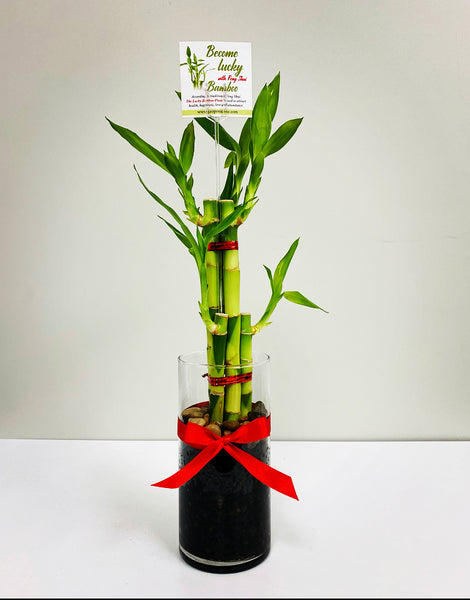
lucky bamboo in feng shui Feng Shui Lucky Bamboo (6 Stalks) – Plant ClubBecome Lucky with Fengshui Bamboo ( 6 Stalks ) A six stalk arrangement is lucky for a few reasons. First, six in the Chinese language also sounds like the word for luck. Six bamboo stalks attract prosperity and advantages to achieve greater wealth. Likewise, six is a multiple of three, so it carries the same lucky energy, only doubled. The lucky bamboo is related to all the 5 elements on which feng shui is based upon. Heres how: Wood: The bamboo plant

Become Lucky with Fengshui Bamboo ( 6 Stalks  )

A six-stalk arrangement is lucky for a few reasons. First, six in the Chinese language also sounds like the word for luck. Six bamboo stalks attract prosperity and advantages to achieve greater wealth. Likewise, six is a multiple of three, so it carries the same lucky energy, only doubled.

The lucky bamboo is related to all the 5 elements on which feng shui is based upon.

Here’s how:

  1. Wood: The bamboo plant symbolizes wood element.
  2. Water: We need to timely fill the vase with water, hence water element is embodied.
  3. Earth: Rock, pebbles, clay stones in the vase represent the Earth element.
  4. Fire: There’s always a red ribbon tied to the vase or plant itself. Red represents fire.
  5. Metal: Usually bamboo is tied with metal wire or a metal coin is tied with the red ribbon or there’s a metal coin with in the vase; thus metal element is also covered.

All in all, it’s for certain that the lucky bamboo is 100% related to all the 5 elements.

Caring for Feng Shui Bamboo Plant – Here’s How to Keep Them Healthy

Alright, so taking care of the lucky bamboo plant in your home isn’t a tough job. They need very less care but you need to make sure that you’re doing a few things and avoiding others.

Below is a list of thing that you need to do and avoid while taking care of bamboo plants in your home or office.

Lucky Bamboo Plant Care – What to Follow (8 Tips)

  1. Choose a vase that’s at least 2 inches wider than the plant.
  2. Adorn the vase with polished stones & pebbles. Apart from making the vase attractive, these stones will help keep the bamboo plant straight.
  3. Keep the plant inside your home.
  4. Lucky bamboo loves filtered or distilled water. If that’s not possible, then try using as much clean water as you can.
  5. If you notice the leaves turning yellow then let the water sit for whole night before using.
  6. Cut yellow leaves immediately.
  7. Replace the water at least once in 15 days.
  8. Love them & they’ll shower love on you.

Lucky Bamboo Plant Care – What to Avoid (4 Tips)

  1. Never over water the plant.
  2. Never under water the plant.
  3. Bamboo hates direct (too strong) sunlight; hence it’s to be avoided.
  4. Avoid clutter, dust, dirt and anything negative near the plant.
Shipping Notes
  • Free Standard Shipping on $100+ Orders to the USA.
  • Except Preorder products are shipped in 48 hours.
  • Delivery to the USA:
  1. Standard Shipping : 3-10 business days
  • If time is of the essence, please consider selecting expedited delivery for faster service.
Exchange/Return Notes
  • We offer a 30-day return/exchange service after receiving.
  • Final sale items are not eligible for returns or exchanges.
  • To process your return/exchange, please contact us at [email protected]
  • Please click here for more details>>> Return & Exchange Policy
SKU: 41074795132

Discover Niche Categories That Outsell lucky bamboo in feng shui

Top-Converting Item to Boost Your Average Order

4.3 ★★★★★
Based on 30 reviews
Sort
Highest Rating
Newest First
Oldest First
Product Reviews
M
Verified Purchase
Mom2
Los Angeles, US
★★★★★ 5
“ incredibly convenient”
Reload type: One Time Reload
I recently used the Amazon.com Gift Card Balance Reload option, and I’m thoroughly satisfied with the process and the overall experience. Here’s my detailed review: Convenience The Gift Card Balance Reload feature is incredibly convenient for anyone who shops frequently on Amazon. It allows me to add funds directly to my Amazon account without having to go through the process of entering credit card information every time I make a purchase. This is perfect for those who prefer to manage their shopping budget by preloading funds to their account. It saves me time and makes the checkout process smoother. Ease of Use Reloading my gift card balance was quick and easy. All I had to do was go to my Amazon account, select the “Reload Your Balance” option, and choose the amount I wanted to add. The process is simple and user-friendly, with clear instructions. You can choose to set it as a one-time reload or opt for an automatic reload at regular intervals, which is an excellent feature for those who want to stay on top of their shopping without worrying about running out of funds. Reloading Options One of the best aspects of this feature is the flexibility in reloading amounts. I can reload any amount I choose, whether it’s a small amount to cover a single purchase or a larger amount for future shopping. There’s also the option to set up an auto-reload, so my balance is automatically replenished when it drops below a certain threshold. This is particularly helpful for frequent Amazon shoppers, as it ensures there’s always enough funds available without having to manually reload every time. Processing Time Reloading my balance was instantaneous, and I was able to make purchases immediately after adding funds. The money is applied to my Amazon account almost immediately, so there’s no waiting around for it to process. This makes it ideal for urgent purchases or spontaneous shopping. Security The Gift Card Balance Reload option is secure, and I have peace of mind knowing that my payment information is kept safe through Amazon’s encrypted systems. I don’t have to worry about storing credit card information for each transaction, and the reload process is secure and straightforward. I also appreciate that I get an email confirmation every time my balance is reloaded, providing an extra layer of security and transparency. Value for Money The Gift Card Balance Reload is a great option for managing your Amazon shopping budget. It doesn’t come with any additional fees or hidden costs, and I get exactly what I pay for. Plus, I can take advantage of any promotions or bonuses Amazon may offer for gift card reloads (e.g., occasional bonus offers or discounts). The ability to add funds as needed without being locked into a set amount of money is very useful and cost-effective. Overall Impression I’m highly satisfied with the Amazon.com Gift Card Balance Reload service. It’s a fast, easy, and secure way to manage your shopping budget and ensure that you never run out of funds on Amazon. The process is simple, and I love the flexibility in choosing how much to reload, as well as the option for automatic reloading. For anyone who frequently shops on Amazon or wants to manage their spending more effectively, this is a great tool to have. I will definitely continue using this feature to make my Amazon purchases even more efficient and hassle-free.
WAS THIS REVIEW HELPFUL?YesReportShare
Reviewed in the United States on November 23, 2024
M
Verified Purchase
Martini81
Natrona Heights, US
★★★★★ 5
Easy and simple: Exact Step-by-Step Guide to Reloading Your Balance
Reload type: One Time Reload
I found reloading my Amazon gift card balance much easier than expected. The process was simple and took about 5 minutes at most. Here are the exact steps to do it: ​Login: In the Amazon app or on Amazon.com, log in to your account. ​ Menu: Tap the 3 lines on the bottom right corner of your screen (next to Rufus, Amazon's AI). ​ Find Category: In the section highlighted "Shop by category," tap on Gifting & Registry (3rd option down in that section) and a drop-down menu will appear. ​ Select Gift Cards: On the drop-down menu, tap Gift Cards (first option). ​ Choose Your Action: "The Gift Card Shop" will appear. There you will have three options: "Redeem a gift card," "View your balance," and "Reload." ​ Start Reload: To add funds, tap Reload. ​ Select Type: Scroll down to "Add funds directly to your Amazon Gift Card balance" and tap which reload type you want (one-time, low balance auto-reload, or scheduled auto-reload). ​ Enter Amount: Choose your reload amount. The default is $25, but you can type in your own amount as well (the minimum amount is $5.00). ​ Finish: Tap the orange "Buy Now" tab. ***I used the Amazon app using the u i OneUI version 8.0 these Amazon app on Android version 16 (Baklava) on a Samsung Galaxy S25 Ultra. Others may have a slight variation of the menu setup on the Amazon app.***
WAS THIS REVIEW HELPFUL?YesReportShare
Reviewed in the United States on April 22, 2026
K
Verified Purchase
Kenneth Lucas
Fort Morgan, US
★★★★★ 5
Easy way to add balance
Reload type: One Time Reload
Reloading my Amazon gift card balance has been easy and convenient. I like using it when I want to keep a little money set aside for Amazon orders or make checkout quicker without thinking about which card I want to use. The process is straightforward, the balance shows up fast, and it has been reliable every time I have used it. It is also helpful for budgeting because I can add a set amount and then use that balance for regular purchases. Nothing complicated about it, which is exactly why I like it.
WAS THIS REVIEW HELPFUL?YesReportShare
Reviewed in the United States on May 28, 2026
P
Verified Purchase
Paola Rodriguez
West Palm Beach, US
★★★★★ 5
Great for Budgeting – Instant Balance and Easy to Use
Reload type: One Time Reload
I use Amazon’s gift card reload feature to plan my spending. It’s perfect when I know I want to make a purchase but prefer to set the funds aside first. I love that it’s immediate—no worries about pending charges or accidental spending from my card. It gives me peace of mind knowing that when I’m ready to buy, the balance is just sitting there, waiting. Pros: easy to use, instant balance update, helps with budgeting and avoiding overspending Cons: funds are locked into Amazon once reloaded, doesn’t count toward certain account requirements like review eligibility Overall, it’s a convenient and reliable way to manage spending on Amazon, especially if you like having control over your purchases.
WAS THIS REVIEW HELPFUL?YesReportShare
Reviewed in the United States on May 1, 2026
L
Verified Purchase
Lt. 635
Lowell, US
★★★★★ 5
I did this with a pay in 4. It made it super simple for a higher balance.
Reload type: One Time Reload
I’ve used this to reload my balance a few times, and it’s been simple and reliable. The process is quick, and the funds show up without any delays or issues. It’s a convenient option when you want to control spending or keep purchases separate without using a card each time. Everything is straightforward and easy to manage. I haven’t run into any problems with transactions or balance updates. It’s been consistent every time I’ve used it. Overall, it’s an easy and dependable way to keep funds ready to go without any hassle.
WAS THIS REVIEW HELPFUL?YesReportShare
Reviewed in the United States on May 6, 2026

recommand products