SKU: 39847115767
monsters 5050

monsters 5050 MONSTER RGBW Magnetic LED Rock Light Pod – Dual Lead | LUX

Sale price$20.50 Regular price$22.78
Save 10%

Pay in installments of $5.70 with ShopPay, AfterPay and Klarna

Shipping Estimate
USA
  • USA
  • CAN

Ships within 48 hours · Estimated delivery Jul 21 - Jul 26

Promo Codes Available:

For Your Every Summer RSVP, with Code: SUMMER15

Description

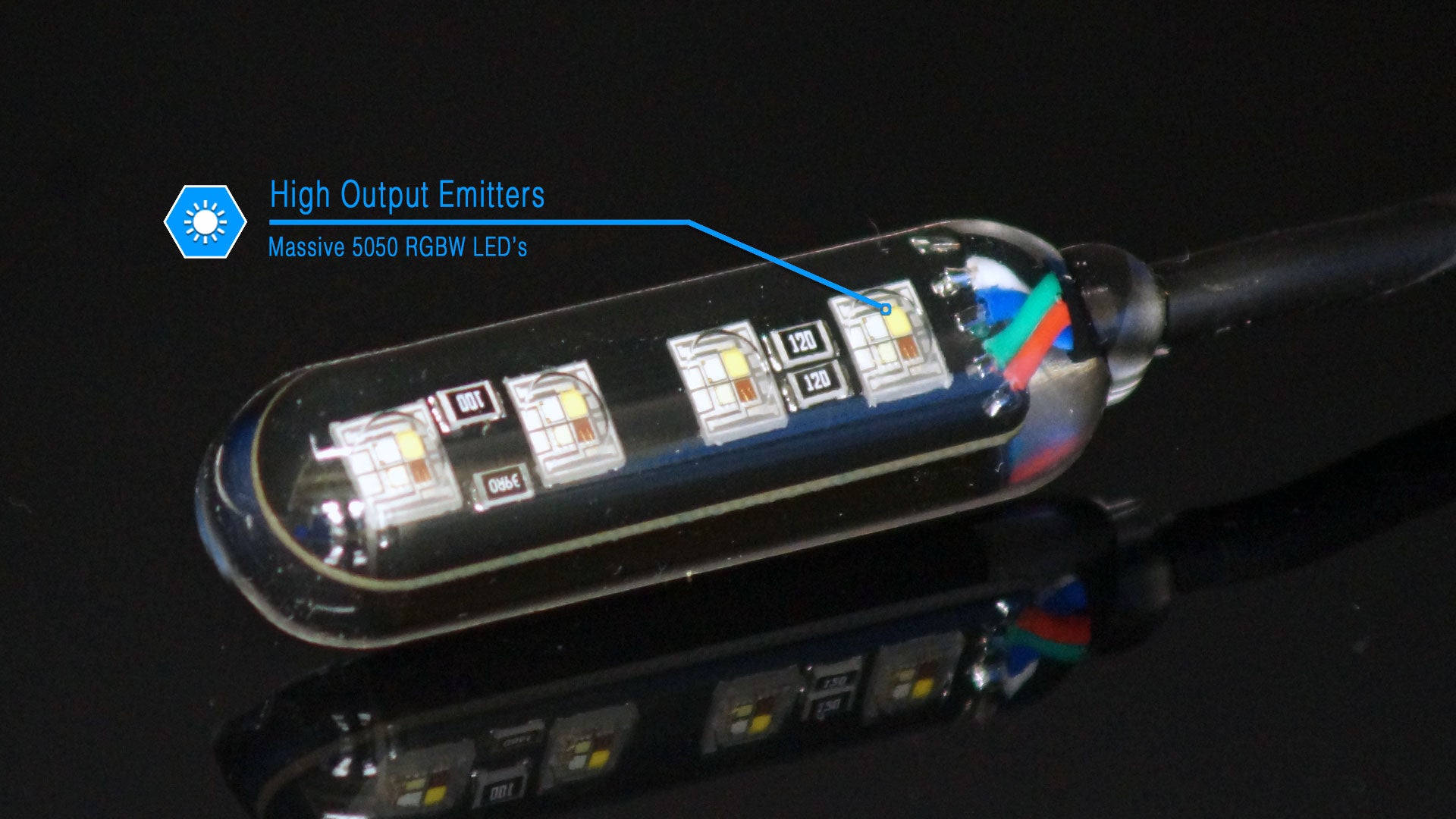
monsters 5050 MONSTER RGBW Magnetic LED Rock Light Pod – Dual Lead | LUXMONSTER RGBW Magnetic LED Rock Light Pod Dual Lead Expand or customize your lighting system with the MONSTER RGBW Magnetic LED Rock Light Pod from LUX Lighting Systems. This high output RGBW LED pod integrates seamlessly with both LUX Direct Connect and Build to Fit rock light systems, allowing you to add lighting exactly where you need it. The dual lead configuration allows the pod to function as a pass through light in a Build to Fit lighting string

MONSTER RGBW Magnetic LED Rock Light Pod – Dual Lead

Expand or customize your lighting system with the MONSTER RGBW Magnetic LED Rock Light Pod from LUX Lighting Systems.

This high-output RGBW LED pod integrates seamlessly with both LUX Direct-Connect™ and Build-to-Fit™ rock light systems, allowing you to add lighting exactly where you need it.

The dual-lead configuration allows the pod to function as a pass-through light in a Build-to-Fit™ lighting string or connect independently in a Direct-Connect™ system.


System Compatibility

This RGBW MONSTER pod is compatible with:

• LUX Direct-Connect™ RGBW rock light systems
• LUX Build-to-Fit™ RGBW rock light systems
• LUX RGBW Bluetooth controllers

Important: RGBW pods cannot be mixed with white LED systems. RGBW lights must be used with RGBW controllers and RGBW lighting systems only.


Fully Customizable RGBW Control

The available RGBW controller allows:

• Full color customization
• Adjustable brightness
• Static white mode
• Dynamic lighting effects
• App + remote control

From functional trail lighting to show-quality underglow — you control the output.


Small Package. Massive Output.

How does LUX produce so much light from such a compact design?

Our patented magnetic mounting system is the difference.

Unlike conventional rock lights that trap heat inside bulky aluminum housings, the LUX magnetic mount transfers heat away from the LEDs and directly into the vehicle’s mounting surface — allowing the LEDs to run cooler and brighter.

The result:

• Cooler-running LEDs
• Smaller, cleaner light pods
• Broader light spread
• Higher usable output


Effortless Installation. Industrial-Grade Hold.

No drilling.
No screws.
No glue.
No tape.

Simply mount the light to a clean, flat metal surface and it locks securely in place.

The MONSTER series uses a custom-cast N45H neodymium magnet engineered for extreme holding force and optimized thermal transfer.


Built to Last — No Shortcuts

Every LUX magnet is triple-coated for durability:

• Nickel — structural strength
• Copper — improved thermal conductivity
• Epoxy — corrosion protection

The solid polycast body is a fully encapsulated 2-part aliphatic urethane system that is:

• Impact resistant
• Fuel and oil resistant
• UV resistant
• Waterproof


What’s Included

• (1) MONSTER RGBW Magnetic LED Rock Light Pod – dual lead
• 6" lead wires with waterproof threaded connectors


Important Installation Notice

LIGHT MUST BE MOUNTED TO A CLEAN, FLAT METAL FRAME RAIL SURFACE FOR PROPER HEAT DISSIPATION.

The magnetic system is engineered into the thermal path of the LEDs.
Improper mounting can result in overheating and premature failure.


Products will be drop shipped from Infinite Offroad within 7 to 10 days of order date. 

  • Q. How do these lights mount?
    A. All LUX MONSTER rock lights use high-strength neodymium magnetic mounting. Simply place the light on a clean, flat steel surface and it locks securely in place — no drilling, screws, glue, or tape required. If a metal mounting surface is not available, optional metal mounting plates are available here.

    Q. How are your lights brighter than other rock lights?
    A. Most rock lights rely on large aluminum housings to dissipate heat. This traps heat inside the light and forces manufacturers to run the LEDs at lower output levels. LUX rock lights use a patented magnetic thermal transfer system that moves heat away from the LEDs and directly into the vehicle frame rail. This allows the LEDs to run cooler and produce significantly more usable light from a much smaller package — designed for real-world output, not inflated numbers printed on a box.

    Q. Will this pod work with my existing LUX system?
    A. Yes. MONSTER pods are compatible with both LUX Direct-Connect™ and Build-to-Fit™ systems. Single lead pods connect directly to the controller or end of a lighting string, while dual lead pods allow pass-through wiring in Build-to-Fit™ installations.

    Q. Can I mix white and RGBW lights?
    A. No. White and RGBW lights must be used with their respective controllers and systems. White pods require white controllers, while RGBW pods require RGBW controllers.
  • Magnetic Mounting + Thermal Management
    The LUX patented magnetic mounting system does more than hold the light in place. The magnet is engineered into the thermal path of the LEDs, transferring heat into the vehicle’s frame rail and allowing higher usable output from a compact light pod.

    Waterproof Connectors
    Heavy-duty threaded plug-and-play connectors provide secure and weather-resistant electrical connections for reliable long-term performance.

    Solid Polycast Body
    Unlike traditional rock lights that use thin aluminum housings and plastic lenses, LUX lights are fully encapsulated in a solid polycast urethane body. This provides superior environmental protection, impact resistance, and broad light dispersion.
  • Jeep
    Expanded underbody lighting for rock crawling, trail visibility, and custom Jeep builds.

    Trucks
    Full ground coverage and accent lighting for full-size and mid-size trucks, including underbody lighting for lifted and larger wheelbase vehicles.

    Overland
    Ideal for overland vehicle lighting, providing reliable ground illumination for campsite setup, gear access, and nighttime vehicle movement during extended travel.

    Work Trucks
    Commonly used for truck toolbox lighting, service body lighting, and ground lighting around commercial work trucks and utility vehicles.

    AMP Research Running Boards
    A popular solution for AMP Research running board lights, providing clean step illumination when entering or exiting the vehicle at night.

    ATV/UTV
    Enhanced ground visibility for trail riding, desert driving, and recreational off-road vehicles.

    RV/Camping
    Wide coverage ground lighting for campsite setup, trailer hookups, and maneuvering vehicles in low-light conditions.
  • LED
    Package size: 5050
    Construction: Ceramic base
    Power Rating: 6 watt per light pod

    Lead Wire
    Size: 24awg stranded copper
    Insulation: 4mm pressure extruded thermoplastic elastomer
    Standards: Sunlight, fuel, and oil resistant. RoHS II and REACH compliant
    Temperature Rating: -40°C to 105°C
    Length: 6 inches
    Waterproof threaded plug-and-play connectors

    Magnets
    Construction: Neodymium
    Classification: N45H
    Coatings: Nickel / Copper / Epoxy triple layer

    Body
    Material: 2-part aliphatic urethane system
    Hardness: 80±2 Shore D
    Tensile Strength: 4000 psi
    Flexural Strength: 7200 psi
    Compressive Strength: 7150 psi
    Standards: Fuel resistant, oil resistant, UV resistant, RoHS compliant
Shipping Notes
  • Free Standard Shipping on $100+ Orders to the USA.
  • Except Preorder products are shipped in 48 hours.
  • Delivery to the USA:
  1. Standard Shipping : 3-10 business days
  • If time is of the essence, please consider selecting expedited delivery for faster service.
Exchange/Return Notes
  • We offer a 30-day return/exchange service after receiving.
  • Final sale items are not eligible for returns or exchanges.
  • To process your return/exchange, please contact us at [email protected]
  • Please click here for more details>>> Return & Exchange Policy
SKU: 39847115767

Discover Niche Categories That Outsell monsters 5050

Top-Converting Item to Boost Your Average Order

4.4 ★★★★★
Based on 5 reviews
Sort
Highest Rating
Newest First
Oldest First
Product Reviews
D
Verified Purchase
DianeH
Massapequa, US
★★★★★ 5
Don't Delay - Get One
Style: Right-Handed, Pattern Name: Mouse, Color: Graphite
Make sure you get the right size - I got the Small/Med. Perfect fit. Have had tennis elbow for years and the computer use exacerbated the issue. Very comfortable, great fit. The best position for your hand is in the upright position. Would recommend one for everyone. Good, solid mouse.
WAS THIS REVIEW HELPFUL?YesReportShare
Reviewed in the United States on April 10, 2026
A
Verified Purchase
Anymuon
Chelsea, US
★★★★★ 5
Bad auto driver install. Great mouse. Few of the left hand mfgs.
Style: Left-Handed, Pattern Name: Mouse, Color: Graphite
Really crappy auto driver install. Locked up my USB ports for my usb keyboard, usb mouse, all usb ports in fact. Had to reboot multiple times with an old style 5pin keyboard since the software screwed up my usb ports. All of them. Lucky I have a motherboard with an old style keyboard port. A reboot of W11 in safe mode, ripped out auto-installed software, registry keys and rebooted to regain control of my USB ports. I do not know what went wrong. Alls I know is Logitech loaded something, it locked up my USB ports and I had to rip everything Logitech out to get control again. I downloaded the software, installed it and it worked fine. I've had no problems since. I'm an old lefty and as such am ambidextrous in most areas, since there just was not left handed oriented items readily available. You had to have left handed stuff made so you learned to do things right handed. I've developed carpal tunnel in both elbows and had purchased a couple of vertical mice, one left and one right. I took the left into work and was looking for a replacement. My other two were around $30 ea. I liked the right handed vertical mouse (Anker). They do not make a left handed version. The left handed mouse is ok, not as good as the Anker. I decided to go above my spend tolerance and get the Logi after reading many reviews. It has not disappointed me. The auto-install sucked. Never letting that happen again. It is a nice smooth mouse. Fine movements that are easily adjustable. The hand position is excellent. I can use this all day without switching to the right because of elbow pain. If you have the pain, you know what I am talking about when it flares. It takes some getting used to the subtlety of the clicks when coming from lower cost mice. Soft and gently like a newborn's .... One of my big criteria for a vertical mouse is a landing area for the outer two fingers (pinky and next to pinky for finger orientation challenged). When you go to a vertical mouse, it takes some adjustment to moving the mouse since you can't really press down with your palm and inside two fingers (the ones next to the outside two fingers). It is helpful to be able to use the two outer fingers and thumb to aid in moving the mouse. You have to experience a vertical mouse to understand. The right handed only Anker goes from an inch to a half inch in the length of my pinky below the buttons on the side. This is a really nice landing area for the outside fingers to assist moving the mouse around. You can squeeze a little and the mouse glides. The Logi mouse is a wee shorter than the Anker and the area below the buttons in a mostly straight 3/4". Both mice curve quickly down to the inside below this area. I was used to a vertical mouse by the time I purchased the Logi and I have no issues with the pinky dragging the table and the finger next to pinky resting on the landing. I move the mouse with no problems. It is the subtlety of how one interacts with these style of mice. The big plus, takes a long time before mouse use causes pain flareups. And this isn't just a pain and done. Depending on how one ignores the pain, often determines how many days life sucks. The Logi mouse minimizes the flare ups. I'm thinking of taking the Anker in and getting a right handed Logi for home. I like the Anker, I'm frugal and highly recommend it for getting your feet wet. I love the Logi (auto-install sucks) and will probably ignore my frugal tendencies and get a right handed one since I don't switch hands as frequently with the Logi in the mix. Don't have to suffer auto-install either.
WAS THIS REVIEW HELPFUL?YesReportShare
Reviewed in the United States on February 29, 2024
L
Verified Purchase
Lauren
Boise, US
★★★★★ 5
Pretty in Pink
Style: Right-Handed, Pattern Name: Mouse, Color: Rose, Style: Right-Handed, Pattern Name: Mouse, Color: Rose
Logitech is a great brand, so that is why I trusted in throwing down the money for this mouse. It feels great, easy to use and the battery life is wonderful! Good quality, abd was very easy to connect to my personal and work laptop!
WAS THIS REVIEW HELPFUL?YesReportShare
Reviewed in the United States on May 17, 2026
W
Verified Purchase
Wayne
Grantham, US
★★★★★ 4
Vast improvement over traditional mice
Style: Left-Handed, Pattern Name: Mouse, Color: Graphite
This review is primarily for the left handed version. When Logitech introduced the left handed Mouseman in 1991, it was the first and only ergonomic mouse for left handers. Merchants refused to dedicate shelf space to it, so it was short lived. The latest version is leaps and bounds above the original and is the most comfortable and natural feeling mouse that I've ever used. At first, it was awkward to use. After about 20 seconds, it felt natural, and traditional mice started feeling very awkward. This mouse lets you keep your arm and wrist in a natural position, whether you are using it as a desk mouse or a couch mouse. The primary button is the index finger button, whether you use the left or right handed version. The Logitech software doesn't have a true setting for swapping buttons, and uses the Windows setting. So if you had your buttons swapped for your old mouse, you need to unswap them. It also means that your old mouse becomes a right handed mouse on that computer. There's no way of having both set to left handed. There's a switch to change the sensitivity. The normal one lets you do work needing fine movements, such as drawing programs. The other setting makes it more sensitive to movement, which means more mouse movement with less hand movement. It's also a good feature if you have limited desk space or are using an airplane tray. This lets you avoid having to use the setup screens to change sensitivity. The scroll wheel is smooth and accurate. It also works for horizontal scrolling if used in conjunction with one of the buttons on the thumb side. It takes getting used to, and is still awkward for me. Those buttons are forward and back buttons by default, so don't use it while editing something on a web page until you are used to it, or you could end up losing everything. A problem is that their Logi software doesn't let you set the scroll increment. It can be done with the Windows mouse settings, but you shouldn't have to go two places to set what the mouse does. Pressing the middle button changes from moving the pointer up and down to scrolling the page up and down. Unfortunately, there's no speed adjustment. The round symbol that pops up should really be a longer vertical symbol that allows greater control over speed. The mouse includes a Logibolt receiver that can plug into a USB port, or you can use the mouse directly with your computer's Bluetooth if it meets the specs. If you use it with your computer's Bluetooth, you remove the tab from the mouse so the battery connects, and then use your computer's Bluetooth configuration. That will save you a USB port. If you need to use the mouse to set up Bluetooth, use the receiver, and then store it inside the mouse once you have your computer's Bluetooth set up. If you use the receiver, plug it into a USB port first, then pull the tab. If you want to be able to use both, there's a button on the bottom to let you set it for up to three different devices. So if it's set for your computer's Bluetooth, and want to set up the receiver to use on another computer, plug in the receiver, touch the button on the bottom of the mouse (the light will move from 1 to 2) and you will be paired. You can also use the third setting for another device. If you paired it to both using the same computer, you can unplug the receiver and use the button to go back to setting 1. If you have a desktop computer, you will want to have the receiver paired, and can use it if you need to change a bios setting, since Windows won't be loaded. So it's good to pair it, even if you will just store it inside the mouse. It would be good to pair it anyway with any computer, so it's ready to go if you ever need it. There's no instruction manual included, nor do they give you a link to one in the configuration software. The QR code takes you to the software download page, but doesn't give a link to the online manual. So some of this wasn't clear to me without searching online. Their original Mouseman came with a 148 page manual and a 48 page getting started guide. The new one comes with pictorial printed on the cardboard it's wrapped in. Something in between might have been nice, even if it were just a link to the manual. Update: 18 months later, it's still working well but the battery is down to 5%. I'm changing the battery.
WAS THIS REVIEW HELPFUL?YesReportShare
Reviewed in the United States on November 14, 2022
J
Verified Purchase
J
Phoenix, US
★★★★★ 5
Good scroll wheel, coming from g305, 18cm hand
Style: Right-Handed, Pattern Name: Mouse, Color: Off White
For reference my hand 18 cm measured from the first crease after your palm to the end of my middle finger. I flexed my wrist and the first crease I used as my end point for my palm. My arms are at a 90 degree angle, and my wrist is neutral (not flexed up or down) due to my wrist rest keeping my wrist straight. Most of my arm weight is on my memory foam wrist rest. My review is based on my personal hand size 1 month update: I have not noticed any staining on my white lift. But I am also a pretty hygienic person and I never touch my mouse if I touched food. 1 year update: Still have not noticed any staining. I do wipe it with a baby wipe maybe once every 1-2 weeks though. One thing to note is that in order to use shortcuts you need to have the Logitech Options+ software installed. The shortcuts/settings you program to you buttons aren't saved on the mouse. Also annoying since the software takes a substantial amount of CPU usage (why????). Wrist pain: This might be because I don't have arm rests so the weight of my arm is resting on the wrist wrest, but I had some minor wrist pains within an hour or so. It didn't really feel like a muscle or bone kind of pain, but a nerve/soft tissue pain. When I didn't use a wrist rest, the weight was mostly the side of my hand, in particular the bony part near the wrist. That part rubbed when moving the mouse around if you don't lift your arm. Edit: After some adjustment I no longer get any wrist pain, even when gaming. Palm grip: I think palm grip would be unusable for this mouse. My fingers extend 0.5-1 cm after the end of the mouse (where the left and right buttons start curving). When clicking the mouse it almost feels like im clicking with my finger joint instead of my fingertip. With a relaxed thumb (thumb slightly curved and only fingertip touching mouse) it is pretty easy to click the side buttons. Side of thumb can press upper button, thumb joint can press lower button. With the entire thumb fully in contact with the mouse, the upper button is a bit awkward to press but possible, and the lower button is the same as relaxed thumb position. Awkward to use the scroll wheel since you have to curve your fingers quite a bit to get your finger tip on the scroll wheel but still usable. Also because of the hand angle, I found it much more comfortable using my middle finger to use the scroll wheel instead of my pointer finger that I use normally. Fingertip grip: Personally I found it feeling different, but perfect. My finger length is perfect so my fingers land around or slightly below where the left and right mouse button start to curve. When I click, the direction of the force from my finger is more diagonally down and to the left. If my fingers were a bit shorter, it the force would be to the left. I found this diagonally force feels more natural, kind of like squeezing a trigger (kinda) instead of just squeezing a mouse. It is hard to describe. In this grip, the only part of my fingers (including my thumb) that are touching the mouse are my fingertips. My palm is resting on the mouse. Thumb characteristics is same as palm grip. Scroll wheel characteristics same as palm grim. Claw grip: Works fine, only problem is pushing lower thumb button is a bit awkward since you kind have to shift your entire thumb back but it is still possible. Easy to use scroll wheel since your fingertips end right next to it Compared to g305: The Lift is much more comfortable and natural. I got used to the Lift very quickly. In comparison, the g305 felt like a petite mouse. The g305 felt hollow, like there was nothing supporting my palm. I didn't have any issues with the mouse shifting when clicking it on my mouse pad. Even on a smooth surface with no mouse pad it would happen rarely. Scroll wheel: Excellent combination of a normal scroll wheel and a free one. I can scroll down all the way to the end of reddit threads and spotify playlists in one scroll. Going back up takes a few scrolls however since I apply less force. Smooth scroll supplied by Logitech Options+ is also nice. Makes it feel like scrolling has inertia. There a lot of very nice features in Logitech Options+ like Logitech Flow
WAS THIS REVIEW HELPFUL?YesReportShare
Reviewed in the United States on September 21, 2024

recommand products