SKU: 21931958938
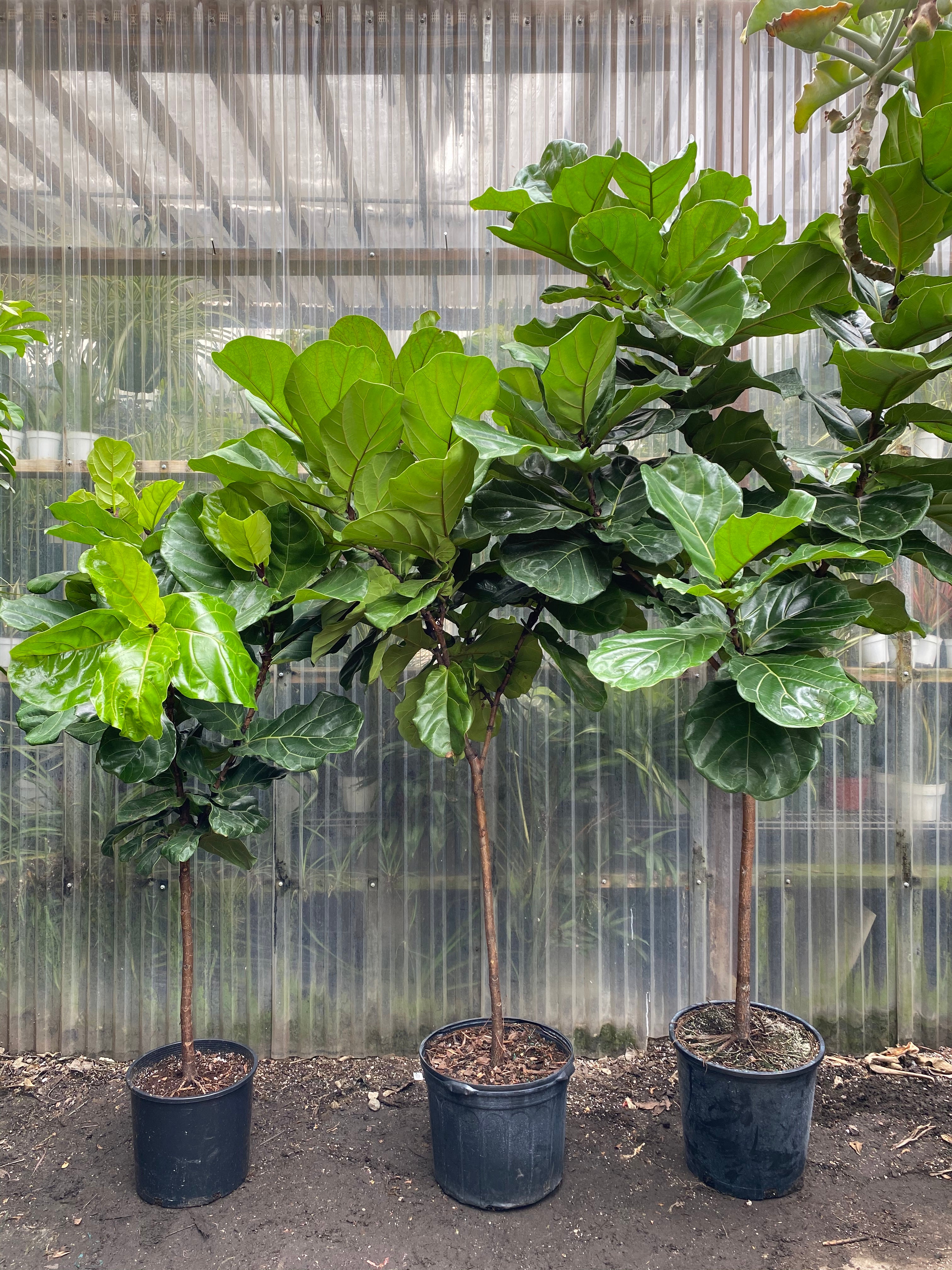
4 ft fiddle leaf fig

4 ft fiddle leaf fig Fiddle Leaf Fig

Sale price$25.36 Regular price$28.18
Save 10%

Pay in installments of $7.04 with ShopPay, AfterPay and Klarna

Shipping Estimate
USA
  • USA
  • CAN

Ships within 48 hours · Estimated delivery Jul 20 - Jul 25

Promo Codes Available:

For Your Every Summer RSVP, with Code: SUMMER15

Description

4 ft fiddle leaf fig Fiddle Leaf FigFicus Lyrata Fiddle Leaf Fig (Standard Form) "Standard" means it has a single stem that is bare on the bottom with only foliage at the top. NOTE: We do not ship plants. You can only purchase for a "pick up" order. Sizes: 10" Pot at 3 4ft Tall 12" Pot at 4 5ft Tall 14" Pot at 5 6ft Tall 14" Pot at 6. 5 7ft Tall *measurements are taken from the ground up (including the planter) Growing Tips Fiddle Leaf Figs need lots of bright light. They can even

Ficus Lyrata - Fiddle Leaf Fig (Standard Form)

"Standard" means it has a single stem that is bare on the bottom with only foliage at the top.  

NOTE: We do not ship plants.  You can only purchase for a "pick-up" order. 

Sizes:

10" Pot at 3-4ft Tall

12" Pot at 4-5ft Tall 

14" Pot at 5-6ft Tall

14" Pot at 6.5-7ft Tall

*measurements are taken from the ground up (including the planter)

Growing Tips 

🌤️ Fiddle Leaf Figs need lots of bright light.  They can even withstand and thrive with direct sun.  In tropical regions you can often see them being used as street trees, backyard trees, and even out in their natural environment. 

🏠 With that being said, if you have a Fiddle indoors they will usually do best directly in front of a window or within 4 feet from a south or west facing window.  If you have a north or east window you will want to keep it close to that window and be sure to keep the curtains/blinds open. 

💦Fiddles like to slightly dry between waterings.  If you let it get bone dry and leave it that way for too long you might start to see yellowing to crispy brown leaves.  Water to evenly moisten the soil but not to leave it overly soggy - aim for your plant to need water once per week.

TIP #1  When watering always keep in mind the season and temperature of your home.  You will need to adjust with regards to these environmental factors.   

TIP #2  Use some sort of way to measure the amount of water you are giving your plant so that you know how much to increase or decrease next time if needed.

TIP #3  Water your plants in place with a saucer under them.  This allows your plant a chance to soak up the water.  After a couple hours if there is still water in the saucer you can dump this out and this will also tell you how much water you can cut back next time. 

TIP #4  Try to water on a weekly basis, this will help to keep you consistent and to at least check on your plants once a week. 

Shipping Notes
  • Free Standard Shipping on $100+ Orders to the USA.
  • Except Preorder products are shipped in 48 hours.
  • Delivery to the USA:
  1. Standard Shipping : 3-10 business days
  • If time is of the essence, please consider selecting expedited delivery for faster service.
Exchange/Return Notes
  • We offer a 30-day return/exchange service after receiving.
  • Final sale items are not eligible for returns or exchanges.
  • To process your return/exchange, please contact us at [email protected]
  • Please click here for more details>>> Return & Exchange Policy
SKU: 21931958938

Discover Niche Categories That Outsell 4 ft fiddle leaf fig

Top-Converting Item to Boost Your Average Order

4.5 ★★★★★
Based on 25 reviews
Sort
Highest Rating
Newest First
Oldest First
Product Reviews
C
Verified Purchase
Christy
Grantham, US
★★★★★ 5
No issues
Color: 2 Black,1 Cyan,1 Magenta,1 Yellow
Works on my epson printer, vibrant colors and not issues
WAS THIS REVIEW HELPFUL?YesReportShare
Reviewed in the United States on April 3, 2026
O
Verified Purchase
Odessa
Alexandria, US
★★★★★ 5
Great alternative to purchasing new cartridges
Color: 2 Black,1 Cyan,1 Magenta,1 Yellow, Color: 2 Black,1 Cyan,1 Magenta,1 Yellow
Cheaper than purchasing new cartridges every time the printer needs more ink. Easy to use. Bottles are a generous size. Ink quality is the same as I already had in my printer.
WAS THIS REVIEW HELPFUL?YesReportShare
Reviewed in the United States on December 12, 2025
E
Verified Purchase
Espy07
Belleville, US
★★★★★ 5
Reliable, Fast, and Excellent Print Quality — A Great All-Around Printer
Style: WF-7820, Set: SINGLE TRAY (250 sheets/FAX/ADF/PRINT/COPY/SCAN, Style: WF-7820, Set: SINGLE TRAY (250 sheets/FAX/ADF/PRINT/COPY/SCAN
I’m extremely happy with this printer and would highly recommend it to anyone looking for a reliable, high-quality device. Setup was quick and straightforward, and it connected seamlessly to both my Wi-Fi and mobile devices. Print quality is excellent—text is crisp, colors are vibrant, and photos come out looking professional. It’s also impressively fast and much quieter than printers I’ve owned in the past. I appreciate the user-friendly interface and the efficient ink usage, which helps keep long-term costs down. Overall, this printer delivers great performance, convenience, and value, making it a fantastic addition to my home office.
WAS THIS REVIEW HELPFUL?YesReportShare
Reviewed in the United States on January 11, 2026
A
Verified Purchase
Amazon Customer
Houston, US
★★★★★ 1
I would rather deal with a dot matrix printer...
Style: WF-7820, Set: SINGLE TRAY (250 sheets/FAX/ADF/PRINT/COPY/SCAN
Let's start with the positive - scanner works fine. I am not a huge fan of having to use a separate program to initiate and scan but with that said, the scanner part of this "printer" is decent, fast, clear and has some functionality (two sided capabilities, rotation, etc.) that is appreciated. It would be nice if it would have OCR option so that you don't have to use a separate program to convert but that is just a convenience thing. Well wait, who doesn't like convenience when it seems like this could be a simple option?! Now for the negative part of this "printer". Issues: - 9 times out of 10 it will not print upon command and usually requires me to unplug, wait 30 seconds, plug and restart printing. Simply turning it off and on with the power button usually doesn't solve the problem hence the unplugging. And even unplugging sometimes doesn't do the trick. Don't worry, it will print the document randomly if you don't cancel the print job usually when you least expect it to and have a minor uptick in the heart rate. - Will not print in black and white (even if selecting the option to print only in B&W) once the color cartridges run out. Yes, it allows you maybe to do this a few times with a warning that it can only do that because the color is out however that is temporary and it will eventually not allow you to print in B&W until you replace the color. Completely ridiculous to me... - Speaking of color cartridges, these do not last long. I rarely print in color however I have had this printer for less than a year and have replaced once and now have to replace again. Also finding that these color cartridges are hard to find locally at like walmart or target and when in a pinch, that is bad. So as stated above, when you color goes out, need just a straight B&W print job and can't find the cartridges around town - you are S.O.L. If you are wanting a multi-use "printer" that just scans - this is a decent option. If you are wanting something more than a scanner that prints ink on paper, do not put this in your cart and move on.
WAS THIS REVIEW HELPFUL?YesReportShare
Reviewed in the United States on December 2, 2023
R
Verified Purchase
Raymond Skelley
Alexandria, US
★★★★★ 5
incredible wide format printer
Style: WF-7820, Set: SINGLE TRAY (250 sheets/FAX/ADF/PRINT/COPY/SCAN, Style: WF-7820, Set: SINGLE TRAY (250 sheets/FAX/ADF/PRINT/COPY/SCAN
I had a WF 4530 that I bought over 10 years ago - that printer was a tank and the ability to scan was HUGE. That printer recently died on me - over a decade with inkjet - with no issues despite long stretches of no use - I can't complain one bit. I bought the 7820 WF - it's an upgrade in every aspect. Quiet. Fast. Great print quality. Edge to edge printing. Wide format (if/when I need it). I've added a photo to the review of a printout I did using HP photo paper (4x6) to give you an idea of the quality - for home printed inkjet it's (IMO) top of the scale. One note: Don't use windows 10 or windows 11 drivers - download and install the drivers from Epson - they give you scan to pdf, scan to your computer, and the printout resolution from the windows drivers is horrible - the epson drivers are really needed.
WAS THIS REVIEW HELPFUL?YesReportShare
Reviewed in the United States on June 17, 2023

recommand products