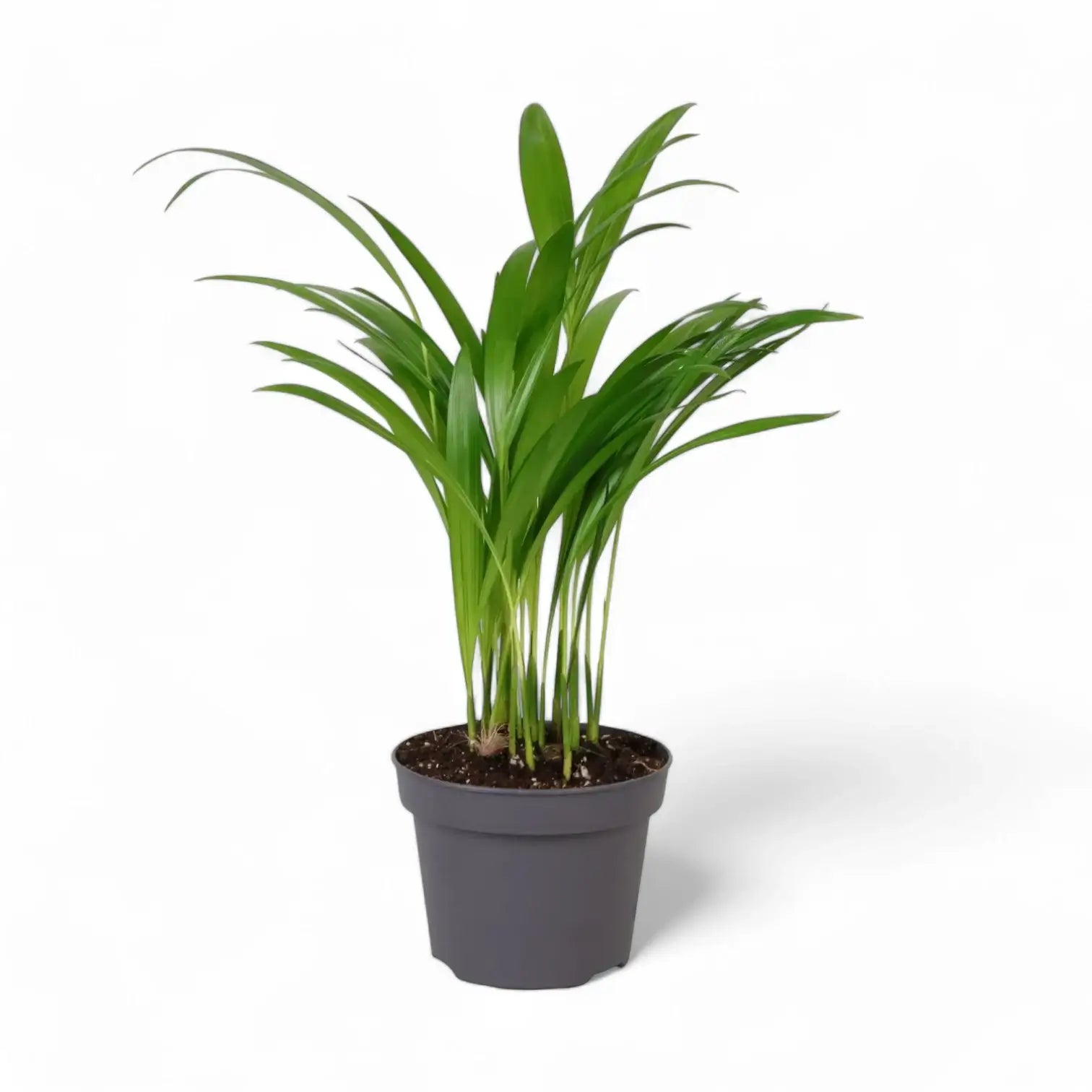
SKU: 12861328436
areca palm botanical name

areca palm botanical name Chrysalidocarpus lutescens

Sale price$25.42 Regular price$28.24
Save 10%

Pay in installments of $7.06 with ShopPay, AfterPay and Klarna

Shipping Estimate
USA
  • USA
  • CAN

Ships within 48 hours · Estimated delivery Jul 21 - Jul 26

Promo Codes Available:

For Your Every Summer RSVP, with Code: SUMMER15

Description

areca palm botanical name Chrysalidocarpus lutescensChrysalidocarpus lutescens Chrysalidocarpus lutescens, still widely known under the synonym Dypsis lutescens, is a clustering palm with upright cane like stems and long, arching feather leaves. Several stems rise from the base, creating a soft, fountain shaped crown with yellow green petioles and narrow leaflets arranged along each frond. Indoors, this palm develops slowly into a broad, leafy specimen with a layered vertical outline. As the stems

Chrysalidocarpus lutescens

Chrysalidocarpus lutescens, still widely known under the synonym Dypsis lutescens, is a clustering palm with upright cane-like stems and long, arching feather leaves. Several stems rise from the base, creating a soft, fountain-shaped crown with yellow-green petioles and narrow leaflets arranged along each frond.

Indoors, this palm develops slowly into a broad, leafy specimen with a layered vertical outline. As the stems mature, they become more defined, while the fronds keep the crown airy, layered, and finely textured.

Golden cane palm details

  • Golden cane palm forming grouped yellow-green stems
  • Arching pinnate fronds with many narrow green leaflets
  • Yellow-green leaf stalks and midribs give the plant its warm tone
  • Can form a sizeable indoor floor plant over time
  • Rarely flowers indoors; mature outdoor plants may produce yellow flowers and small fruits

Eastern Madagascar origin and clumping growth

Chrysalidocarpus lutescens is native to Madagascar and belongs to the palm family, Arecaceae. In habitat and tropical cultivation it can grow as a shrub-like or tree-like palm, with multiple stems forming a broad clump. Indoors, its final shape depends on light, root space, and steady watering.

Each stem grows from a central crown. Fully brown fronds can be removed at the base, while green fronds should stay in place so the palm retains enough leaf area for new fronds. New fronds emerge from the growing points and gradually open into the palm’s feathered canopy.

Because this palm forms a clump, uneven growth is normal: some canes may sit lower while newer stems fill the centre. Turn the pot occasionally so the crown develops evenly, and keep the leaf bases open enough for inspection because pests often settle where the fronds meet the stems.

Keeping Chrysalidocarpus lutescens evenly leafy

  • Light: Use a bright, indirect position. Gentle morning or late afternoon sun suits acclimated plants, while strong midday sun behind glass can scorch fronds.
  • Watering: Keep the substrate evenly lightly moist during active growth, then let the upper layer dry before watering again. Avoid cold, saturated soil.
  • Substrate: Use an airy, well-drained palm or houseplant mix with mineral drainage material to keep the root zone open.
  • Temperature: Keep the palm warm, ideally above 18 °C, and avoid cold draughts or temperatures below about 15 °C.
  • Humidity: Average to moderate indoor humidity is workable, although very dry heated air can crisp leaflet tips. Use a humidifier where winter air becomes persistently dry.
  • Feeding: Use a low-strength fertiliser in spring and summer. Too much feed can show as yellowing or salt stress on leaflet tips.
  • Repotting: Move up one pot size when roots have filled the container, often after 2–3 years. Avoid oversized pots that keep the mix wet for too long.
  • Pruning: Remove only fully spent fronds. Cutting green fronds reduces the palm’s active leaf area.
  • Leaf cleaning: Wipe dusty leaflets gently or rinse the fronds with lukewarm water so the narrow leaflets can receive light evenly.

Frond, cane and pest checks

  • Brown tips: Often linked to dry air, irregular watering, salt build-up, or old leaf age. Check moisture pattern and flush the substrate if fertiliser salts have built up.
  • Yellowing fronds: Can follow overwatering, poor drainage, low light, nutrient imbalance, or natural ageing of older leaves. Check the root zone before feeding.
  • Mites or scale insects: Fine stippling, webbing, sticky residue, or bumps on stems and leaf bases need early inspection and treatment.
  • Collapsed stems: Soft bases usually point to root or crown stress from persistently wet, cool conditions.

Pet-safe palm status

ASPCA treats the areca palm, Chrysalidocarpus lutescens, as non-toxic to cats and dogs. Sensitive pets may still get mild stomach upset from chewing the fronds.

Accepted name and synonym note

Chrysalidocarpus lutescens H.Wendl. is the accepted botanical name for this Arecaceae species. Dypsis lutescens remains a common synonym in horticulture. The genus name refers to chrysalis-like fruits, while lutescens means turning yellow, matching the yellow tones in the flowers, stems, and leaflet midribs.

Chrysalidocarpus lutescens grows into golden cane clusters with airy fronds and a full upright palm outline.

Shipping Notes
  • Free Standard Shipping on $100+ Orders to the USA.
  • Except Preorder products are shipped in 48 hours.
  • Delivery to the USA:
  1. Standard Shipping : 3-10 business days
  • If time is of the essence, please consider selecting expedited delivery for faster service.
Exchange/Return Notes
  • We offer a 30-day return/exchange service after receiving.
  • Final sale items are not eligible for returns or exchanges.
  • To process your return/exchange, please contact us at [email protected]
  • Please click here for more details>>> Return & Exchange Policy
SKU: 12861328436

Discover Niche Categories That Outsell areca palm botanical name

Top-Converting Item to Boost Your Average Order

4.5 ★★★★★
Based on 28 reviews
Sort
Highest Rating
Newest First
Oldest First
Product Reviews
K
Verified Purchase
Katie
Dallas, US
★★★★★ 5
18 months and going strong
Style: ET-5150, Set: ET PRO FAX/ADF/PRINT/COPY/SCAN, Style: ET-5150, Set: ET PRO FAX/ADF/PRINT/COPY/SCAN
Edit 1/18/26: 2 years in, and I just topped off the ink. I used the extra bottle of black that came with it, and bought a set of color ink for the first time. Love it. Original: I’ve had this printer for 18 months and love it. I haven’t even had to refill the ink yet! I print a fair amount, not constantly, but I homeschool and print things for church and scouts also. I’m able to connect easily from my Windows laptop, Mac desktop, and iPhone. Automatic double sided printing is great. Color printing is good quality. Printing on card stock can get jammed, but there’s a rear bypass for that. It’s annoying that you have to do a single sheet at a time, but oh well. Copying and scanning is handy.
WAS THIS REVIEW HELPFUL?YesReportShare
Reviewed in the United States on July 27, 2025
J
Verified Purchase
Jennifer
Carnegie, US
★★★★★ 5
The Perfect Printer
Style: ET-5150, Set: ET PRO FAX/ADF/PRINT/COPY/SCAN
This is the perfect printer! I love the paper loading tray that holds a ton of paper, and the sophisticated scanning hinge AND THE TOUCHSCREEN! Other printer's I have owned have had the weirdest buttons, but this is so clear and easy to use. We were replacing a broken black and white printer and upgraded to a color printer. We had an eco tank before (LOVE THEM!) so we knew we wanted an eco tank printer again. Honestly I cannot find a single downside of this printer. For Mac users, know that the CD that comes with it is unnecessary :) Just go online per the instructions to grab the Epson software and you'll be set! Full context: My husband and I are small business owners and we love having an in-home printer!
WAS THIS REVIEW HELPFUL?YesReportShare
Reviewed in the United States on September 19, 2025
C
Verified Purchase
Carrie
Omaha, US
★★★★★ 5
Great Investment Printer
Style: ET-5850, Set: FAX/Print/Copy/Scan
This is a great overall printer, especially for a home office or small business setup. It prints quickly, handles everyday documents with ease, and the EcoTank system is very convenient and cost-effective over time. Honestly, it could even hold its own in a regular office environment because of how efficient and fast it is. It is also easy to connect to from a phone, laptop or computer. It was compatible with all the devices and computers in my household, even those with Windows 10. That said, if your main goal is printing high-quality photos, this wouldn’t be the best option Epson offers. Photo quality is decent, but not exceptional. If photo printing is important to you, I would recommend looking into the Epson 8550 instead. Overall, a solid, reliable printer for everyday use—just not the top choice for photo-focused needs.
WAS THIS REVIEW HELPFUL?YesReportShare
Reviewed in the United States on March 23, 2026
B
Verified Purchase
Brian
Grantham, US
★★★★★ 5
Excellent Epson, worth the investment!
Style: ET-5800, Set: FAX/Print/Copy/Scan
First, this is a big printer so double check the measurement specs before purchasing if space is an issue. First impressions: very well built, especially comparing to ET versions such as the ET-4800 ( see my review on that one for details). This is a sturdy printer, you can feel it when you lift the scanning bed, pull out the paper trays, etc. Printing quality: excellent right out of the box. I didn’t need to do an extensive alignment or cleaning during setup, everything printed perfectly and was photo quality. Setup was easy. Although it has a fax feature, I don’t use that so I didn’t need to set it up. Printing: using the rear paper trays, it prints on 100lb card stock very easily. I recommend only loading a few pages at a time to avoid any issues. I loaded 5 pages and made prints without any issues. 65 lb card stock was also easy to print on using the back paper feed tray and I loaded 8 sheets without an issue but know it could probably handle a few more. Just remember that the thicker the paper the more chance of having it jam with multiple sheets in the rear paper try. AND, only use the rear tray feed for cardstock or other thick paper. The actual paper tray drawers, there are two and you can set them up for different sizes and types of paper, very convenient. Now the cool detail: most printers have a flimsy plastic slide tray to catch the prints as they come out of the printer. Not this one. This has a really amazing tray catch that comes out of the printer automatically (it is motorized), and when you are done there is a little illuminated icon on the screen that looks like the printer, you press it and the tray retracts. Pretty cool detail. The screen: very easy to use and you can actually see it, unlike the postage stamp size screen they used in the ET-4800. All features are very easy to find and select and the icons are illuminated. Using this screen, setup was very easy. Ink: again a very good feature and very well thought out. The bottles are keyed so they fit in the receptacle. Simply unscrew the cap, tip them over (they won’t spill or leak) and place them in the correct color, the bottles automatically fill the tank. When done filling, remove the bottle and put the cap back on, again they won’t spill or leak because they have a mechanism that prevents it from doing so. Overall: excellent printer, expensive but over time the ink savings alone help ease the sticker price. It is heavy and sturdy, has wireless capability so you can put it anywhere and print with ease connected to your wireless network, has the ability to print from android and IPhone with an app, and it has amazing prints. This is one printer I highly recommend.
WAS THIS REVIEW HELPFUL?YesReportShare
Reviewed in the United States on June 2, 2026
A
Verified Purchase
Amazon Customer
Boise, US
★★★★★ 5
No more expensive ink cartridges
Style: ET-5800, Set: FAX/Print/Copy/Scan
Great printer. I am sick and tired of HP giving me problems with their ink cartridges. I discarded my HP office Jet and replaced it with this Epson printer. Easy to set up. Came with two sets of ink bottles. Easy and clean to fill tanks with ink. The screen on my old HP Office Jet printer was so small and difficult to use. This Epson printer has a very large LCD screen which can tilt if you want and very easy to use. Separate paper trays for letter and legal or other sizes. Print, scan and fax. Connect via cable or WiFi. I wish I had purchased this sooner.
WAS THIS REVIEW HELPFUL?YesReportShare
Reviewed in the United States on April 19, 2026

recommand products