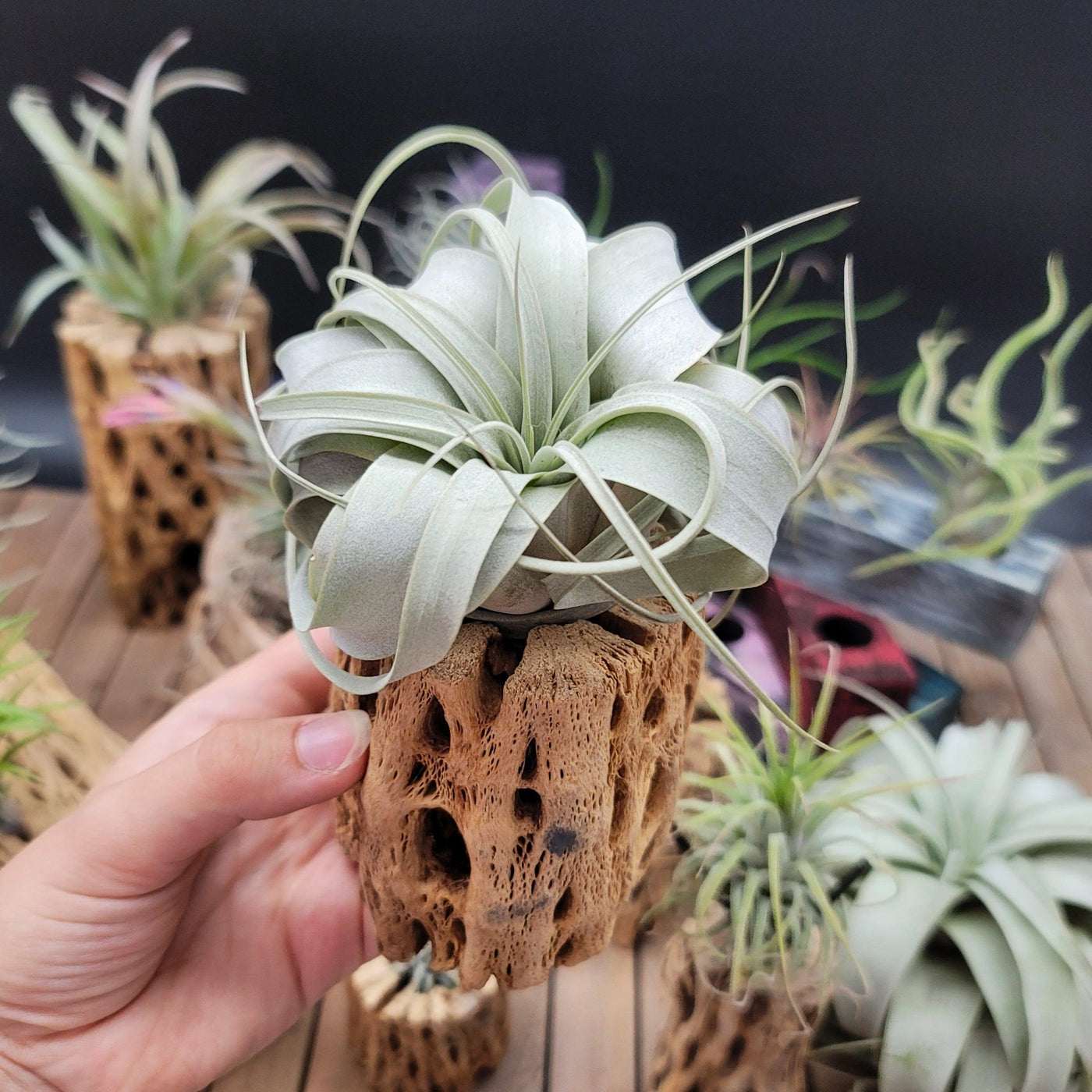
SKU: 12655099338
xerographica air plant holder

xerographica air plant holder Get 'Tillandsia xerographica' For sale

Sale price$24.70 Regular price$27.44
Save 10%

Shipping Estimate
USA
  • USA
  • CAN

Ships within 48 hours · Estimated delivery Jul 15 - Jul 20

Promo Codes Available:

For Your Every Summer RSVP, with Code: SUMMER15

Description

xerographica air plant holder Get 'Tillandsia xerographica' For saleWelcome to the world of the king of air plants Tillandsia xerographica, a stunning perennial, evergreen epiphyte that's bound to leave you in awe period. It reigns supreme over all other Tillandsias! Its name is derived from the Greek words "Xero" and "graphica; which both indicate "dry writing" or "dry painting." The "king or Queen" of air plants is another name for the Xerographica air plant. These slow growing Xerographica air plants are native to

Welcome to the world of the king of air plants - Tillandsia xerographica, a stunning perennial, evergreen epiphyte that's bound to leave you in awe period. It reigns supreme over all other Tillandsias! Its name is derived from the Greek words "Xero" and "graphica”; which both indicate "dry writing" or "dry painting." The "king or Queen" of air plants is another name for the Xerographica air plant. 

These slow-growing Xerographica air plants are native to Southern Mexico, El Salvador, and Guatemala, where you can find them hanging out in the topmost branches of subtropical forests. They cling to the trees and grow completely in the air, high in the forest canopy. Xeros stand out from other air plants in terms of aesthetic appeal. 

As they grow, their mossy green (silvery-gray leaves) flocked lovely thick leaves wrap and spiral around one another and are also covered in trichomes, which are small scales that help the xerographica air plant absorb moisture from the air. This produces a beautiful, nearly spherical air plant that will provide you with stunning living décor that is simple to maintain because of its sluggish growth habits. 

With its quite large growth of up to 3 feet in diameter with the leaves curving inward to form a tight rosette shape, as compared to other air plants, and low maintenance needs, this perennial evergreen large air plant is sure to impress and make it perfect for even the busiest gardener. 

Mature and large Tillandsia Xerographica blooms between spring and summer, and it takes years to flower. A single spiky inflorescence (floral bracts) bears bisexual red to purple Tillandsia Xerographica blooms. With a magnificent spike of long-lasting purple to crimson inflorescences, the tubular flowers, and stem can reach a height of one to three feet. Only under ideal conditions do plants bloom once during their lifespan. 

The typical Tillandsia Xerographica lifespan is about twenty years. Tillandsia Xerographica pups formed after the death of the flower at the base is the ideal way oftheir propagation from a mother plant. The Tillandsia Xerographica mini and adult plants are stunners in landscaping, balconies, and gardens. You can plant air plants in mounted displays and holders like terrariums and aeriums! 

Belonging to the esteemed Bromeliaceae family of plants (the beloved bromeliad family), Tillandsia xerographica exudes an irresistible charm fit for royalty in your stunning living decor! You can get this king of air plants for sale online at Planet Desert. In this product description, we'll take you through everything you need to know about caring for this xerographic air plant - from sun exposure to hardiness zones. So, let's dive in! 

Watering Needs 

When it comes to watering this king of the air plants Tillandsia xerographica, it's important to strike a balance. These air plants prefer to be underwatered rather than overwatered. A good rule of thumb is to mist, soak or rinse them once or twice a week, depending on the humidity of your environment. This stunning air plant gets its moisture from the morning dew instead of traditional roots. 

To water the Tillandsia xerographica, you can either mist it with water using a spray bottle or give it a thorough soak. When misting, make sure to evenly spray the leaves, allowing the water to gently coat them. If you choose to soak your air plant, you can submerge it in a deep bowl or basin of water for about 5 minutes, then let it drain by shaking excess water and dry completely before placing it back on its display. A few good shakes will drain the excess water and will help to protect it from rotting. 

Additionally, rinsing is indeed a great method for watering Tillandsia xerographica air plants. Giving them a gentle rinse under running water is an effective way to hydrate them. Just make sure to thoroughly wet the leaves, allowing the water to reach all parts of the plant. After rinsing with lukewarm water, hold your healthy plant upside down and let the excess water drain off and allow the plant to dry completely before placing it back in its display. This method helps mimic the natural rainfall that these plants would receive in their native habitats. 

Remember, it's important to avoid letting water sit in the center of the plant, as this can lead to rot. After watering, make sure to shake off any excess water and allow the plant to dry within a few hours. Providing proper air circulation is key to preventing any moisture buildup.

Light Requirements 

When it comes to light requirements, xerographica air plants are sun-loving epiphytes that prefer bright, indirect light for at least 4-6 hours daily. These plants thrive in a spot where they can receive ample amounts of filtered sunlight throughout the day. It's best to avoid placing them in direct sunlight for prolonged periods, as it can potentially scorch their delicate leaves. 

To provide the ideal lighting conditions, you can place your Tillandsia xerographica near a west-facing window with sheer curtains or window space in a location where it can receive bright light. This will help mimic the natural conditions these air plants would experience in their native habitats. 

Remember to observe your air plant closely and make adjustments to its placement if you notice any signs of stress, such as leaf discoloration or wilting of the green leaves. Finding the right balance of light is essential for the health and well-being of your Tillandsia xerographica air plant. 

Optimal Soil & Fertilizer Needs 

When it comes to soil, Tillandsia xerographica air plants don't require soil like other plants. They are epiphytic plants, which means they naturally grow on other surfaces and absorb nutrients and moisture from the air. Instead of soil, you can mount or place your Tillandsia xerographica on a piece of driftwood, bark, or other decorative surfaces. 

As for fertilizer, Tillandsia xerographica air plants have minimal nutritional needs. They can absorb nutrients directly from the air and rainfall. However, if you want to give them a little boost, you can use a specialized air plant bromeliad fertilizer or natural fertilizer with an equal mix of NPK. Apply the fertilizer sparingly, about once a year during the growing season. 

Remember, air plants are adapted to survive in nutrient-poor environments, so it's crucial not to over-fertilize them. Providing them with the right mounting surface and occasional light feeding will help keep your Tillandsia xerographica air plant healthy and thriving. They also are among theeasiest air plantsto grow in the home. 

Hardiness Zone & More

Tillandsia xerographica air plants are native to tropical regions and are typically found in USDA hardiness zones 10-11, which means they thrive in warm climates with minimum temperatures above 30°F.  

In terms of temperature, for Tillandsia xerographica air plants, the ideal temperature range is between 60°F and 80°F. They can tolerate slightly higher temperatures, but it's important to avoid exposing them to extreme heat or cooler temperatures. 

When it comes to humidity, these air plants prefer moderate to high humidity levels. They are adapted to tropical environments where humidity is naturally higher. To provide the optimal humidity for your Tillandsia xerographica, you can mist them with water a few times a week or place them in a humid location, such as a bathroom or near a humidifier. 

By providing the appropriate hardiness zone, temperature range, and humidity levels, you can create a favorable environment for your Tillandsia xerographica air plants to thrive and grow beautifully. 

Shipping Notes
  • Free Standard Shipping on $100+ Orders to the USA.
  • Except Preorder products are shipped in 48 hours.
  • Delivery to the USA:
  1. Standard Shipping : 3-10 business days
  • If time is of the essence, please consider selecting expedited delivery for faster service.
Exchange/Return Notes
  • We offer a 30-day return/exchange service after receiving.
  • Final sale items are not eligible for returns or exchanges.
  • To process your return/exchange, please contact us at [email protected]
  • Please click here for more details>>> Return & Exchange Policy
SKU: 12655099338

Discover Niche Categories That Outsell xerographica air plant holder

Top-Converting Item to Boost Your Average Order

4.4 ★★★★★
Based on 1416 reviews
Sort
Highest Rating
Newest First
Oldest First
Product Reviews
G
Grant Harlow
Port Orchard, US
★★★★★ 4
Very capable large format color inkjet printer
This thing is big. It’s replacing our Brother color laser, which didn’t get a lot of use (but is great for quick and cheap prints). The HP is longer in one dimension but less tall, so is roughly occupying the same space but with more wall visible (so looks less intrusive). Heavy. I could (and did) lift it on my own but all the packing and instructions say for 2 people to lift it. It’s manageable but I see why there’s that warning. Build quality is mostly plastic but sturdy enough for a static object. Scan lid opens easily, trays extend smoothly etc. Feels well build overall, no concerns. You can download installation instructions using a QR code and it’ll guide you to also install the HP app. The app ideally requires an account, mandatory if you plan to free trial the Instant Ink I think. I had an existing old HP account and used that. The setup was way enough but there’s a weird UI step in the app during pairing where the setup modal is blank grey with a greyed out “Next” button. Looks like it can’t find the printer. Wrong! Just hit Next to proceed. Weird and stupid and I wasted time figuring it out. Loses a star for that. Other than that, setup went fine and test print came out decent. WiFi connected ok and it also has Ethernet. The Brother only has WiFi but is flaky / goes to deep sleep too often. Testing with WiFi has been fine but I feel better knowing I can hardwire into my switch if there are issues! The HP shows on the network as an AirPrint target, and my Mac found it without issue / set up its own drivers. The fold out touch screen is nice, I wish it could be angled horizontally and not just vertically but it’s fine and responds predictably to touch. Colors and text are bright and crisp. Not quite laser crisp but pretty darn close to these old eyes. The colors are also better / truer in my opinion. Had issues with feeding vinyl sticker paper sheets, which repeatedly generated paper jam messages (at no point was the paper jammed) and wasted a lot of time. Willing to blame the paper / media (it’s slightly tacky) but our laser handled it ok. When it finally did print, I noticed some print quality issues / flaws repeatedly in the same places. Unsure of the cause and doesn’t impact subsequent printouts on other paper. Really like the ability to print larger (A3!) size. Note that scanning does not accommodate larger papers (up to Legal / same as the Brother). The supplied ink installed easily but they shipped me more as part of the Instant Ink trial. Subscribed to the lowest tier, which is affordable-ish (they just raised the lowest tier to $1.99 for 10 prints per month) but still costlier than laser. Not a huge fan of vendor lock-in / subs but did see in the fine print that HP allows third party inks to be used, which is reassuring if the subscription doesn’t make sense long term. While printing, the motion of the printer head caused my desk to shake. Worth bearing in mind if you plan on printing heavily while sharing a desk with it. Noise isn’t too bad, better than the laser printing noise we’re used to (lower frequency noise on the HP). I would not print during a zoom call though (noise + shaking). At time of review, $350 for a large format printer with built in scanning (and Ethernet) seems pretty decent. It’s not a bargain but it’s fair. Need to spend more time with other media and have ordered more paper types to test with. Will update if anything changes my rating but so far I feel like it’s a capable replacement for the color laser given our relatively modest print volume and need for higher quality color prints.
WAS THIS REVIEW HELPFUL?YesReportShare
Reviewed in the United States on June 7, 2026
A
Amazon_Customer
Massapequa, US
★★★★★ 5
Reliable Wide-Format Office Printer – Versatile, Fast, and Feature-Rich
Reliable Wide-Format Office Printer – Versatile, Fast, and Feature-Rich ★★★★★ The HP OfficeJet Pro 9720 is a strong all-in-one wide-format printer designed for small offices or home office environments that need 11x17 printing capability. It handles printing, scanning, copying, and faxing in one unit, making it a very versatile productivity tool. Print quality is sharp and consistent, especially for documents, presentations, and color graphics. The wide-format support is a major advantage for users who need larger prints like spreadsheets, posters, or marketing materials. The automatic document feeder (ADF) and duplex printing features significantly improve efficiency, allowing for hands-free scanning and double-sided printing without constant manual input. Wireless connectivity is stable and easy to set up, with good support for mobile printing from phones and laptops. It integrates smoothly into typical office networks. Print speed is solid for an inkjet in this category, making it suitable for moderate to heavy office workloads. The included Instant Ink trial is a helpful bonus for managing ongoing supply costs. Overall, this is a dependable and well-rounded wide-format all-in-one printer that delivers strong performance, convenience features, and good print quality for office environments that require flexibility and larger document output.
WAS THIS REVIEW HELPFUL?YesReportShare
Reviewed in the United States on June 2, 2026
C
Chy In Pa
Grantham, US
★★★★★ 5
Definitely Not Your Average Home Printer
What a beast of a printer. First thing to know is this is definitely not your standard little home office printer size. This thing is more small business office sized, so make sure you actually have room for it before it arrives. That said, the quality is exactly what I expect from HP. Setup was super easy and pretty painless overall. One quick tip though: remember to remove the cardboard insert from the paper tray before testing it because apparently I needed that reminder myself. Print quality is excellent, especially for color documents and larger format stuff. Everything comes out sharp, vibrant, and professional looking. The phone app is honestly one of my favorite parts. It makes it really easy to monitor ink levels, print from your phone, and troubleshoot without having to stand in front of the printer pushing buttons and getting annoyed. The touchscreen is responsive, wireless setup was smooth, and overall it just feels like a solid well thought out machine. Definitely overkill for someone who only prints a return label twice a year, but if you print a lot or need larger format printing, this thing is fantastic.
WAS THIS REVIEW HELPFUL?YesReportShare
Reviewed in the United States on June 2, 2026
J
Jen
Draper, US
★★★★★ 5
Decent printer
The print quality and speed are great. I currently have several different printers for various needs (laser for work, sublimation for crafting, and this one is potentially replacing my ink jet, for stickers) and this one is faster and a nicer quality print than my similarly priced of a different brand. Sometimes (and for literally no reason that I've been able to identify) this printer decides it doesn't want to print. Exactly like every other printer I've ever owned, connectivity can feel chaotic. Overall, all things considered, I think this a decent value for the money. It was easy to set up and get printing. Minimal packaging. Intuitive design. Up and printing within 5 minutes. I love the ability to print is larger formats. I did not sign up for the free 3 months of ink club, so cannot comment on that. So far, the ink consumption feels typical for an inkjet printer. Overall, this is a yes from me.
WAS THIS REVIEW HELPFUL?YesReportShare
Reviewed in the United States on June 6, 2026
L
Liis
Alexandria, US
★★★★★ 3
requirement: scan codes & down load proprietary app to set up & use all the functions of the unit
SPECS The printer weighs 39.19 pounds.  Overall it is 22.625 x 17.5 x 12.03125 inches.  The output tray extender sticks out 5.875 inches from the unit.  The usable power cord length is 59.5 inches. The unit can use legal [B00006GNXZ], letter [B0B57CKBCT], or ledger [B0017LR3M4] size paper. The control panel tilts up and is a color touch screen. The display is 2.125 x 1.625 inches.  The unit has two sided coping, scanning, and printing. There is a document feeder on the top.  The home screen has menu, copy, scan, trays, supplies, jobs, and help as the main functions.  Firmware updates can be set to automatic, notify, or disabled.  The printer does not come with a user manual.  OVERVIEW The unit comes wrapped in a plastic bag that has handles on each side. I was able to easily lift the printer up myself using the handles and took it to the desk.  The printer is missing some key features that do not make the printer cost effective. There is only one print tray. A fold out rear tray vertical tray is not even there.  Having to constantly change paper size is an extreme inconvenience. There is no USB port to be able to print from or scan documents to a USB hard drive or directly from a camera, which is a disadvantage.    In addition, to utilize all the features a code needs to be scanned and or the H P app needs to be used.  I did not like having to scan a code to set up and connect to wireless connection as well as using any of the scan features of email, network folder, computer, and share point, which makes the scan option useless. I had to download the HP app to set up the printer. When I was done I deleted the app. I do not want numerous apps on my devices.  I found not having a manual for the unit to be a disadvantage.  This is not a user friendly printer with all the code and app requirements.  Using the web address on my laptop and phone, just gave me a link to the play store to download the app again, which I did not want.  The size of the display screen is small. At times I had to touch the menu button more than one time to get it to continue to the next screen.   The unit functioned well printing and scanning. I was able to print from the computer via wireless connection without using the app. The copy function does not require the app or show a code to scan to be able to continue. The document feeder allows for quick copying and scanning, which is an advantage. The rollers did grab a one sheet copy job crooked and the copy was askew on the page which is a disadvantage.  On best, the copy did not come out any better than normal.  The copy images were a poor representation of the original. The copy images were more pix elated making them not as complete and crisp. In addition, the single color grey images were very pale and could barely be seen. I did not sign up for HP instant ink, compatibility. I also disabled firmware updates.
WAS THIS REVIEW HELPFUL?YesReportShare
Reviewed in the United States on May 25, 2026

recommand products