Pay in installments of $6.40 with
 ,
,
 and
and

Shipping Estimate
USA
- USA
- CAN
- USA
- CAN
Ships within 48 hours · Estimated delivery Jul 23 - Jul 28
 Promo Codes Available:
For Your Every Summer RSVP, with Code: SUMMER15
Description
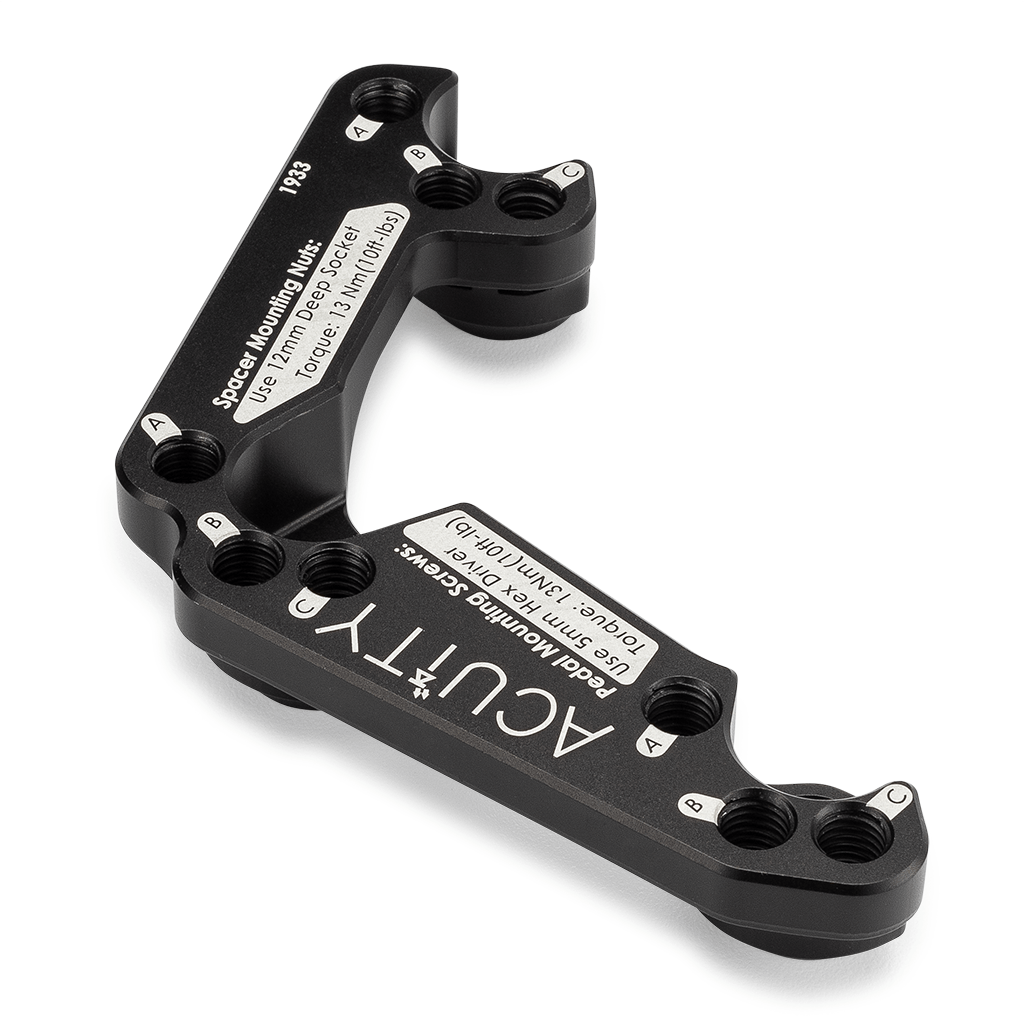
gas pedal spacer Throttle Pedal Spacer for the Right-Hand-Drive VehiclesFits the Right Hand Drive FK2, FK8, and GK5 Relocates throttle pedal closer to driver Relocates throttle pedal closer to brake pedal Helps with foot placement for heel toe shifting technique 3 unique bolt patterns allow adjustment to your preferred position Full aluminum construction Class 10. 9 or higher hardware Simplify Heel Toe Shifting In Your Honda: Most drivers that have raced a Honda will agree that the default pedal positions make using the
- Fits the Right-Hand-Drive FK2, FK8, and GK5
- Relocates throttle pedal closer to driver
- Relocates throttle pedal closer to brake pedal
- Helps with foot placement for heel-toe shifting technique
- 3 unique bolt patterns allow adjustment to your preferred position
- Full aluminum construction
- Class 10.9 or higher hardware
Simplify Heel-Toe Shifting In Your Honda:
Most drivers that have raced a Honda will agree that the default pedal positions make using the heel-toe technique rather difficult, if not impossible. The solution? Move the throttle pedal toward the driver, better aligning the brake and accelerator pedals. The ACUITY Accelerator Pedal Relocation Bracket helps resolve this problem by providing three unique new positions for your accelerator pedal so that you can fine tune the throttle pedal position to your liking.
Is my car Right-Hand Drive or Left-Hand Drive?:
While many gear heads are immediately aware of the unique distinction between Right-Hand Drive and Left-Hand Drive cars, to the uninitiated, this may be a bit confusing. For those that require clarification, please note that "Right-Hand" and "Left-Hand" refers to the side of the vehicle (when seated in the vehicle) that the steering wheel is on. So a vehicle from the USA, Canada, etc. with the steering wheel on the left is "Left-Hand Drive" while a vehicle from Japan, UK, Australia, etc. with the steering wheel on the right is considered "Right-Hand Drive."
Pedal Location:
The ACUITY Throttle Pedal Spacer allows the driver to select one of 3 possible non-stock pedal locations. Each location provides a slightly different driving feel. We recommend trying them all to find what suits you best. Below is a brief description of each position.
- Position A moves the throttle pedal closest to the driver
- Position B is slightly further from the driver than Position A and slightly closer to the brake pedal, laterally
- Position C is furthest from the driver (still much closer than stock) and also moves the accelerator pedal closer to the brake pedal, laterally, like Position B
Fitment:
- 2014-2020 Right-Hand-Drive Honda Fit/Jazz (3rd Gen, GK5, RHD Only)
- 2015-2017 Right-Hand-Drive Honda Civic Typer R (9th Gen, FK2, RHD Only)
- 2017-2021 Right-Hand-Drive Honda Civic Typer R (10th Gen, FK8, RHD Only)
Install Guide:
Click here to access all of ACUiTY's install guide PDFs and install guide videos for this product and many others.
Shipping Notes
- Free Standard Shipping on $100+ Orders to the USA.
- Except Preorder products are shipped in 48 hours.
- Delivery to the USA:
- Standard Shipping : 3-10 business days
- If time is of the essence, please consider selecting expedited delivery for faster service.
Exchange/Return Notes
- We offer a 30-day return/exchange service after receiving.
- Final sale items are not eligible for returns or exchanges.
- To process your return/exchange, please contact us at [email protected]
- Please click here for more details>>> Return & Exchange Policy